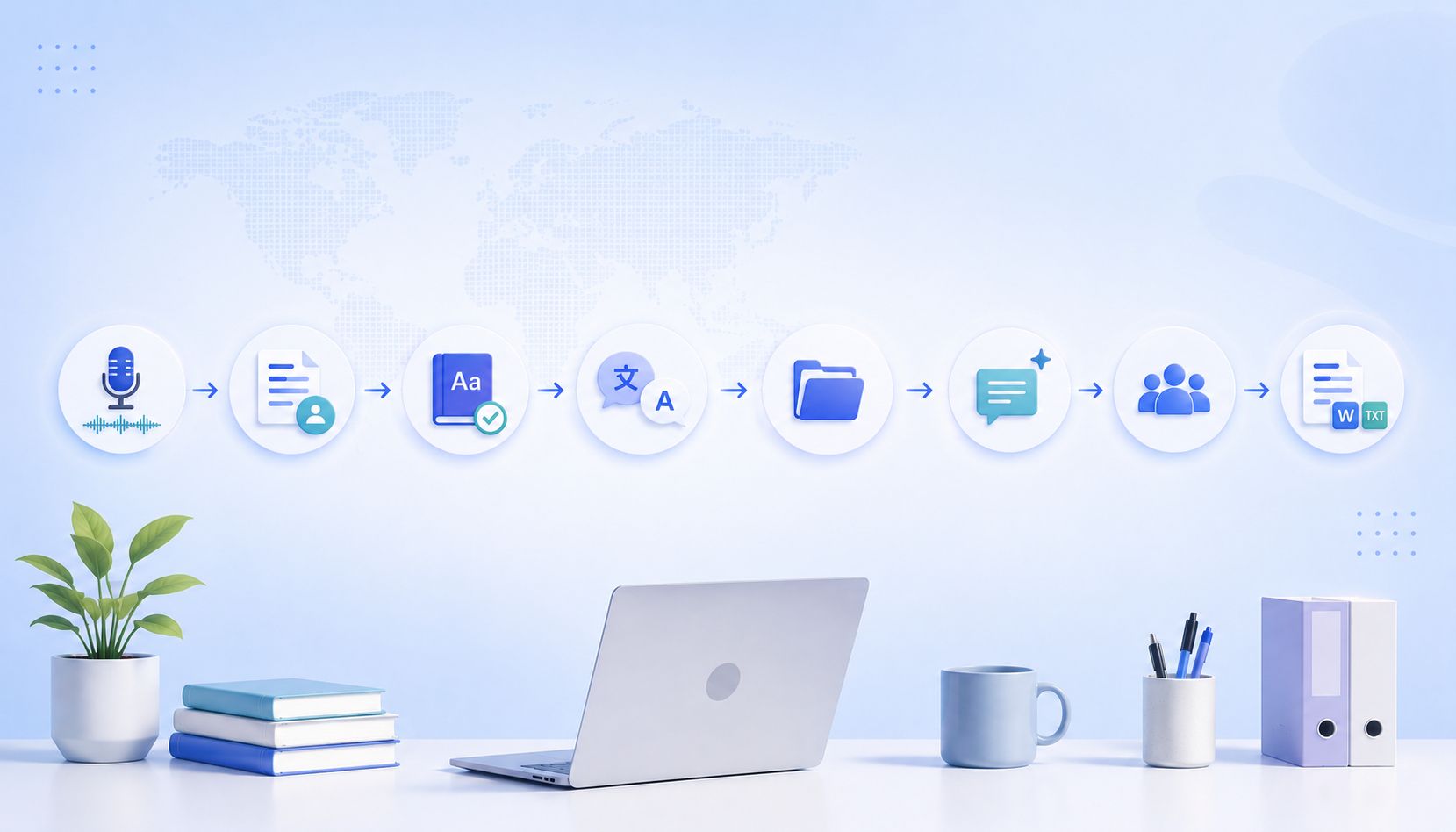
The best AI transcription tools today offer 90-95% accuracy, which is good enough for everyday tasks. But these numbers are not set in stone.
Some users get near-perfect transcripts that require almost no editing. Others, using the same tool on the same plan, struggle with spelling mistakes and missing contexts. If you’re in the second camp, know that the gap is not random.
Accuracy is largely determined before the file ever hits the AI, so going for a more expensive transcription service over free audio transcription tools might not fix your problems.
I've sorted these factors impacting accuracy into 6 practical categories. Once you fix the issues that muddle speech and texts, you'll churn out accurate transcripts ready for publishing and compliance.
| Accuracy lever | What goes wrong | What to do |
|---|---|---|
| Audio quality | Noise, echo, and compression distort speech | Use a proper mic, a quiet room, and high-quality audio formats |
| Speaker behavior | Overlap, fast speech, unclear enunciation | Enforce one speaker at a time and slow, clear speech |
| Language complexity | Jargon, names, and mixed languages confuse models | Use glossaries, spell key terms once, and avoid code-switching |
| Speaker labeling | Too many speakers and interruptions | Limit active speakers and keep clean turn-taking |
How does audio quality limit transcription accuracy?
The first and most obvious change you can make is to the raw audio quality. If the AI engine has a better source to work with, you'll get better results.
You improve audio to text quality in two ways: noise reduction and audio capture improvement.
1. Microphone type and placement
Built-in laptop and phone mics are great for convenience, but they're not built for serious work. They capture room echo, keyboard noise, and other speakers as aggressively as your voice.
Whenever possible, use a dedicated lavalier mic and keep it within 6-12 inches of the speaker's mouth. This way, you can capture clean, isolated signals that improve word recognition and speaker separation.
2. Background noise and interference
AI might struggle to separate human speech from ambient chaos like traffic, air conditioning, or watercooler talk. These competing frequencies often get transcribed as gibberish or cause the engine to miss entire sentences.
Try to record in a quiet, treated room. This gives the AI a clean path to the words without having to fight through the noise.
3. Compression and audio formats
Heavily compressed formats such as low-bitrate MP3s remove parts of the audio spectrum that speech models rely on to distinguish similar sounds. That is how “fifteen” becomes “fifty” and “we’ll” becomes “will”.
Uncompressed or lightly compressed formats such as WAV, FLAC, or high-bitrate MP3 preserve vocal detail and give the transcription engine far more data to work with.
How does speaker behavior affect AI transcription?
Once you make sure the background noise and audio quality are satisfactory, you can focus on reducing frictions in speaker variables.
Here are three easy ways you can tweak speech to get more accurate AI transcriptions:
1. Overlapping voices
Crosstalk is the single biggest confusion point for AI models. When multiple people talk at once, the algorithm cannot disentangle the sound waves to figure out who said what, often resulting in skipped phrases or garbled text.
Enforce a simple “one speaker at a time" rule to keep the audio streams distinct and the transcript clean. Even a half-second pause between speakers improves sentence integrity.
2. Speaking speed and clarity
Fast, clipped speech removes the acoustic cues models use to separate syllables. That is how “did you send it” turns into “did you see it.”
Encourage speakers to slow down slightly and finish their words. Enunciating ideas fully ensures the engine captures every syllable correctly, which is useful for both audio and video to text transcriptions.
3. Accents and pronunciation variance
Most AI models are trained heavily on standard American or British English, meaning strong regional accents can sometimes trip up the pattern recognition. Tools like HappyScribe solve this by supporting a wide array of languages (140+), so most speakers can feel comfortable in their voice.
To get the best results, you can speak deliberately and hit your consonants harder, which gives the AI clearer phonetic data to work with.
How does language complexity influence transcription results?
Language support brings me to the next factor: industry-specific terms.
If you're using AI transcription in highly specialized fields like healthcare, legal, or research, make sure the unique terms are spoken clearly.
1. Industry-specific terminology
Technical language rarely appears in everyday training data. When a model hears “myocardial infarction", “estoppel,” or “containerization,” it often guesses based on similar-sounding common words.
The fix is simple. Say complex terms clearly and consistently. If a term will come up often, spell it out once early in the recording so the model can anchor future references correctly.
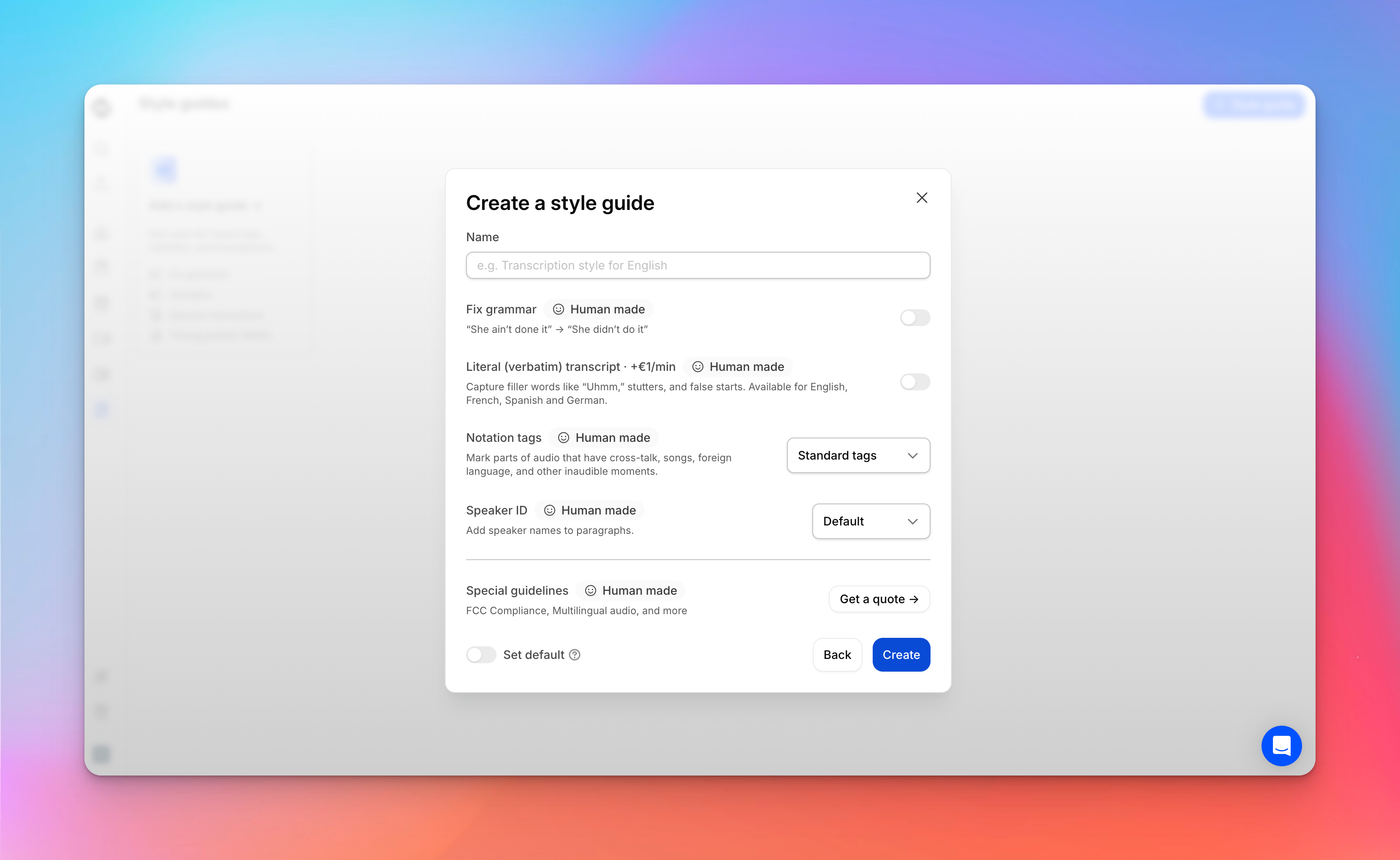
If your transcription tool supports a style guide or specific training for your industry, use that.
2. Named entities and proper nouns
Names of people, companies, and products are notoriously difficult because they don't follow standard dictionary patterns. Without context, "Lyft" becomes "lift" and "SaaS" becomes "sass". You can mitigate this by adding these specific entities to your tool's glossary settings before you upload the file.
3. Code-switching and mixed languages
Most transcription engines are designed to listen for a single language at a time. If speakers switch fluidly between English and Spanish or drop French phrases into an English conversation, the AI often forces the foreign words into English phonetics.
To fix this, look for tools that explicitly support multi-language detection, or stick to one primary language per recording. If they have a track record of transcribing tricky languages like Swiss German, you're in safe hands.
How does speaker labeling affect transcript accuracy?
One of the quickest ways to improve transcripts is to guide the AI to label the right speakers. Here's how you avoid speaker labeling mistakes:
1. Number of speakers
Every additional speaker increases the model’s classification burden. With two speakers, the system is choosing between A and B. But when you add a third, fourth, or fifth speaker, it's continuously re-evaluating overlapping voice profiles in real time.
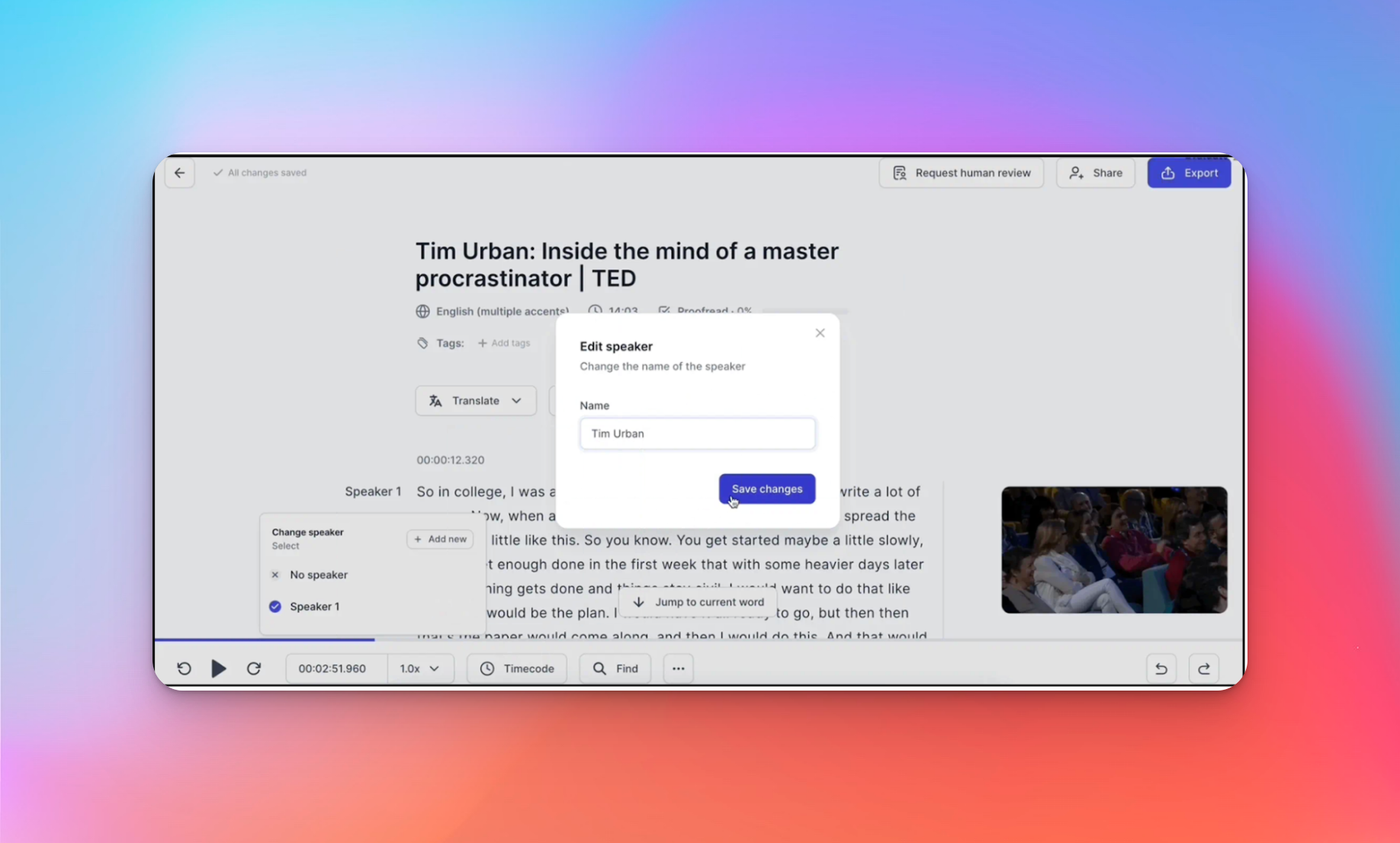
If you're recording a focus group or a roundtable, try to limit the active participants or make sure they identify themselves before talking. If you have to edit the transcript, it helps if you have a rich, interactive editor with collaboration features.
2. Consistency of speaker turns
AI models love predictable back-and-forths but hate chaos. Short bursts of agreement like "right," "yeah," or "uh-huh" are hard to attribute correctly and can sometimes trick the engine into creating a ghost speaker.
To fix this, encourage speakers to hold the floor for full sentences rather than rapid-fire interjections. This helps the AI lock onto the unique fingerprint of their voice.
How do training data and language coverage impact accuracy?
Even with perfect audio and disciplined speakers, transcription quality still depends on what the model has been trained to recognize. If you're working in a regulated industry, transcription accuracy might just depend on the training data.
1. Training data diversity
Models trained mostly on podcasts, call centers, and news broadcasts perform well on those formats but struggle with complex use cases such as interviews, field recordings, classrooms, or international meetings.
Diverse training data matters more than model size. A system exposed to many voices, recording environments, and speaking styles will generalize better and make fewer substitutions when conditions are imperfect. While choosing an AI transcription tool, check their reviews and case studies to understand how they fare in different situations.
2. Language and dialect support
Most transcription engines are strongest in standard American and British English. Regional accents, dialects, and non-native speakers fall outside those dominant training clusters, which is where error rates spike.
This is why broad language coverage is not a marketing checkbox. Tools that support many languages and dialects, such as HappyScribe, have been trained on wider phonetic patterns, which makes them far more reliable for global teams, multilingual content, and international research.
Why does transcription accuracy vary between tools?
At some point, two users can upload the same file and get very different transcripts. The difference often comes down to user settings and review options.
1. Real-time vs asynchronous transcription
Speed comes at the cost of precision. Real-time transcriptions have to guess words early, meaning they have zero future context to correct mistakes.
Asynchronous tools (where you upload a file) can listen to the entire sentence before deciding on a word. They use the end of a sentence to make sense of the beginning, which typically results in 2-5% higher accuracy.
If you don't need live captions, always choose file upload for better results.
2. Editing layers and human review options
Even the best AI will stumble on mumbled phrases. The difference between a “good” and a “great” tool is how easy it makes the cleanup process.
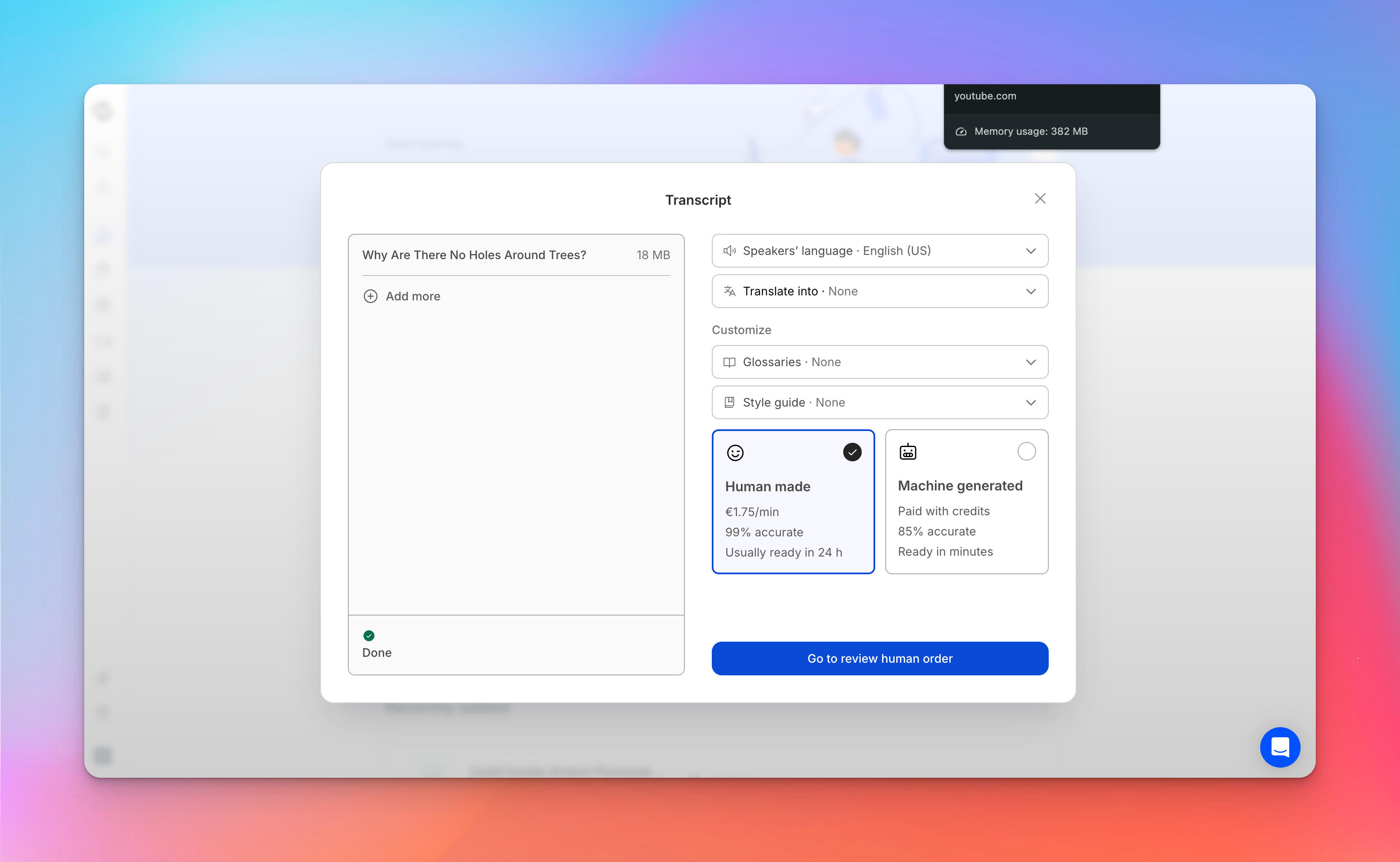
Top-tier platforms offer a human-in-the-loop option where professional transcribers verify the AI's work to guarantee 99% accuracy. If your project is high-stakes, like legal evidence or medical records, this hybrid workflow is the only way to ensure perfection.
Also read:Best human transcription services in 2026
How can you improve AI transcription accuracy in practice?
By now, one thing should be clear: throwing money at transcription tools doesn't always solve accuracy issues. It's something you can engineer.
Here's a checklist you can follow while transcribing audio:
1. Record with accuracy in mind
Treat your recording setup like a professional studio. Use a proper mic. Control the room. Avoid overlap. Speak clearly. Capture in high-quality formats.
But if you need more flexibility for translation, subtitling, or editing, HappyScribe offers a range of productivity tools to help you out.
2. Match the tool to the use case
Not all transcription tools are built for the same job. If you are a lawyer, use a tool trained for court transcription. If you're a journalist, pick a tool that's tuned for interview transcriptions. This is why users choose HappyScribe, which is designed for accuracy-first workflows rather than speed-first demos.
3. Validate accuracy before scaling
Never assume a tool is accurate, especially at the start. Run a test first: transcribe 15-30 minutes of typical audio, correct it manually, and calculate the word error rate (WER). This benchmark tells you exactly how much manual cleanup your specific workflow requires.
If the error rate is too high, tweak your recording setup or switch tools before you process hundreds of hours of footage.
If you want to know more about WER and how accuracy is quantified, here's a cool explainer: How accuracy is measured in AI transcription.
How do you choose an accuracy-first transcription solution?
If you strip away the marketing, accuracy comes down to three things: how well a tool handles messy audio, how broad its language coverage is, and how easy it is to fix the errors.
HappyScribe is built on that foundation. It combines strong speech models with user controls that actually improve accuracy: multi-language and dialect support, speaker labeling, custom glossaries, and a professional-grade editor that makes fixing edge cases fast instead of painful.
When the stakes are higher, it also gives you a human-verified option that takes accuracy to 99%.
In practice, this means you spend less time cleaning transcripts and more time using them. For journalists, researchers, legal, and media teams that cannot afford transcription errors, that's what the best transcription solution really looks like.
How to use HappyScribe for accurate AI transcription: A step-by-step guide
1. Upload your recording (it’s free to start)
Upload your audio or video file, or import recordings from Box, Google Drive, Dropbox, or YouTube.
2. Select the language of the proceeding
HappyScribe supports more than 140 languages, dialects, and accents.
3. Choose your transcription method
Pick the machine-generated option when you need a quick working draft, or choose the human-made service for 99% accuracy
4. Review your transcript
Automatic transcripts appear in minutes and can be edited or reviewed by humans. Human-made transcripts arrive fully reviewed within 24 hours, ready to be used.
5. Export in the format your case requires
Download your transcript as TXT, DOCX, PDF, HTML, or other supported formats. This helps you file, share, or annotate the document without extra reformatting
FAQ
What is the accuracy level of AI transcription services?
Popular AI transcription tools achieve accuracy rates between 90-95% for clear audio. This performance relies on advanced automatic speech recognition (ASR) and large language models. But accuracy drops significantly if the audio sample has background noise or low-quality recording equipment.
Which factors influence the accuracy of AI transcription?
The three biggest factors are audio quality, speaker clarity, and the transcription process itself. Background noise disrupts the waveform analysis, while heavy accents or fast talking can confuse speech recognition systems. Using uncompressed audio and video files helps machine learning algos capture more phonetic detail, lowering the word error rate (WER).
What are the best practices for improving AI transcription accuracy in multi-speaker environments?
To improve results, enforce a "one speaker at a time" rule to help speaker detection algorithms separate voices. Use dedicated microphones to minimize crosstalk. Advanced tools use speaker recognition to label participants, but you can also improve clarity by ensuring speakers pause briefly between turns, which helps neural networks process the dialogue segments.
Which AI transcription platforms offer the highest accuracy for specialized jargon or accents?
Platforms like HappyScribe are top-rated because they allow you to add custom vocabulary for technical terminologies and legal transcription. These tools utilize machine learning models trained on diverse datasets, including Whisper, to better handle accent and dialect variations that generic speech-to-text engines often miss.
How does AI transcription accuracy compare to human transcription?
While artificial intelligence has improved, human transcriptionists still set the gold standard with 99%+ accuracy. Human transcription excels at deciphering nuance, overlapping speech, and complex context that automated speech recognition struggles with. For critical documentation where errors are unacceptable, human review remains the safest choice.
How reliable are AI transcription tools for interviews?
AI tools are highly reliable for first drafts, especially if you record in a quiet environment. Modern natural language processing allows LLMs to generate readable transcripts quickly. However, for publication-ready content, you should always verify the output against the original video or audio, as subtle context can occasionally be misinterpreted.
Are AI transcription tools finally accurate enough for professional use?
Yes, provided you choose the right tool and workflow. With accuracy rates consistently topping 90%, speech recognition is now viable for meeting notes, content creation, and rough drafts. For high-stakes professional use, many experts prefer a hybrid approach, using AI transcription for speed and a human layer for final verification.

Rodoshi Das
Rodoshi is the Content Lead at HappyScribe, the privacy-first transcription and AI notetaker platform based in Barcelona. Shaping content strategies and building AI workflows excites her as much as exploring new SaaS tools. She specializes in product-led content that informs rather than sells, grounded in honest product benchmarking and low tolerance for empty marketing speak.