


HappyScribe vs. Rev: Which is Better for AI Transcription and Multilingual Accuracy?
When you think of Rev, you think of reliable (albeit expensive) human transcripts and captions. It has an AI note taker now, but Rev’s AI implementation is janky at best.
4.6 on G2 4.7 on Trustpilot


 SOC 2 Type II
 GDPR compliant

And that might bring you to HappyScribe. A transcription platform that does both human-verified transcripts and AI meeting notes.
But hey, you just need one tool. And you have better things to do than test both yourself.
So here I am making your life simpler. I’ve used and reviewed HappyScribe and Rev on real workflows so you can pick the one that suits you. Let’s get in.
HappyScribe vs. Rev: Head-to-head comparison
| Feature | HappyScribe | Rev |
|---|---|---|
| Best for | AI and human transcription options with a wide language coverage | English human transcription and legal work |
| Transcription accuracy | 95%+ accuracy on AI and 99% human-verified transcripts | 99% human. AI loses rare words |
| Language support | 150+ AI, 60+ human | 37 AI, English-only for human services |
| AI meeting notetaker | Auto-join, calendar or link, 150+ languages | Auto-join, live transcription, English-tuned AI |
| Compliance and security | SOC 2 Type II, GDPR, EU residency | SOC 2 Type II, GDPR, HIPAA, CJIS, US-hosted |
| AI assistant | AI Chat with citations on every plan | File analysis is slow, and accuracy is worse than file transcripts |
| Integrations | Meetings, storage, video platforms, Zapier, API, MCP | Calendar, Dropbox, Zapier, API, caption platforms |
| Pricing | From $8.50/month billed annually | From $25.49/seat billed annually, AI-minute metered |
| Human expert tier | 60+ languages from $2.00/min | English only from $1.99/min |
| Free plan | Unlimited AI meeting notes | 45 AI minutes monthly |
What does HappyScribe do?
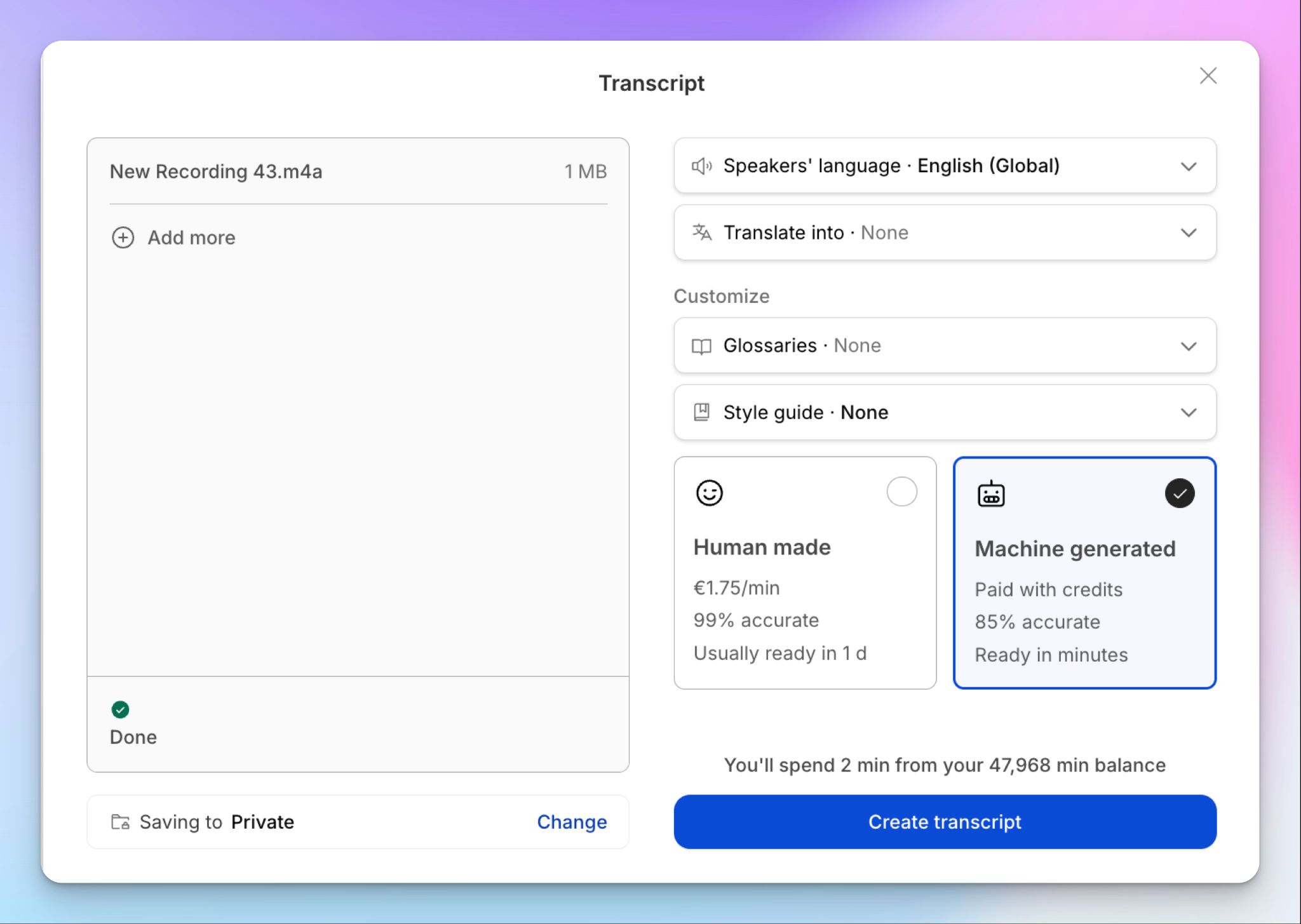
Barcelona-based HappyScribe turns audio and video into text in two ways: AI transcripts for quick work, and a human expert tier for 99% accuracy.
Both transcript workflows are part of the same workspace that also handles subtitles, translation, and an AI meeting notetaker that joins your meetings across 150+ languages.
It stores your data in an ISO 27001-compliant European data center, and the tool is SOC 2 Type II and GDPR compliant.
HappyScribe is useful for qualitative researchers, media teams, journalists, founders, and students.
What does Rev do?
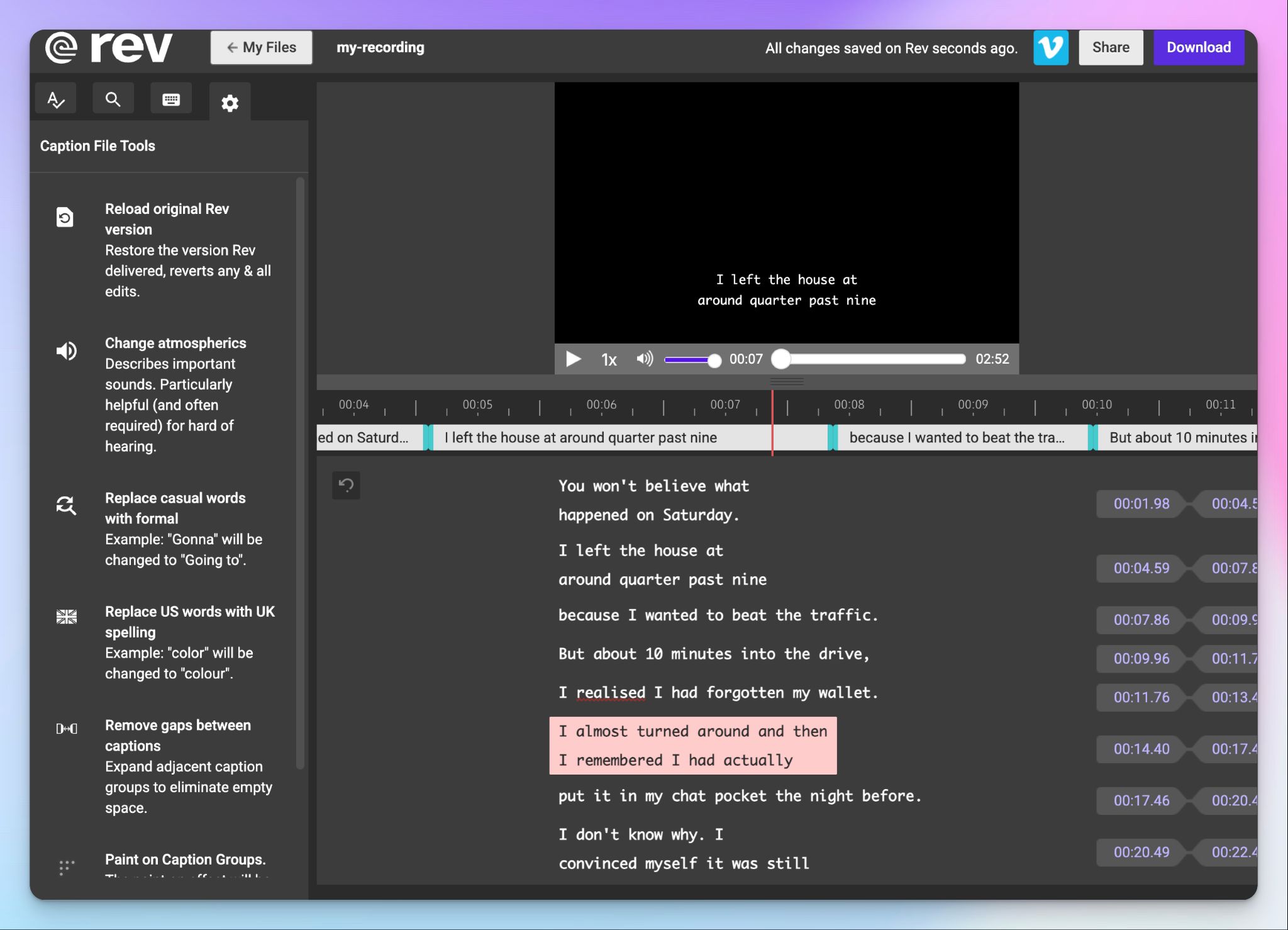
Rev has been the go-to for English human transcription for years, and for good reasons. You upload a file, a vetted transcriptionist works on it, and you get a 99% accurate transcript within about 12 hours at $1.99 a minute.
Beyond that, Rev has an AI transcription tier, an AI notetaker for scheduled meetings, and a feature-packed caption editor.
Rev’s recent bet is SmartDepo, a legal stack that turns depositions into topic-organized summaries with page-line citations, backed by CJIS and HIPAA compliance.
I’ve made a deep dive into the state of Rev, so if you want to know more about the tool, you can read my Rev review.
HappyScribe vs Rev: Transcription accuracy
To test real accuracy (and not rely on buzzwords), I ran the same file through happyScribe and Rev. The results are below:
HappyScribe's accuracy
My audio file was full of personal anecdotes and data points, including a café name, a dog breed, a friend's name spelled out loud, and a mountain range.
HappyScribe's transcript caught them.
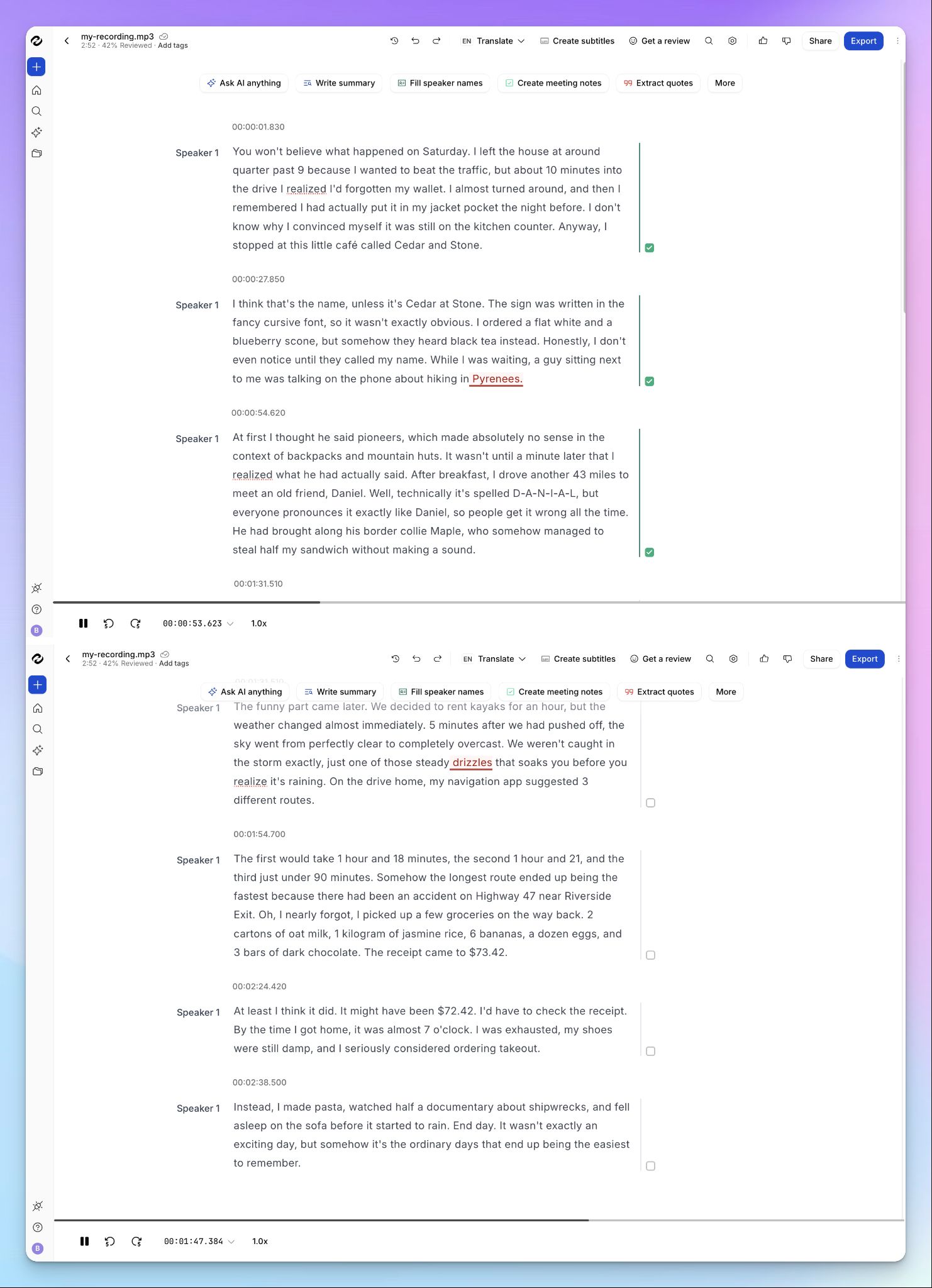
"Cedar and Stone" came through as the café, the border collie named Maple stayed a border collie, "Daniel" showed up with the exact D-A-N-I-A-L spelling, and "Pyrenees" sat right there in the transcript. Currency stayed consistent too, down to $73.42 and $72.42 a line apart.
It's not 100% perfect, but it had no artifacts that could change the meaning. If I needed my transcript to be flawless, I could send it to a human expert for 99% accuracy from the same editor.
Rev's accuracy
Rev’s primarily a human transcription tool, and I wouldn't argue with anyone who trusts it for a clean audio file in English.
But Rev’s AI transcription is a different story.
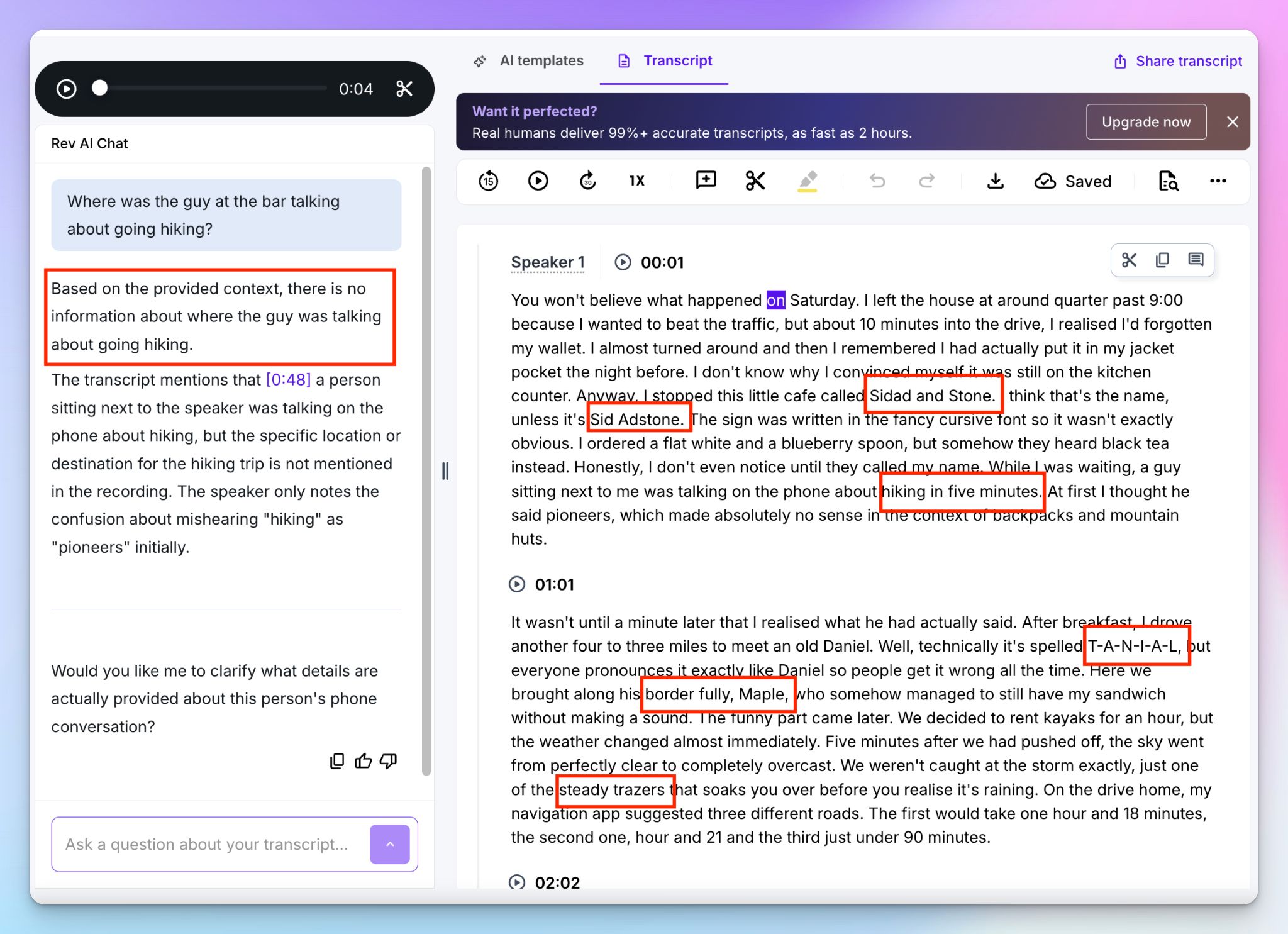
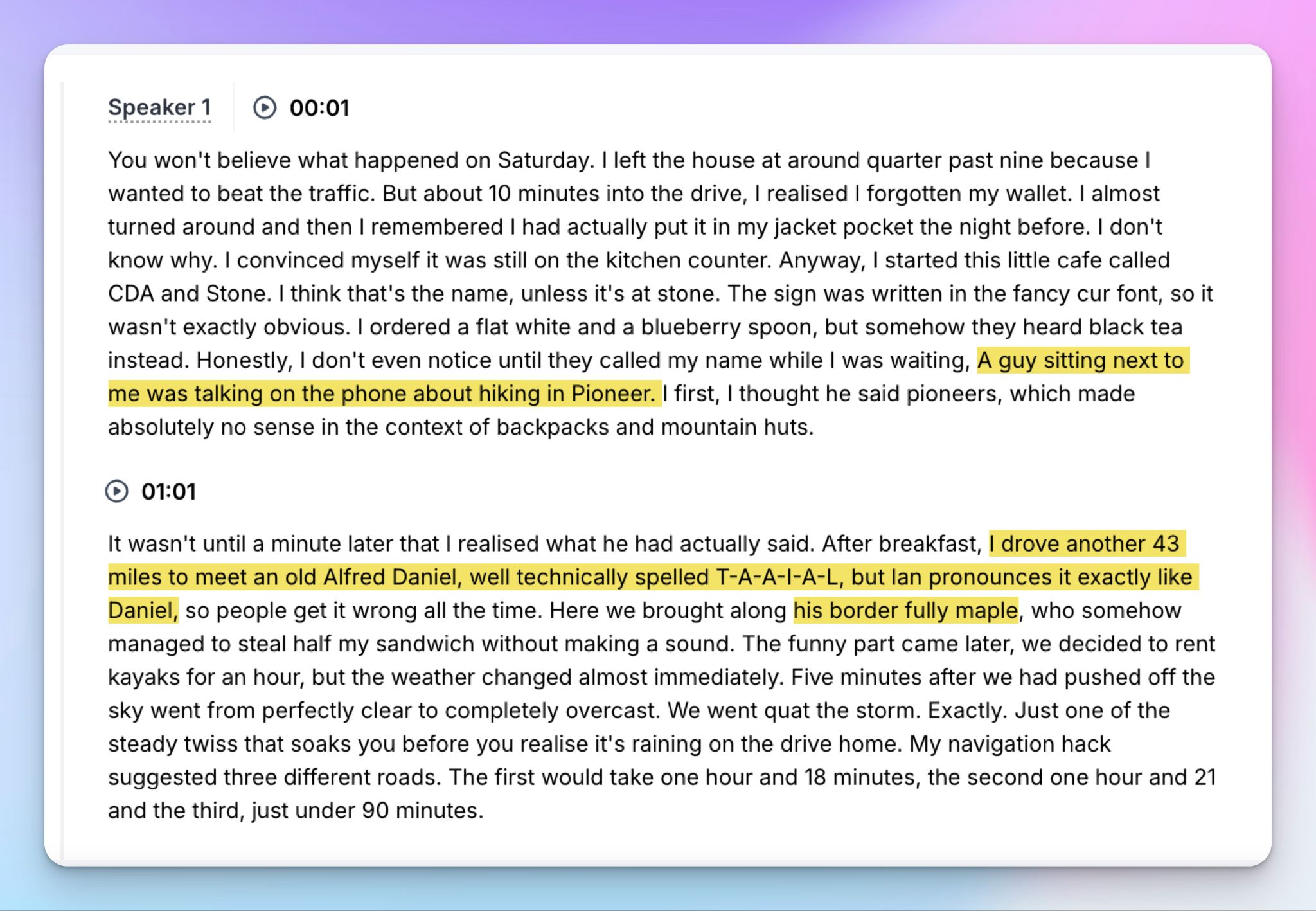
On that same clip, Rev turned the café "Cedar and Stone" into "Sidad and Stone," then "Sid Adstone" a line later. The border collie became a "border fully." "Daniel" came out as T-A-N-I-A-L. "Steady drizzles" became "steady trazers," which isn't even a word.
The worst one erased the meaning entirely. A hiker headed for the "Pyrenees" was transcribed as "hiking in five minutes."
When I asked Rev's AI chat where the person was hiking, it couldn't tell me, because the transcript had already swallowed the word.
📌 Verdict:
HappyScribe matches Rev’s human services at 99%. Everywhere else, HappyScribe wins. Its AI identifies names and rare words that Rev's AI loses, and it's the AI transcription most people use every day.
HappyScribe vs Rev: Language support
HappyScribe's language support
HappyScribe transcribes in 150+ languages and dialects with AI, and 60+ with its human experts. That range goes well past the usual English, Spanish, and French and into rarer territory like Basque, Galician, Lao, and Uzbek.
Upload a file, and HappyScribe detects the language for you, so a multilingual workflow doesn't stall on a dropdown menu.
For anyone working across borders, this is the difference between maximizing output with one tool and stitching together several others.
Rev's language support
Rev's AI transcription supports about 37 languages, but the speech model is tuned for English, and you feel it the moment the audio isn't clear.
The bigger limitation sits in the human tier, which is English only. Human captions add Spanish and nothing else.
So the accuracy Rev is famous for is locked to one language, and everything outside it falls back to the AI that couldn’t transcribe “border collie”.
📌 Verdict:
HappyScribe wins, and it isn't even close. It covers four times the AI languages, and extends 99% human accuracy to 60+ languages where Rev's best work stays boxed into English.
HappyScribe vs Rev: Meeting notes and workflows
HappyScribe's notetaker
HappyScribe's AI meeting note taker connects to your Google or Outlook calendar and joins your Zoom, Meet, and Teams calls on its own. If you don’t want to give it access to your calendar, just paste the meeting link directly.
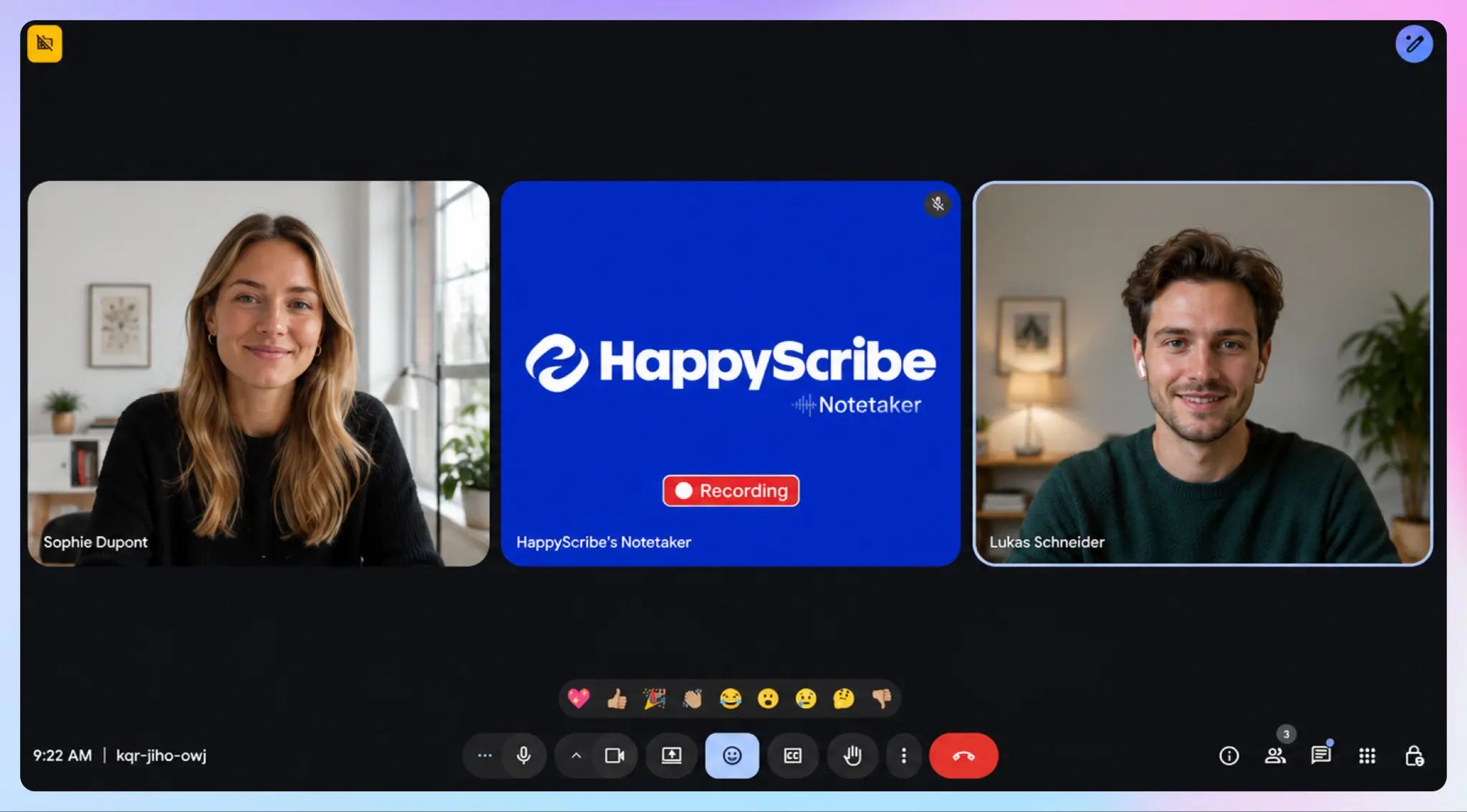
The HappyScribe meeting bot announces itself to gather consent from users, and the in-call controls let you pause or remove it on the fly. You can also customize the bot’s look so it feels part of your team.
For the calls that happen away from your screen, the HappyScribe mobile apps and voice recorder capture audio without a meeting bot, so you decide how each meeting gets recorded.
After the call, the transcript editor shows you timestamped speaker labels and AI Chat that finds decisions, action items, and quotes.
Rev's notetaker
A couple of years ago, this section wouldn't exist because Rev was a file-transcription tool.
But now Rev’s notetaker connects to your Google or Microsoft calendar, auto-joins live Zoom, Meet, and Teams calls, and generates summaries from AI templates. If following words as you speak is important to you, Rev helps you with live transcription.
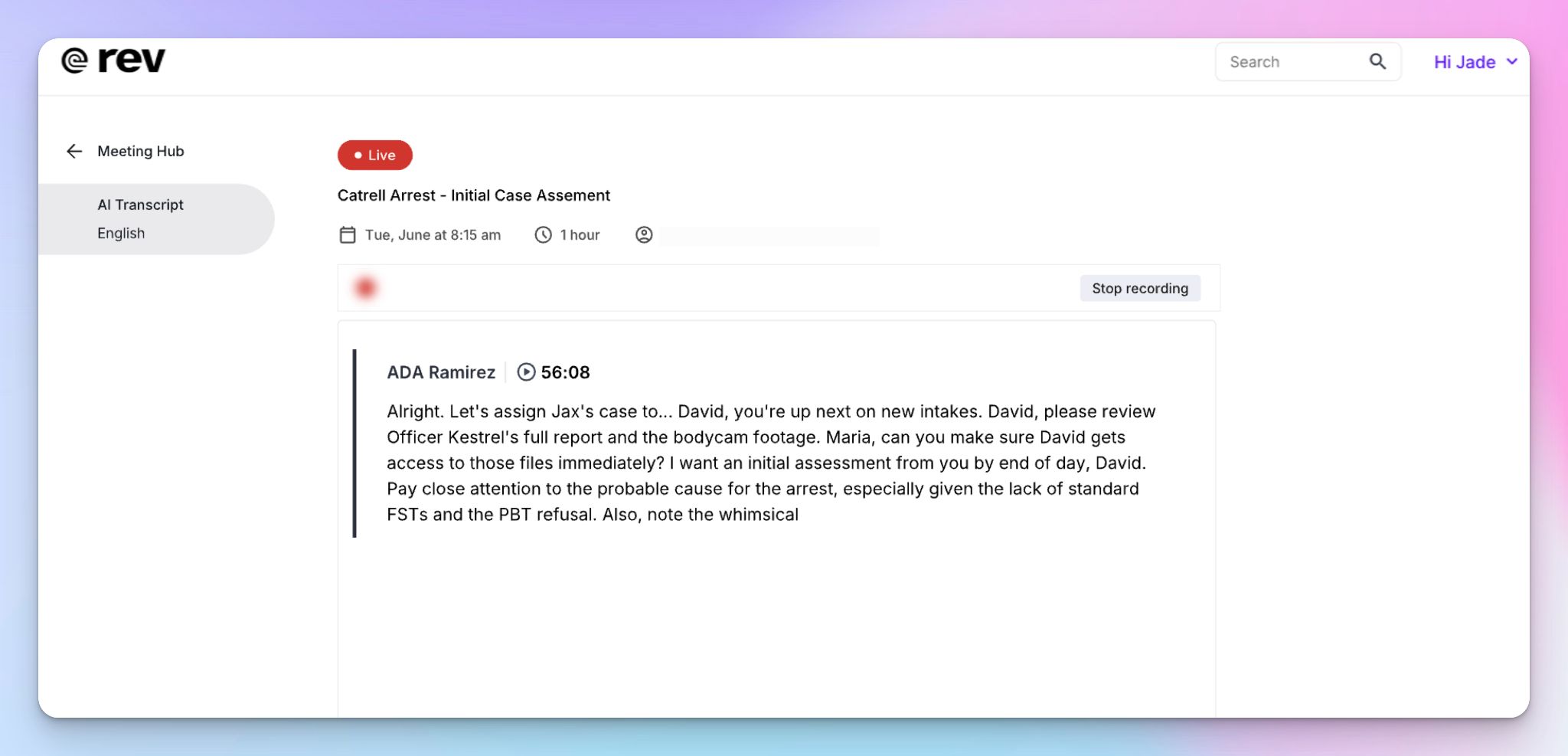
You can ask its chatbot follow-up questions or have it draft a recap email. Rev has closed the gap for scheduled meetings, but you can’t paste a meeting link on the website to join meetings on the desktop.
It also can't shed the engine underneath. The note taker runs on the same AI that turned "Pyrenees" into "hiking in five minutes," and it's limited on multilingual calls.
📌 Verdict:
Both tools join your calls and take notes, but HappyScribe pulls ahead with better accuracy, the ability to join via meeting links, and a simpler transcript editor.
HappyScribe vs Rev: Compliance and security
HappyScribe's compliance and security
HappyScribe is Europe-first. It's SOC 2 Type II certified and GDPR compliant, stores your data in a Tier IV, PCI DSS, and ISO 27001-compliant EU data center, and encrypts files in transit and at rest. With granular access control, you can keep staff out of your files on higher tiers.
For researchers handling participant data, or any team that has to keep records under European law, the EU residency is the point. Your transcripts stay inside the EU and out of reach of overseas access requests.
The one box HappyScribe doesn't tick is HIPAA, so US medical recordings are the case where it isn't the right fit.
Rev's compliance and security
This is where Rev's legal focus pays off. You get SOC 2 Type II, GDPR, HIPAA, and CJIS, with encryption in transit and at rest, and no data sold or used to train outside models. You can purge files yourself, opt out of AI training, and set deep access controls.
CJIS and HIPAA are the ones that separate Rev, because they open up law enforcement and US healthcare use cases. Rev’s SmartDepo turns depositions into topic-organized summaries with page-line citations.
The single caveat is location. Rev hosts in the US, so for sensitive EU and UK participant data, your files leave the continent.
📌 Verdict:
Rev wins for US legal, law enforcement, and healthcare, where CJIS and HIPAA are non-negotiable. For everyone handling EU data, HappyScribe wins on residency. Pick the tool depending on the laws governing you and your participants.
HappyScribe vs Rev: AI features
I’ve already covered AI accuracy, so here I’m going to focus on AI assistants of both platforms.
HappyScribe's AI features
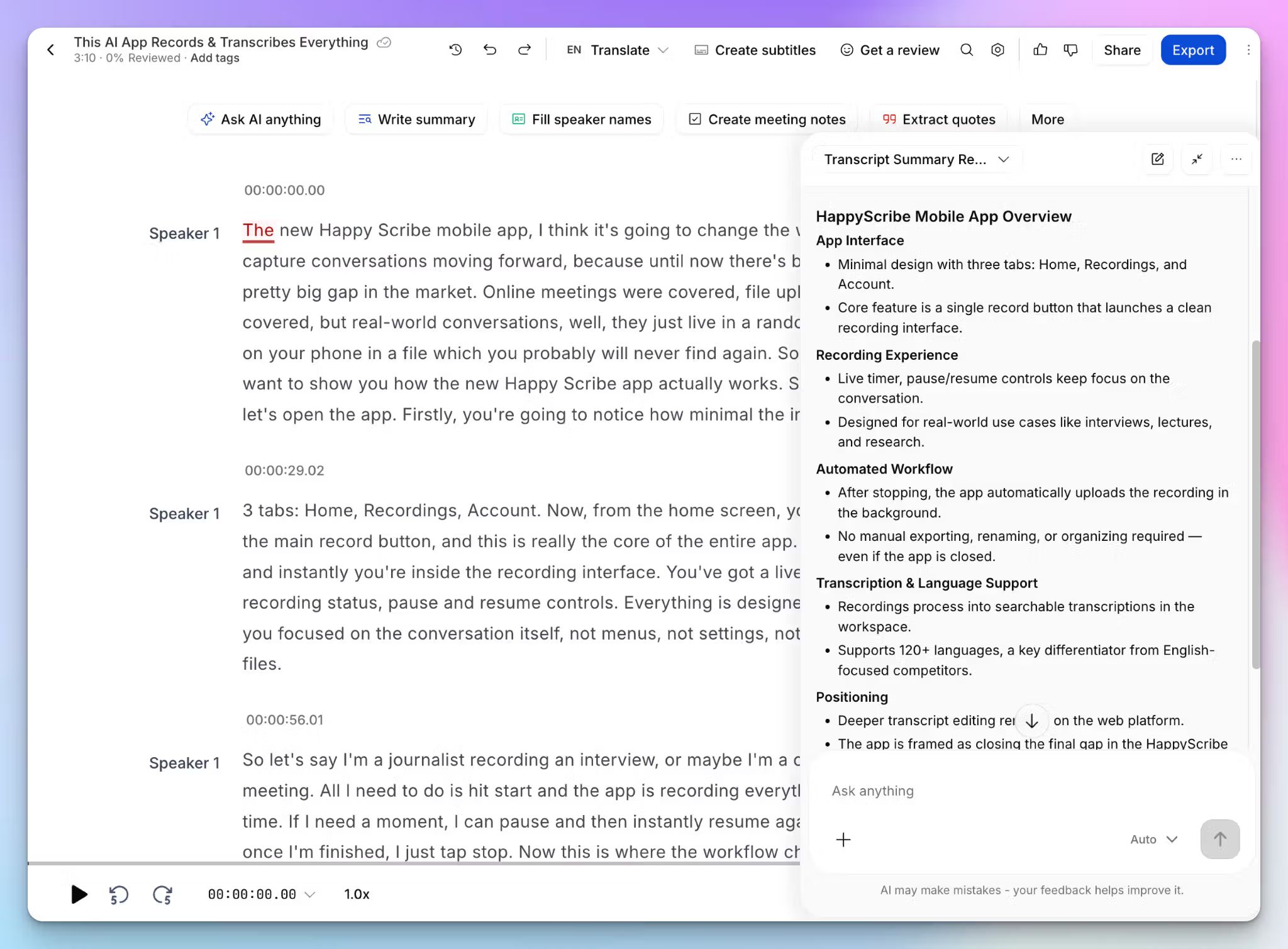
HappyScribe's AI Chat lets you ask your transcripts questions in plain language and get answers with citations. It works on a single file and across your entire library, so you can pull decisions or quotes from weeks ago and contextualize topics for upcoming meetings.
It’s not only your knowledge base, but it also helps you write summaries, find action items, and draft content like social posts or clip ideas with timestamps.
You can link your transcription and meeting data to Claude, ChatGPT, or Gemini through the MCP server.
Rev's AI features
Rev leans on AI file analysis as its headline service beyond human transcription, and this is where it overpromises. When you see Rev advertise a testimonial finder, a social post creator, and a sales insights tool, they're the same AI chatbot running different prompts.
The bigger problem is that it underdelivers. In my testing, the file analysis came back less accurate than Rev's own plain transcript of the same audio, so you spend extra minutes to get worse results.
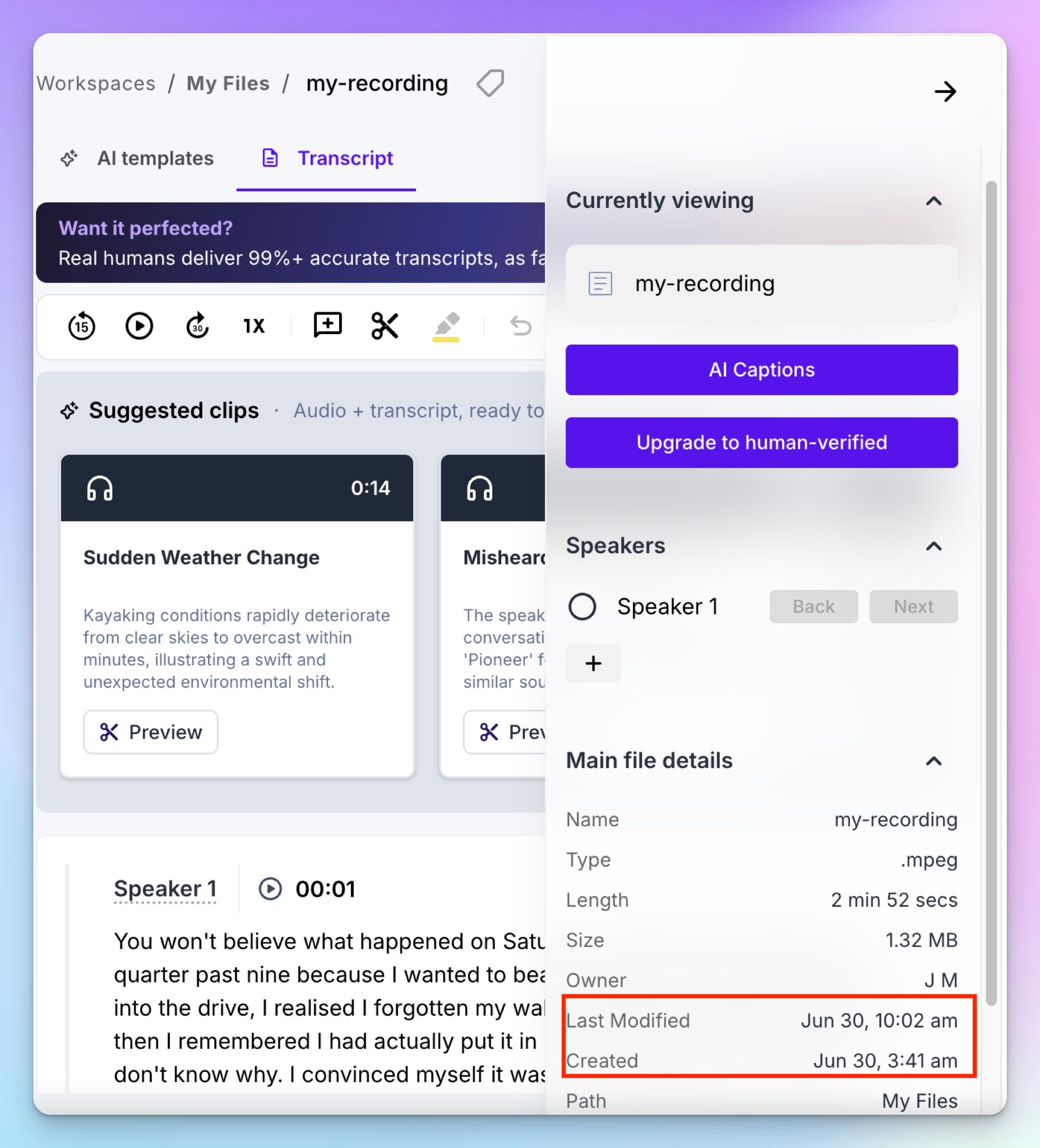
It's slow too. One of my files took over six hours to process, and because Rev doesn't detect a duplicate upload, you can burn credits analyzing the same file.
📌 Verdict:
HappyScribe wins on both value and reliability. Its AI Chat is included all across the HappyScribe workspace, and it cites its sources cleanly, while Rev's analysis costs more, runs slower, and trails the accuracy of its own transcripts.
HappyScribe vs Rev: Integrations
HappyScribe's integrations
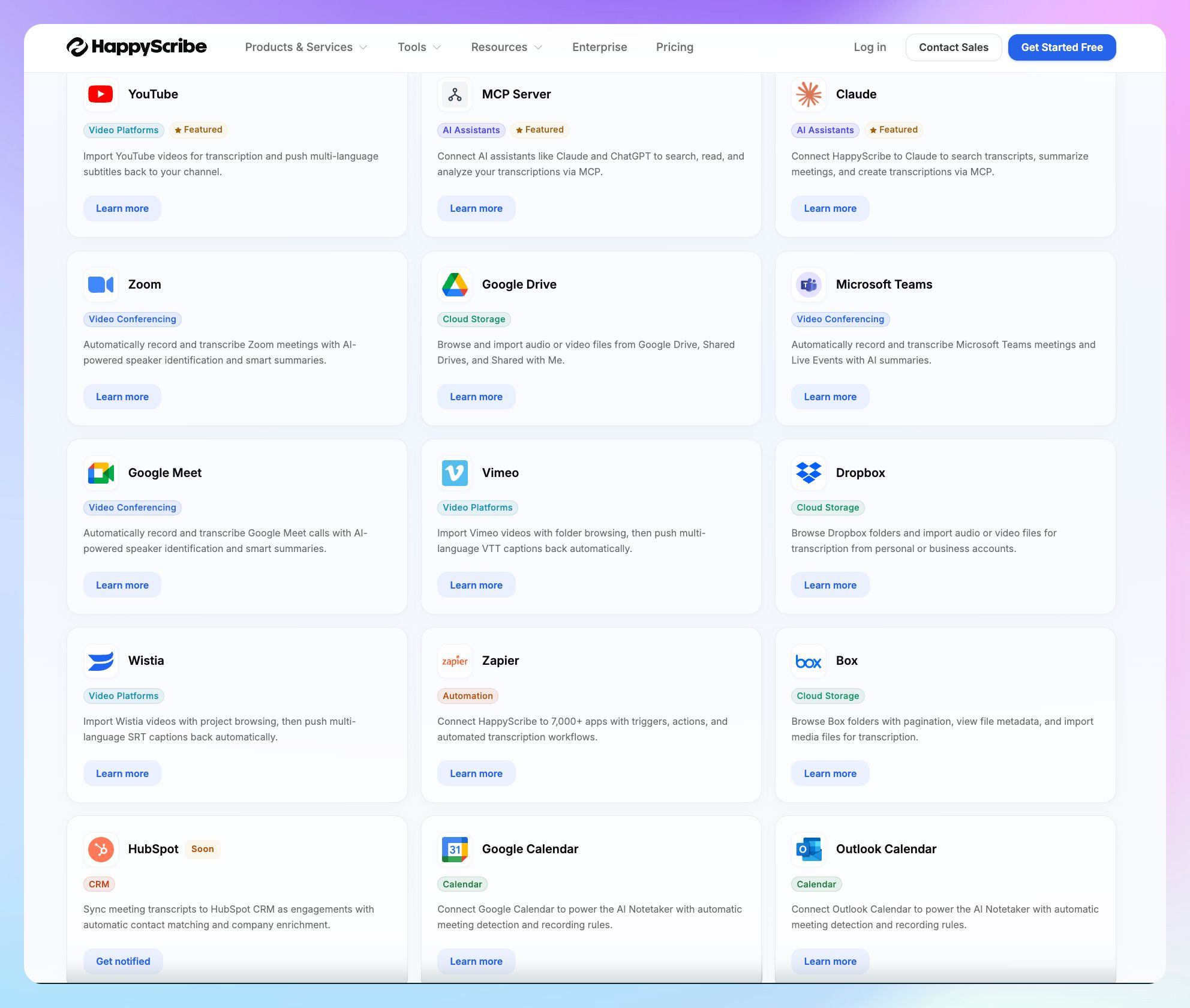
HappyScribe syncs with Google and Outlook calendars and integrates with Zoom, Meet, and Teams for meeting capture. It also pulls files from Google Drive, Dropbox, Box, YouTube, Wistia, and Vimeo for transcription.
You can push the finished subtitles back out to YouTube, Wistia, and Vimeo, so the workflow runs in both directions.
Beyond the native connections, Zapier extends HappyScribe data to thousands more apps, and there's a HappyScribe API for advanced work.
All of this is additional to the MCP server, so daily tasks keep flowing without disruptions.
Rev's integrations
Rev keeps it short but relevant. You can connect your Outlook or Google calendar and let it auto-transcribe Teams, Meet, and Zoom calls. You also get Dropbox for storage and Zapier for third-party tools.
That's enough to move files in and out, and the API gives developers room to work, so it isn't a dead end.
If you need a tool purely for captions, Rev covers a lot. It connects with YouTube, Panopto, Vimeo, JWPlayer, Kaltura, Yuja, Brightcove, Ensemble, and WarpWire to simplify ordering and syncing.
📌 Verdict:
Both platforms cover essential transcription and note-taking integrations. HappyScribe adds MCP for your existing AI stack, and Rev covers a wider range of video management tools for captions. Pick the one that fits your work.
HappyScribe vs Rev: Pricing
HappyScribe's pricing
AI transcription plans
- Free: Unlimited meeting recordings (45 mins per recording), 10-minute trial of AI transcription, subtitling, and translation
- Basic: $8.50/month (billed annually) or $17/month (billed monthly)
- Pro: $19/month (billed annually) or $29/month (billed monthly)
- Business: $59/month (billed annually) or $89/month (billed monthly)
- Enterprise: Contact sales for tailored solutions
Human transcription service: Starts from $2.00/min. Extra discount for Business users
Rev's pricing
Rev’s pricing is a maze on its own, so stay with me here.
- Free: 45 AI minutes a month, English only
- Essentials: $25.49/month billed annually or $29.99/month billed monthly, per seat
- Pro: $47.99/month billed annually or $59.99/month billed monthly, per seat
- Unlimited: Custom pricing
Without a subscription, you pay $0.25/min for AI transcription. Rev’s human-led services are billed separately, and here’s how much they cost:
- Human transcription and captions: Starts from $1.99/minute (rushed delivery, verbatim, premium quality charged extra)
- Spanish captions: $3.25/minute
- Global subtitles: $6.49-$15.99/minute
📌 Verdict:
HappyScribe wins on clarity and a generous free tier. It starts cheaper for AI services and matches Rev’s cheapest human service rates while covering more languages.
HappyScribe vs Rev: What are customers saying?
HappyScribe customer reviews
What users love
I am using Happyscribe for many years now. The pricing is ultra fair. The deals if they are active are amazing and the quality of transcripts is astronomical. It is so well, that most of the time, I can leave everything as is.
Names can be tricky at times ... however, I never met a tool for this, that didn´t have that issue …
The service is fast, easy to handle, well thought through and organisable in a clever deep workspace and folder kinda way. Makes everything findable again.
The support is there for you and listens. They are always open for suggestions and activily improving the tool.
From me ... this tool is a total 100% recommendation. Thanks Happyscribe for all those years of service!
It makes transcribing recorded videos (in my case, podcasts) simple and smooth, and the whole process feels easy and straightforward. It is capable of doing quite accurate diarisation and splitting the conversation to the various speakers.
What could be better
I do wish I had more credits, but I understand why we get limited. A website as great as this needs the funding to be able to keep being up.
I love most part of this platform but I wish that the pricing of this platform was more moderate. Other than this, I also wish that there was more integration tools available for this platform. The mobile app doesn't feel as powerful as the desktop web version.
Rev customer reviews
What users love
I prefer to use my iPhone's VoiceMemos app and Rev works with it seamlessly, allowing me to hit '3 dots' on a recording, then send it Rev in just a few seconds. The Rev environment is what I like to use on my laptop... I can quickly go to a transcript and give names to voices, correct little things, download transcriptions, etc.
I use Rev for making transcriptions of conversations in meetings and recording webinars. I appreciate the speed of transcription and the AI's ability to summarize meeting notes. Rev is convenient, easy, and discreet. I love the ability to quickly summarize my meeting notes with key points, especially speaker key notes. Setting up Rev was really easy.
What could be better
The paid AI transcription tier didn’t deliver the accuracy promised. It was only about 75% correct, forcing me to manually fix large sections. That made it not worth the cost, especially since I expected near-professional quality for a paid service.
Sometimes the accuracy drops when the audio quality isn’t great or there are multiple people talking, so you still have to proofread more than you’d hope. The pricing can also add up quickly on longer recordings, and there aren’t a ton of customization options without editing the transcript yourself afterward.
HappyScribe works best when
✅ You work across global languages, including rare ones, and want them detected and transcribed consistently
✅ You need 99% human-verified transcription accuracy in languages beyond US English
✅ You run scheduled online meetings and want an AI meeting note taker to join and take notes for you
✅ You work in Europe or handle EU participant data and need GDPR compliance with European data residency
✅ You want transcription, subtitles, translation, and meeting notes in one workspace, with predictable pricing you can read
✅ You want AI insights to quickly find decisions, quotes, and action items from your notes and files
HappyScribe doesn't work well when
❌ You transcribe US healthcare recordings that require HIPAA compliance
❌ You need CJIS-level compliance for US law enforcement work
❌ You only need occasional English human transcription and would rather pay per minute than keep any subscription
Rev works best when
✅ You run deposition-heavy legal workflows and want topic-organized summaries with page-line citations
✅ You transcribe US clinical, healthcare, or law enforcement recordings that require HIPAA or CJIS compliance
✅ You’re working for an enterprise or institution with a large budget for transcription at scale
✅ You transcribe occasionally in English and would rather pay per minute than keep a subscription
✅ You rely on native caption integrations for video platforms like Kaltura, Brightcove, or Panopto
Rev doesn't work well when
❌ Your work involves multilingual meetings and documents, since Rev’s human tier is English only and the AI is tuned for English
❌ You rely on AI transcription and analysis as your main workflow and want a reliable AI assistant
❌ You have a tight budget and want to read your bill easily
❌ You need EU data residency for compliance and security, since Rev hosts user data in the US
HappyScribe vs Rev: Final verdict
Choose Rev if your work is all about court-grade human transcription and depositions in English.
Choose HappyScribe if you need better transcription accuracy in more languages, European data residency, and reasonable pricing.
For researchers, media teams, and professionals, HappyScribe is a simpler pick.