


HappyScribe vs. Sonix: Which is the Best Tool for AI Transcription and Meeting Notes?
If you’ve ever wanted to convert speech to text, translate your transcripts, or generate captions for videos, you might’ve come across HappyScribe. You might’ve also come across Sonix.
Rated 4.6 on G2


 SOC 2 Type II
 GDPR compliant

Both tools help you with documentation and research, but the difference is reach. Sonix focuses on transcription and analysis, while HappyScribe extends to live meeting notes, which makes it more of an end-to-end speech-to-text platform.
But that’s just the overview. You don’t have to waste hours testing both HappyScribe and Sonix to see what works for you in the long term. I’ve done the hard yards for you.
If you’re stuck between HappyScribe and Sonix, here’s how they pan out head-to-head across use cases and roles:
| Feature | HappyScribe | Sonix |
|---|---|---|
| Best for | All-in-one speech-to-text platform | Recorded-file transcription and analysis |
| Transcription accuracy | Up to 99%, clean on names and numbers | Up to 99%, extra cleanup required |
| Languages | 150+ AI, 60+ human | 54+ languages |
| AI meeting note taker | Auto-join on Zoom, Meet, Teams. In-person bot-free recordings | None, upload files only |
| Compliance and security | SOC 2 Type II, GDPR | SOC 2 Type II, HIPAA, GDPR |
| Data residency | ISO-27001-compliant EU-based data center | AWS US servers, SCCs for EU |
| Subtitle editor | Waveform, CPS warnings, styling, SDH subtitle compliance | Confidence coloring, SDH subtitle compliance, no waveform |
| Translation | 80+ languages | 55 languages |
| AI features | AI chat assistant included in every plan | Chat, sentiment, entity. Only on subscriptions |
| Integrations | Live meetings, storage, video platforms, API, Zapier, MCP server | Video platforms, legal practice software, API, Webhooks, Zapier |
| Human expert tier | From $2.00/min | Automated only |
| Free plan | Free tier with unlimited AI meeting notes | 30-minute trial only |
| Starting price | $8.50/month billed annually | $10/audio hour, or $275/year |
What does HappyScribe do?
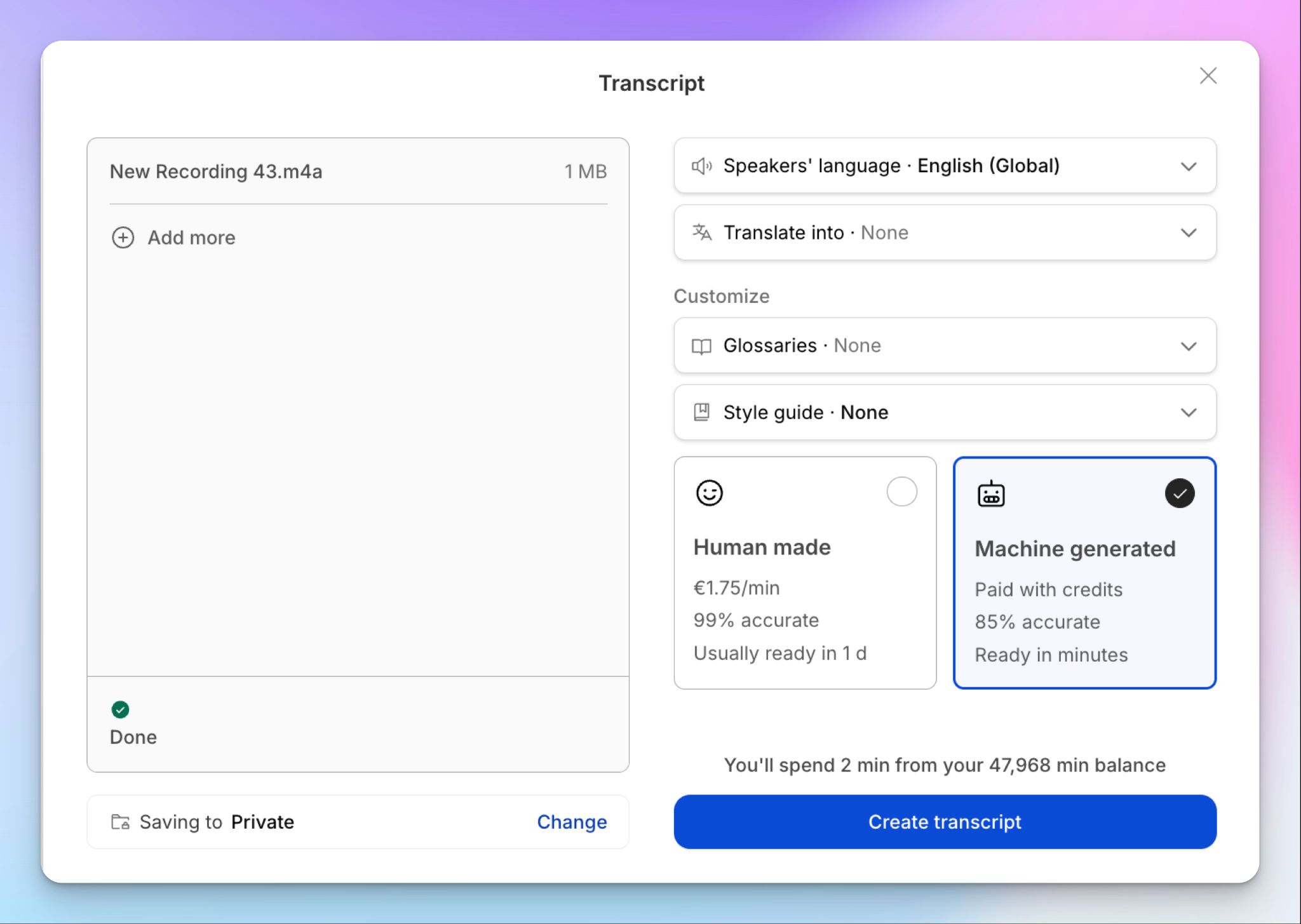
Barcelona-based HappyScribe is an all-in-one audio-to-text platform that turns audio and video into accurate, searchable text. It covers transcription, subtitles, translation, and an AI meeting notetaker in one workspace.
HappyScribe's standout feature is the dual engine: AI for speed, with an optional human expert tier when you want near-perfect accuracy.
The AI meeting note taker joins Zoom, Google Meet, and Teams to capture summaries and action items automatically. It’s SOC 2 Type II and GDPR-compliant, and serves creators, researchers, and business teams.
What does Sonix do?
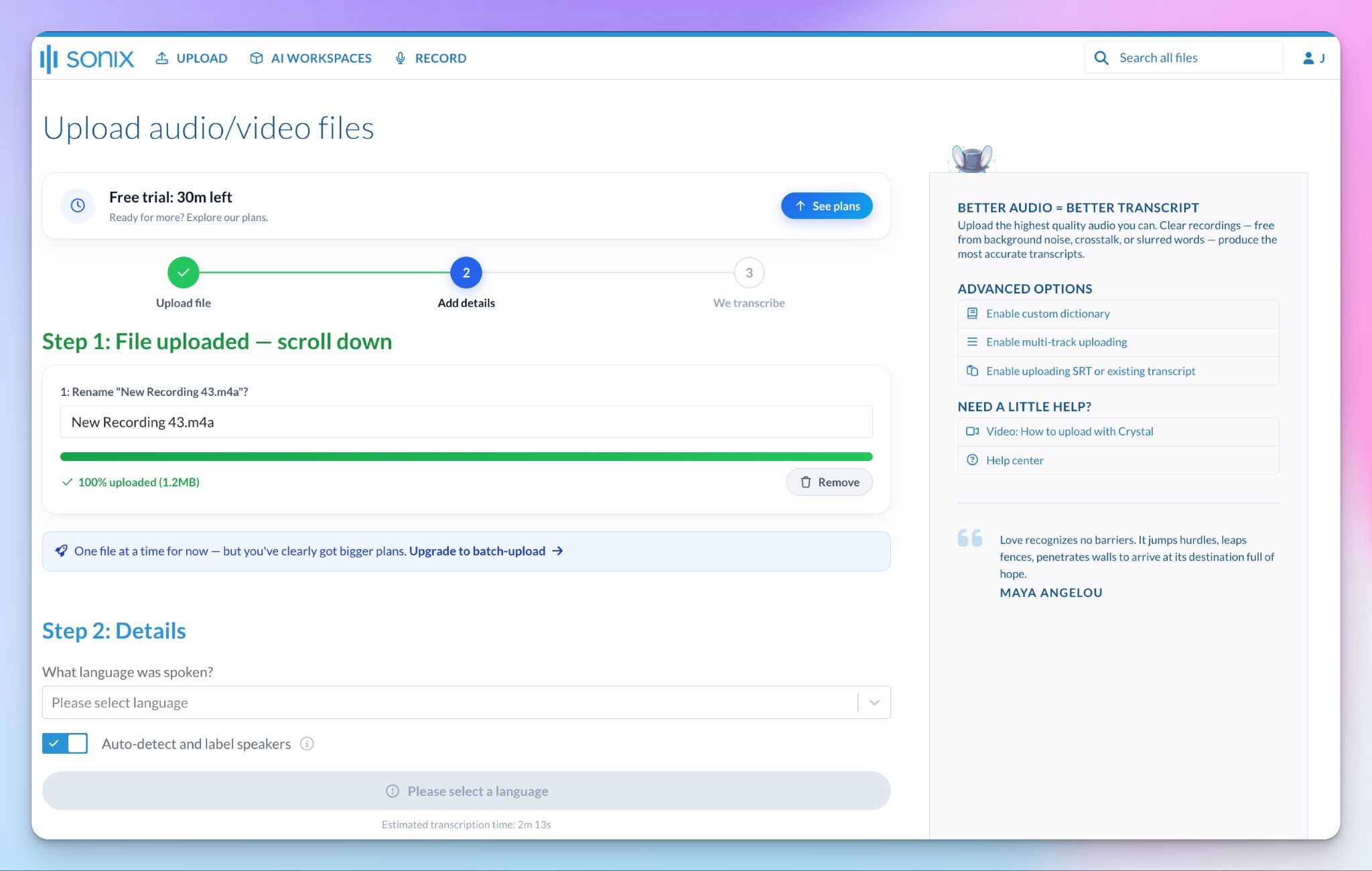
Sonix is an AI transcription platform that turns audio and video files into editable transcripts in minutes. On top of that, it adds analysis tools like AI summaries and topic detection, plus translation and subtitle export.
It's SOC 2-certified and HIPAA-compliant, which has made it a fixture for journalists, researchers, lawyers, and enterprise teams handling sensitive recordings.
Sonix focuses on processing files you've already captured, not online meetings. If you want a deep dive, check our in-depth Sonix review.
HappyScribe vs. Sonix: Transcription accuracy
You’ll see both tools claim up to 99% accuracy. To test it out, I ran a dense call, packed with figures, company names, and an alphanumeric ticket code, through each.
HappyScribe's accuracy
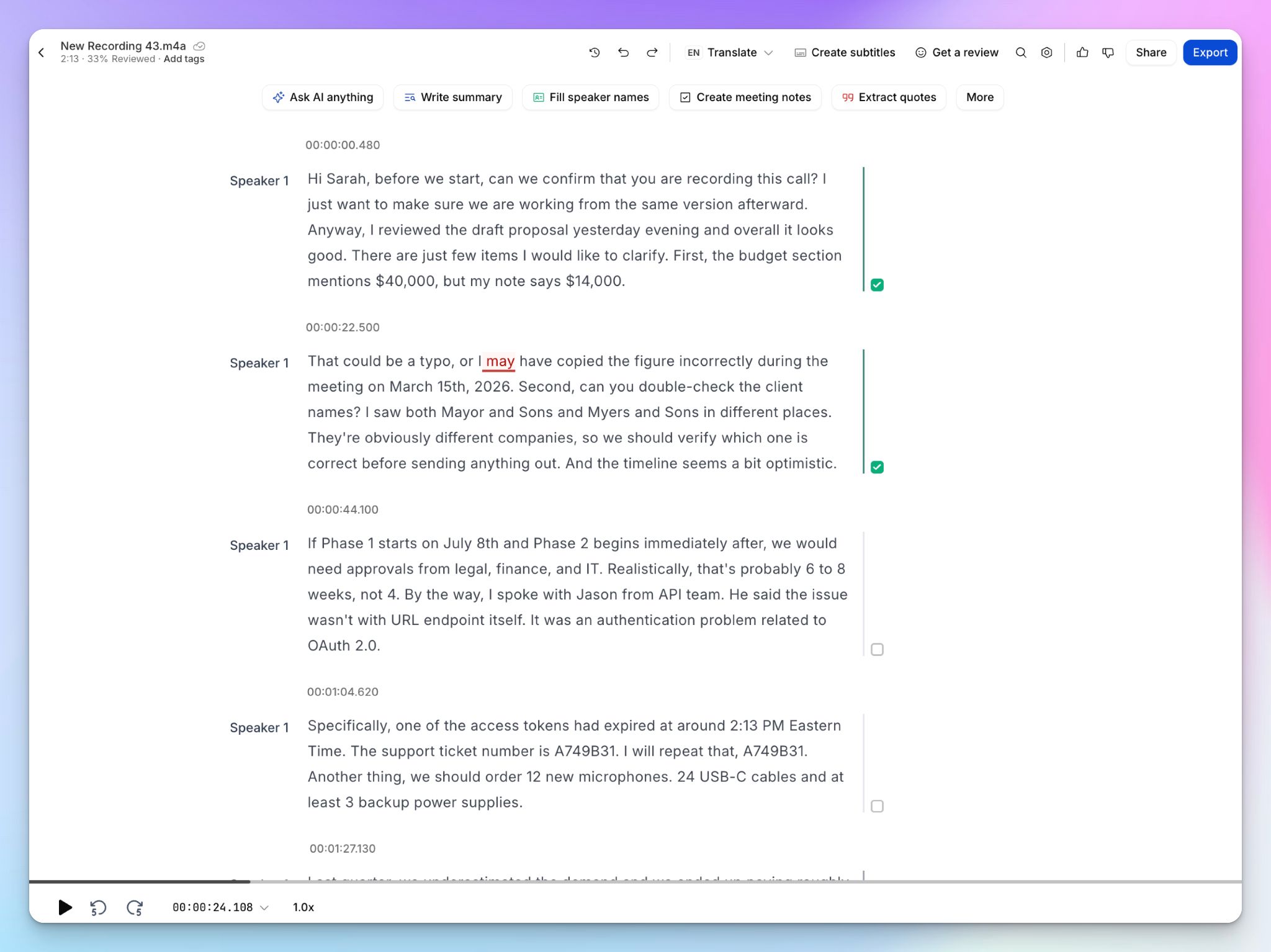
HappyScribe's AI transcription handled the hard parts cleanly. It caught the ticket as a copy-ready "A749B31," kept both currency figures consistent at "$40,000" and "$14,000," and rendered "Mayor and Sons" and "Myers and Sons" as two distinct companies, which is the exact point the speaker was making.
Lists, such as “legal, finance, and IT”, were punctuated, and the transcript was formatted with timestamps, so it was quick to scan and edit. And all of these were without adding words to custom glossaries, which you can do from the dashboard.
From the same editor, I could request a human expert review for guaranteed accuracy.
Sonix's accuracy
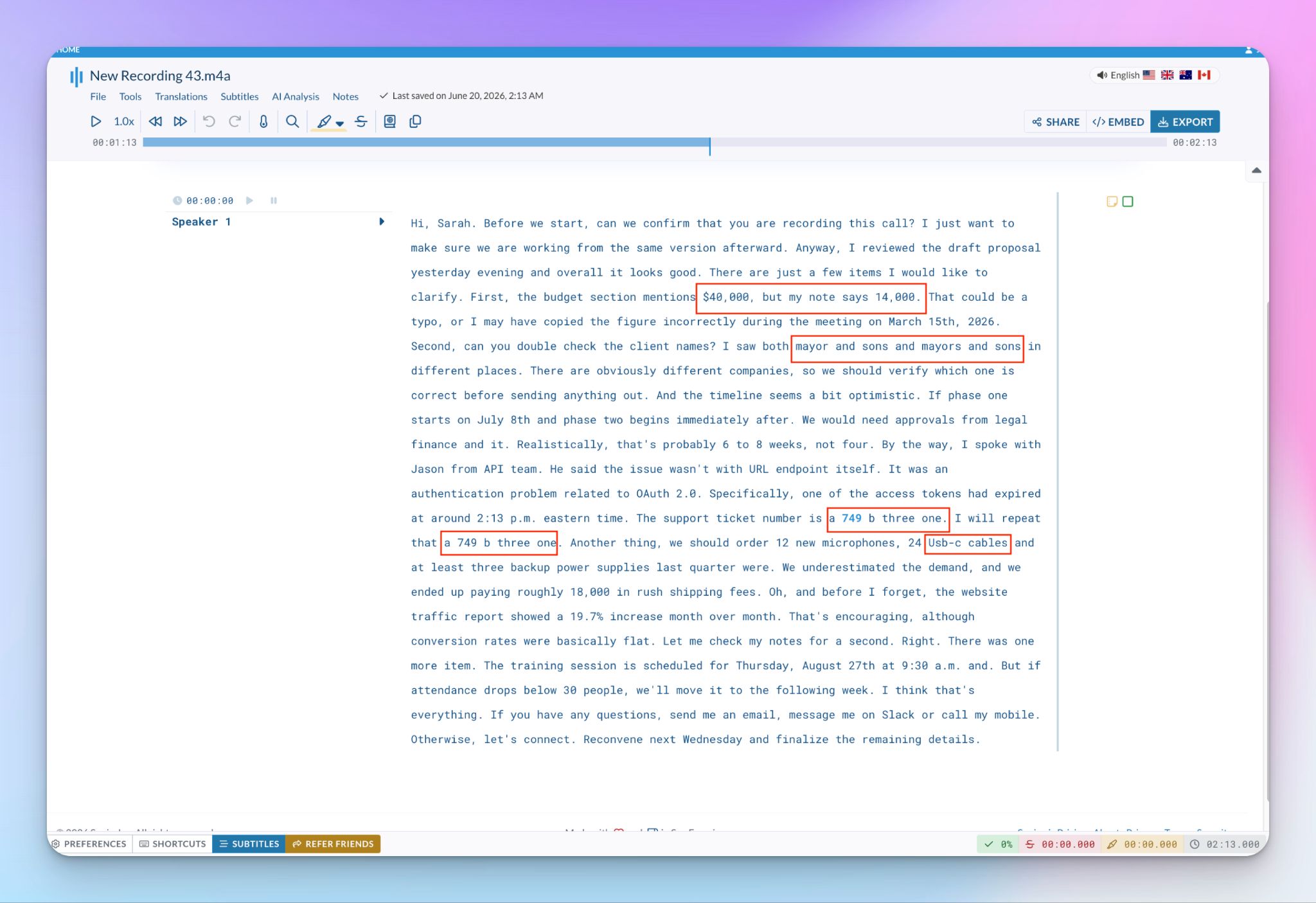
Sonix was slower to upload and process the identical file, so you’d have to wait a few seconds more compared to HappyScribe. It’s not a dealbreaker, as long as you get an error-free transcript. But it wasn’t the case for me.
Sonix mangled the ticket into "a 749 b three one," lowercase and spelled out, so you can't paste it anywhere useful. Currency lost consistency as well, with "$40,000" turning into a bare "14,000", a few words later. The two firms collapsed into "mayor and sons" and "mayors and sons," near-identical despite the speaker calling them different companies.
Stack that with missing commas, an odd "Usb-c," and a few garbled run-ons in a dated, single-block layout, and you're editing far more than you should.
👉 Verdict:
HappyScribe, clearly, is more accurate than Sonix. On the same file, it was faster and cleaner, and it nailed the names and figures that usually eat your editing time. Sonix gets you close, but you'll have to spend extra time fixing what it missed.
HappyScribe vs. Sonix: Language support
If your work crosses languages and borders, this is where the gap widens between HappyScribe and Sonix.
HappyScribe's language coverage
HappyScribe transcribes in 150+ languages and dialects with AI, and 60+ with its human expert service. It comfortably reaches past the usual English, Spanish, and French into rare territory like Galician, Basque, Swiss German, Lao, and Uzbek.
The bigger time-saver is detection. You upload a file, and HappyScribe analyzes the audio and identifies the language on its own. You can override that if you want. For global teams that don't want to be slowed down by language barriers, the little things help a lot.
Sonix's language coverage
Sonix supports 54+ languages, the major ones plus some regional coverage like Catalan, Welsh, and Swahili. That's fine for mainstream work, but it's a fraction of HappyScribe's range, and it demands more from you.
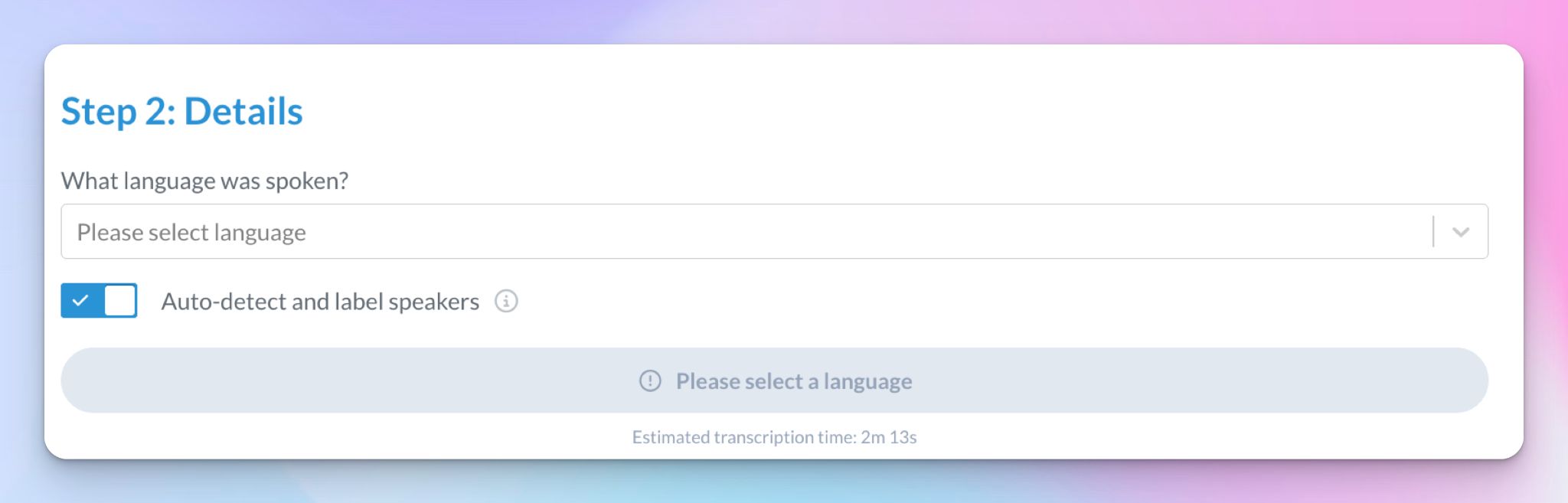
At the upload step, Sonix won't start until you answer "What language was spoken?" from a dropdown, with the transcribe button locked behind a "Please select a language" prompt. The only auto-detect on that screen is for speakers, not the language.
👉 Verdict:
HappyScribe wins, on both counts. It covers nearly three times the languages and detects them for you on upload, whereas Sonix offers a narrower set of languages and relies on you to pick the language.
HappyScribe vs. Sonix: Compliance and security
If you record interviews, client calls, or patient sessions, data compliance and storage are a massive part of your evaluation process. It's sharpest for researchers, whose consent obligations differ between recording in the US and recording in the UK. They have to keep participant data protected long after the interview ends.
Four terms decide most of this, so here's what each means for you:
- GDPR: The EU's data protection law, governing how personal data of people in the EU is collected, stored, and used
- SOC 2 Type II: An independent audit confirming a vendor's security controls actually work over time, not on a single day. For you, SOC 2 Type II compliance is a third-party proof that your data is guarded as claimed
- HIPAA: A US law protecting patients' health information. For you, it's required if you transcribe medical or clinical recordings in the US
- EU data residency: Keeping your data on servers physically inside the EU. For you, the transcripts stay under European law and out of reach of overseas access
HappyScribe's compliance and security features
HappyScribe is EU-first. It's SOC 2 Type II-certified and GDPR-compliant, stores its data in a PCI DSS and ISO 27001-compliant Tier IV EU data center, and encrypts files in transit (TLS) and at rest (AES-256).
You control whether it trains AI on your content, and strict access controls keep staff out of your files at higher tiers. The one box it doesn't tick is HIPAA, which it doesn't have yet.
For most teams, and especially researchers handling interview recordings, EU-based infrastructure and DPA on request are the bigger draws.
Sonix's compliance and security features
Sonix is equally serious about security, from a US base. It's GDPR and SOC 2 Type II-certified and is HIPAA-compliant, with AES-256 encryption and a no-training policy on your audio.
The trade-off is location. All Sonix data is stored on AWS servers in the United States, and while Sonix will sign a DPA and SCCs for GDPR, your data still leaves the EU, which can expose it to US authorities under the CLOUD Act.
For US healthcare, that's a strong fit. For EU participant data, it adds paperwork you'd otherwise skip.
👉 Verdict:
HappyScribe is the better choice for most teams. It matches Sonix on SOC 2 Type II and GDPR and adds full EU data residency. The one real exception is HIPAA. If you transcribe US clinical or medical content, Sonix is the compliant pick.
HappyScribe vs. Sonix: Meeting workflow
This is where the two tools stop competing in the same field. HappyScribe can manage your online meetings. Sonix can’t.
HappyScribe's meeting note taker features
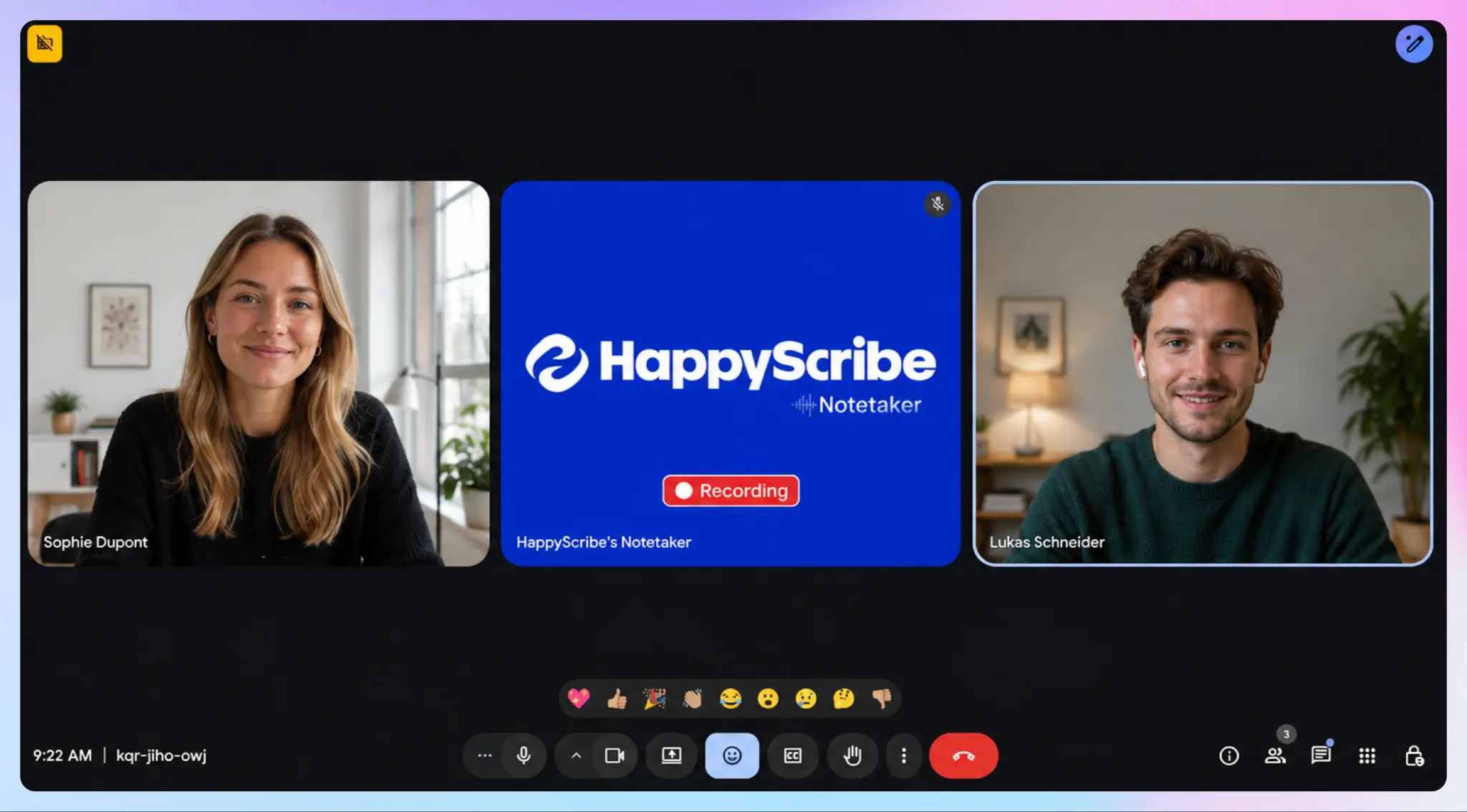
HappyScribe's AI note taker connects to your Google or Outlook calendar and automatically joins your Zoom, Google Meet, and Teams calls. It auto-detects languages and transcribes speech, while you stay focused on the conversation. If anyone feels uneasy with a note taker on call, the in-call controls let you pause or remove the note taker on the fly.
For impromptu calls away from your screen, the web voice recorder and HappyScribe mobile app capture audio without a meeting bot. You choose how you want to record meetings.
After your meeting ends, the transcripts and notes are formatted with timestamped speaker labels, and you have the conversational AI Chat to extract insights.
Sonix's meeting note taker features
Sonix has no meeting notetaker. It can't auto-join an online call or transcribe one in real time. It has a web audio recorder to capture live conversations.
Sonix prefers that you record the meeting yourself, store it to the cloud or your device, and then upload that file to Sonix. It's a capable transcriber, but it’ll slow down your meeting documentation.
👉 Verdict:
HappyScribe wins for meeting notes, with no contest. It manages meeting workflows from calendar invites to action items, while Sonix waits for you to figure out recordings and file uploads.
HappyScribe vs. Sonix: Subtitle workflow
Both HappyScribe and Sonix can create and edit subtitles, so I ran the same file through each editor to see how they feel to work with.
HappyScribe's subtitle tools and features
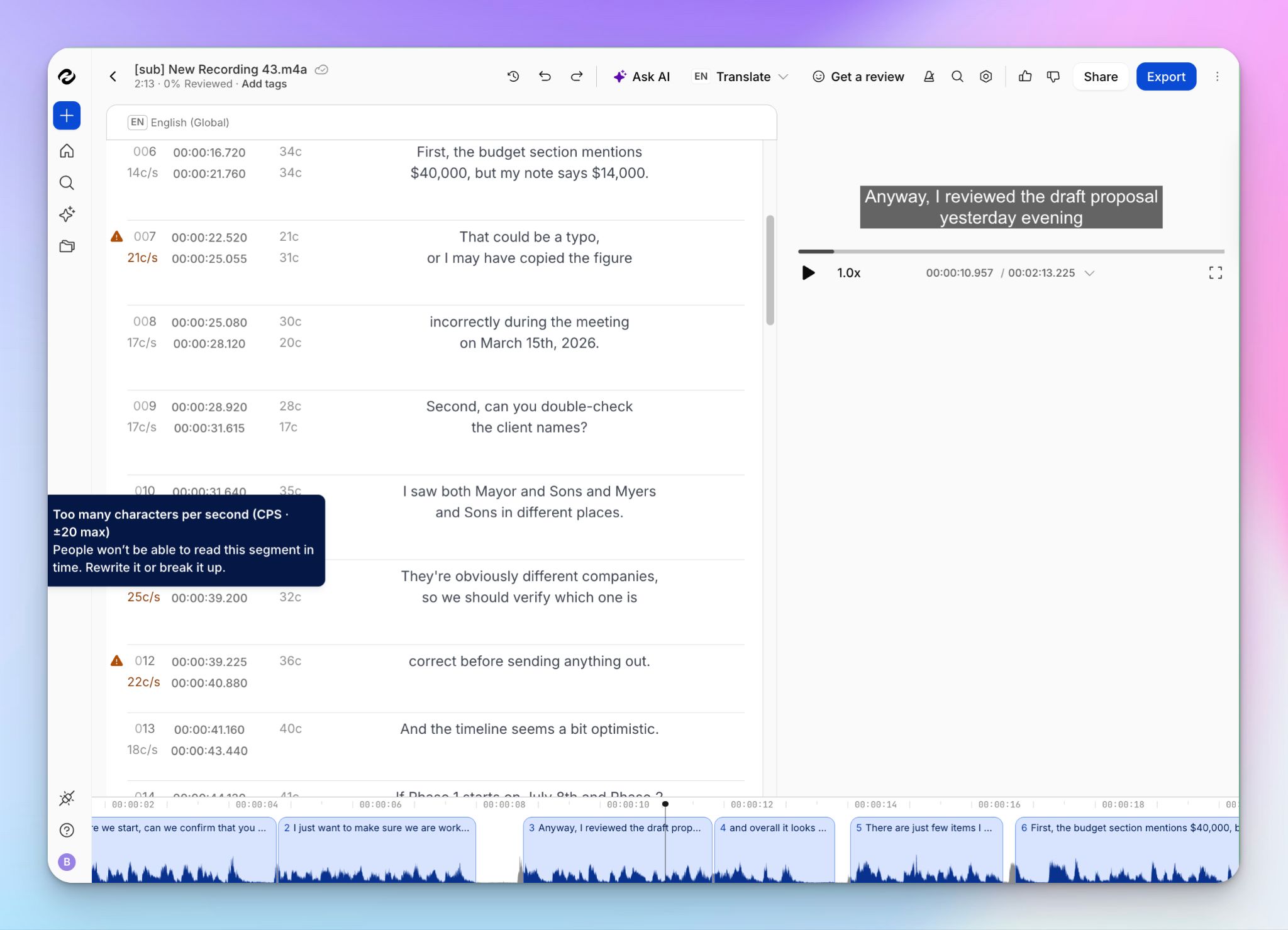
HappyScribe's subtitle editor is built for QA. It shows an easy-to-follow audio waveform, flags segments with too many characters per second so viewers can keep up, and lets you add, merge, and mark segments while you work.
It fits CPS and CPL to broadcast standards, SDH for accessibility, surfaces export formats (SRT, VTT, STL, Final Cut Pro, MAXQDA, Avid) in the export tab, and offers style customization for fonts, colors, and position.
Since the editor controls and cues sit inline rather than behind menus, new users will find HappyScribe faster to work with.
Sonix's subtitle tools and features
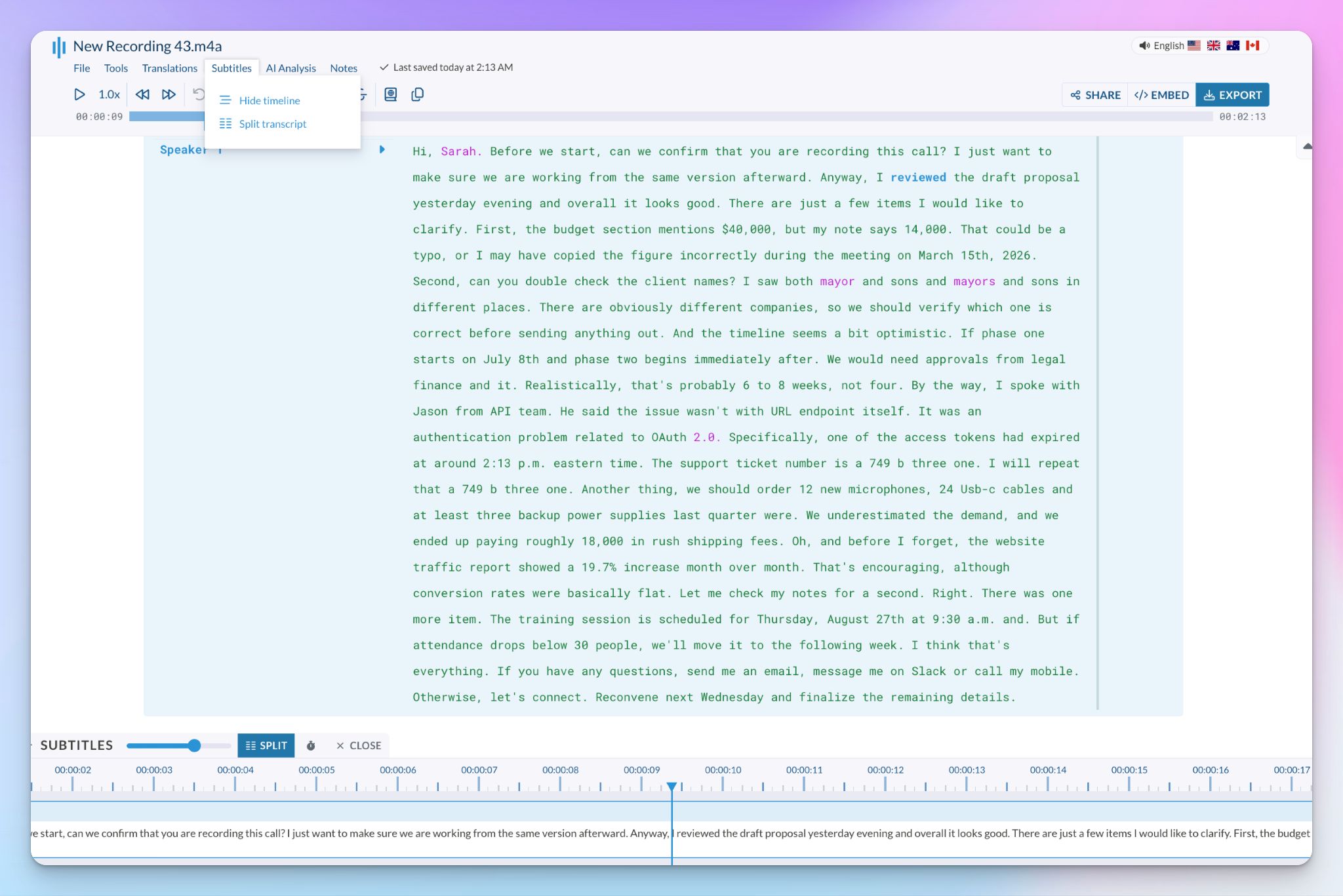
Sonix is a capable subtitle editor in its own right. It exports the same professional formats, burns in styled captions, builds SDH, and has granular split controls for lines, characters, and duration.
Its standout feature is confidence coloring, which highlights words the AI is unsure about, so you know where to look. But the editor is a letdown. No waveform, a denser layout, and you have to scroll to find export formats.
👉 Verdict:
HappyScribe leads, purely on the editing experience. Both ship broadcast-ready subtitles, but the waveform, the readability warnings, and review tracking make HappyScribe faster and more intuitive, especially for teams.
HappyScribe vs. Sonix: AI features
Beyond AI-powered transcription, translation, and subtitling, both tools let you interact with your recordings, and they overlap more than you'd expect.
HappyScribe's AI features
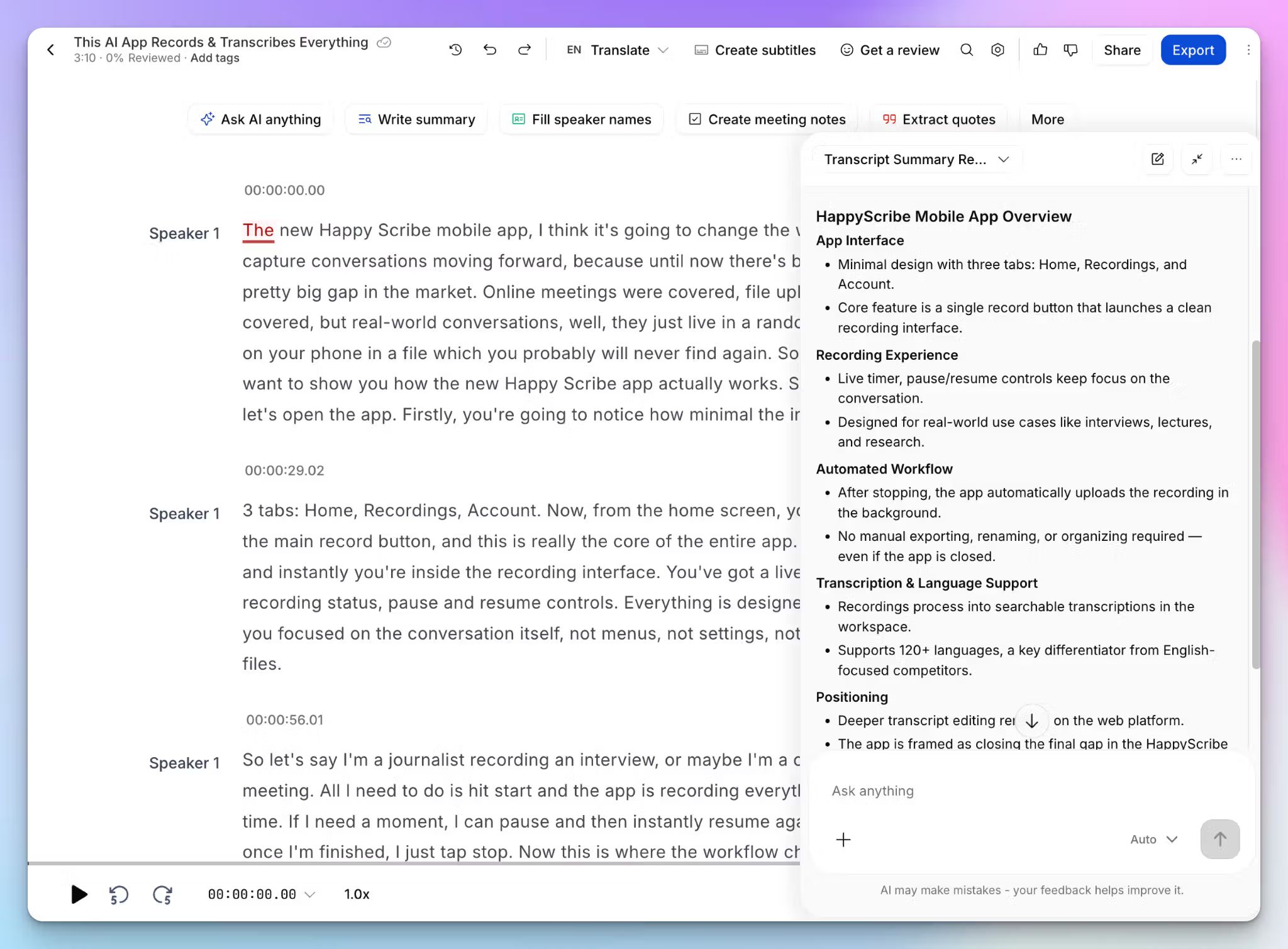
With HappyScribe AI Chat, you can ask your transcripts questions in plain language and get answers with proper citations. It works for a single file, a whole project folder of several interviews, or your company’s institutional memory.
The same chat window helps you write summaries, find action items and quotes, and draft content like social posts or clip ideas with timestamps and rationale. You can even link the meeting data to Claude or ChatGPT via MCP.
AI Chat is included on every plan, with a larger scope and model picker on Pro and Business.
Sonix's AI features
Sonix's AI Workspace covers the same conversational queries but leans more into structured analysis. You can ask across hundreds of hours of transcripts and get answers cited to the exact timestamp and speaker.
On top of chat, it scans for deeper analytics, including thematic and sentiment scoring, topic detection, and entity extraction, plus batch analysis.
Sonix’s AI analysis is part of the subscription plans, so if you prefer the pay-as-you-go model, you don’t get AI.
👉 Verdict:
Both tools are good with AI implementation, so you’ll likely be sorted with either of them. HappyScribe has more everyday usability, while Sonix’s best value is reserved for qualitative researchers.
HappyScribe vs. Sonix: Integrations
Both tools connect to the other tools you already use, with slightly different priorities.
HappyScribe's integrations
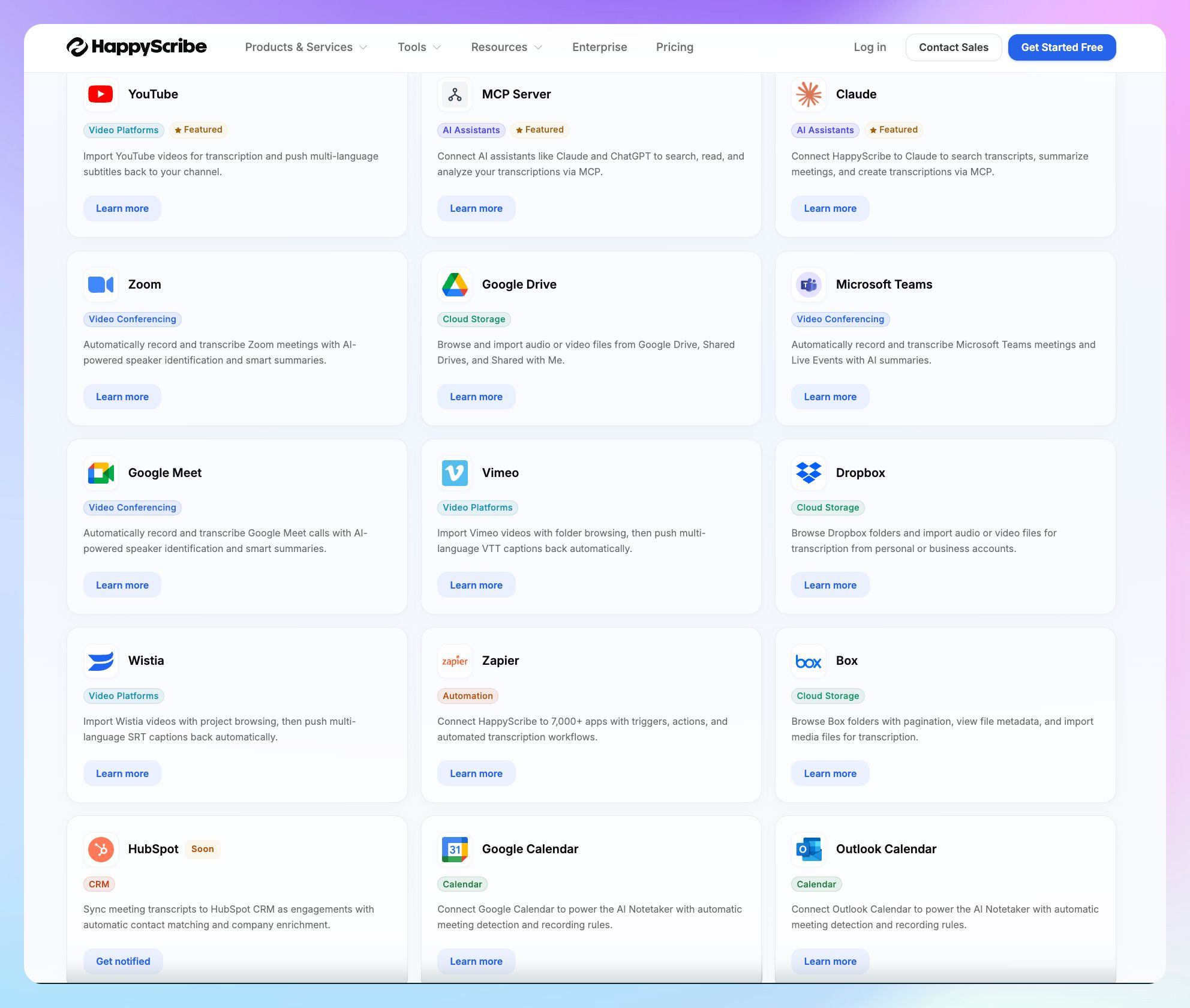
HappyScribe integrates with Zoom, Google Meet, and Teams for meeting recording and pulls files from Google Drive, Dropbox, Box, YouTube, Wistia, and Vimeo for transcription. It also pushes finished subtitles back to YouTube, Wistia, and Vimeo.
HappyScribe connects with Zapier to extend your workflows to 7,000+ more apps, and there's REST API support for advanced work. MCP server supports Claude, Gemini, ChatGPT, and Cursor, and HubSpot CRM sync is on the way.
Sonix's integrations
Sonix lists 30+ integrations across video conferencing, storage, CRM, and legal software. But here’s the issue: since Sonix can’t join meetings to take notes, it simply lists popular platforms.
You still have to record meetings by yourself and upload them to Sonix. Apart from Zoom and Teams, it doesn’t actually have native workflows.
On a more positive note, Sonix syncs with Zapier and Clio for law firms and supports REST API and webhooks for developers.
👉 Verdict:
HappyScribe stays ahead, narrowly. Sonix connects to more use cases, but HappyScribe's live auto-join, bidirectional subtitle push, MCP server, and API align better with popular workflows.
HappyScribe vs. Sonix: Pricing
The tools have different approaches to pricing, so the right pick depends on how you work.
HappyScribe's pricing
AI transcription plans
- Free: Unlimited meeting recordings (45 mins per recording), 10-minute trial of AI transcription, subtitling, and translation
- Basic: $8.50/month (billed annually) or $17/month (billed monthly)
- Pro: $19/month (billed annually) or $29/month (billed monthly)
- Business: $59/month (billed annually) or $89/month (billed monthly)
- Enterprise: Contact sales for tailored solutions
Human transcription service: Starts from $2.00/min. Extra discount for Business users
Sonix's pricing
- Pay-as-you-go: $10/audio hour (5 GB storage)
- Core: $25/month or $275/year
- Advanced: $50/month or $550/year
- Pro: $80/month or $880/year
- Enterprise: Custom pricing
👉 Verdict:
HappyScribe is the most value-for-money option for most users. It's cheaper to start, includes the AI meeting note taker and AI Chat in both free and paid plans, and offers a human tier Sonix doesn't. Sonix's one clear edge is the pay-as-you-go plan for occasional, one-off jobs.
HappyScribe vs. Sonix: What are customers saying?
HappyScribe customer reviews
What users love:
I use HappyScribe in combination with ZoomCalls with my colleague to document our podcast. It is really easy to use and a professional tool to record everything. My recommendation to this wonderful tool.
What I like best about HappyScribe is how efficiently it converts meeting recordings into searchable transcripts and summaries. In my work, project reviews, technical discussions, and coordination meetings often contain important decisions that need to be documented accurately. The AI-powered transcription and meeting summary features significantly reduce the time spent on manual note-taking.
The user interface is clean and intuitive, making it easy to upload recordings, review transcripts, and export results without extensive training. The onboarding experience was straightforward, allowing me to start using the platform quickly. I also appreciate the integrations with cloud storage and collaboration tools, which simplify document management and sharing.
VINAY P. (G2)
What could be better:
I love most part of this platform but I wish that the pricing of this platform was more moderate. Other than this, I also wish that there was more integration tools available for this platform. The mobile app doesn't feel as powerful as the desktop web version.
While HappyScribe performs well overall, technical terminology, engineering-related vocabulary, and product names occasionally require manual correction after transcription. This is not a major issue, but it can add extra review time when working with specialized discussions.
Sonix customer reviews
What users love:
I used Sonix to transcribe 16 videos, each ranging between 1 and 20 minutes long. The transcripts were created very quickly, and the transcription accuracy was excellent. I appreciated the pay-as-you-go option, as I will not need the service in the foreseeable future.
Simple and accurate first experience with Sonix transcription.
Swift and friendly replies to my questions.
What could be better:
Waiting for over 2 hours for a 28-minute video to upload. The last .1 Mb has been uploading for an hour. Waste of time.
The customer service is totally hopeless. There was a technical issue that doesnt allow exporting the subtitles correctly. I asked for help in the chat and literally they replied once per day. So after a whole two days, all the reply I got is they will ask the technicians what's going on. This is not what I'd expect from a paid service. They have proved themselves to be incompetent both at technology and service level. Also, one thing many AI transcribers do not understand is that native speaker often mix English into Cantonese. The users are literally doing all the transcribing work themselves. So whoever is reading this now, please could you take this in mind when you are developing a better transcribing tool? thanks.
HappyScribe works best when:
✅ You run regular online meetings and want them auto-transcribed and summarized for you
✅ You handle sensitive or EU participant data and need GDPR compliance with European data residency
✅ You work across many languages, including rare ones, and want them detected and transcribed reliably
✅ You produce video subtitles and want an easy-to-use editor, readability checks, and broadcast-ready export
✅ You want to chat with your entire transcript library to extract insights, from one file to the whole org, with no add-on
✅ You want transcription, subtitles, translation, and meeting notes in one place, with a human tier for perfect accuracy
HappyScribe doesn't work well when:
❌ You need HIPAA compliance for US medical or clinical recordings
❌ You want specific analysis, like sentiment or entity extraction at scale
❌ You transcribe only occasionally and would rather pay by the hour than keep a subscription
Sonix works best when:
✅ You transcribe US medical, clinical, or legal recordings and need HIPAA compliance
✅ You run structured analysis at scale, pulling sentiment, themes, and named entities across transcripts
✅ You transcribe only occasionally and want to pay by the hour with no subscription
✅ You're a legal team that needs direct Clio sync
✅ You want your subtitle editor to flag low-confidence words and give you granular split controls
Sonix doesn't work well when:
❌ You need to capture scheduled online meetings and are looking for an AI meeting note taker
❌ You handle EU participant data and want it stored in the EU, not on US servers
❌ You want subtitles edited against an audio waveform with inline readability warnings
❌ You want a free plan or a low monthly entry point
❌ You need a human-expert tier for guaranteed accuracy, which Sonix doesn't offer
Final verdict: HappyScribe vs. Sonix
For most teams, creators, and researchers, HappyScribe is the stronger all-rounder. It wins on live meetings, language coverage, EU privacy, and value.
Choose Sonix if you need HIPAA for US clinical or legal work or pay-per-use for the occasional file.
For the everyday work most people do, HappyScribe covers more ground in one place, usually for less.