Otter AI has been coasting on its reputation for a while. If it were still the obvious choice, the AI note taker market wouldn't be this crowded.
Meetings have become more advanced since Otter's moment in the sun five years ago. It's still a solid AI meeting assistant and transcription tool, but solid isn't the same as the safe default it used to be.
My take comes from using Otter myself for the last four years. If you want to know if Otter suits your work in 2026, read on for the first-hand experience of a long-term user.
📌 In a nutshell: Is Otter AI worth it in 2026?
Here's the short version of this Otter AI review: Otter defined the AI meeting assistant category, and it still nails the thing it's known for, which is live capture that works without your constant input. But the shine has worn off.
The raw transcript underneath is messy, the language support is stuck, and the company is now tangled in a pile of consent lawsuits.
✅ Otter is best for: English-language teams who live in back-to-back video calls and want live notes that take care of themselves
❌ Otter is not a great option for: Multilingual work, privacy-sensitive or all-party-consent calls, or anyone who needs accurate transcripts without relying on other AI support windows
Otter’s greatest hits: Ranked
Otter’s built around live meeting notes, and everything good about it starts from there.
1. Auto-join live capture
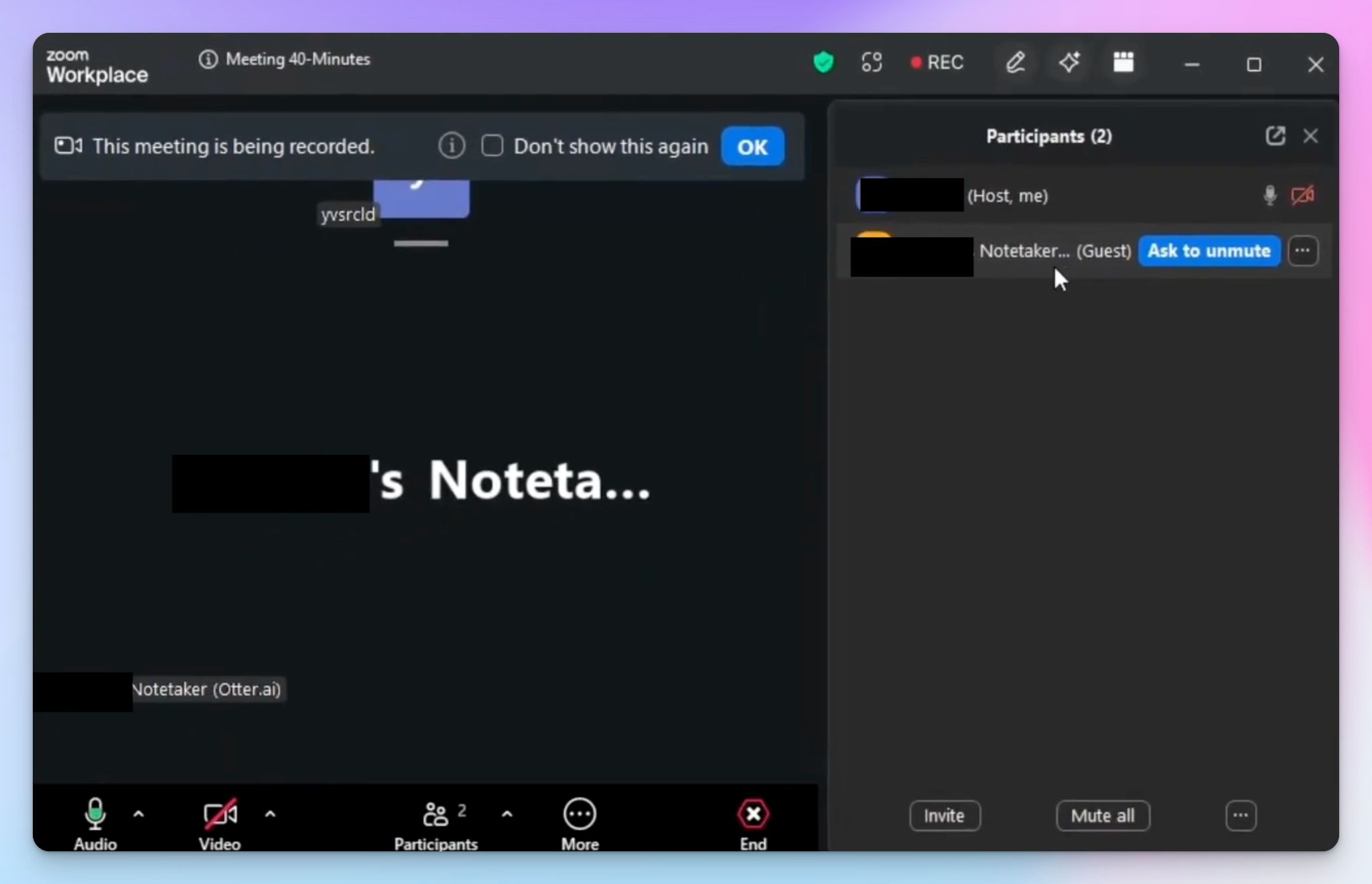
This is the home turf. Connect your Microsoft or Google Calendar, and Otter's notetaker will automatically join your Meet, Teams, and Zoom meetings and handle real-time transcription. It’s pretty reliable, sometimes to a fault.
You can send it into a meeting you can't attend and read the notes later, and on paid plans, it can even sit in multiple meetings at once.
Otter also leaves after a few minutes of silence, so it isn't eating up your minutes on dead air. But this one’s a hit-or-miss.
2. AI agents for specific workflows
One of its newer additions for the AI era, Otter splits its AI assistant into role-based agents.
The Sales agent pulls Salesforce and HubSpot context into pre-call briefs, flags objections live, drafts follow-ups, and updates CRMs. The Recruiting agent syncs candidate notes to Greenhouse, the Education agent turns lectures into organized summaries, and the Media agent handles interview transcription.
Whether you need those workflows depends on how much you’re willing to pay, but role-specific tuning beats a one-size-fits-all assistant. Just know how far the agents can go.
Otter surfaces action items, but it won't assign them to a person or push them into your project tool without manual review or integration.
3. The mature ecosystem
Otter has been in this space since 2016, and it shows. The web app is polished, the native iOS, Android, and desktop apps are even better, and the Chrome extension is as reliable as they come.
No matter your method, you have a general idea that the UX will be consistent across the board. For heavy users, the product stability goes a long way.
Otter at a glance
| Factors | What I found | Rating |
|---|---|---|
| Ease of use | Polished, mature interface and a reliable calendar bot, though the raw transcript is hard to scan | 🟢🟢🟢🟢🔴 |
| Security | Strong certifications and AES-256 encryption, undercut by US-only storage and ongoing privacy lawsuits | 🟢🟢🔴🔴🔴 |
| Integrations | Native Zoom, Meet, Teams, and calendar support plus an MCP server, but the wider catalog is Enterprise-locked | 🟢🟢🟢🔴🔴 |
| Customer support | Email and help center support. Expect occasional bumps in speed and helpfulness | 🟢🟢🟢🔴🔴 |
Benefits of using Otter: Things you observe in daily use
I’ve used Otter longer than I expected I would. Looking back, these are the things that kept me hooked:
1. The live transcription is the real deal
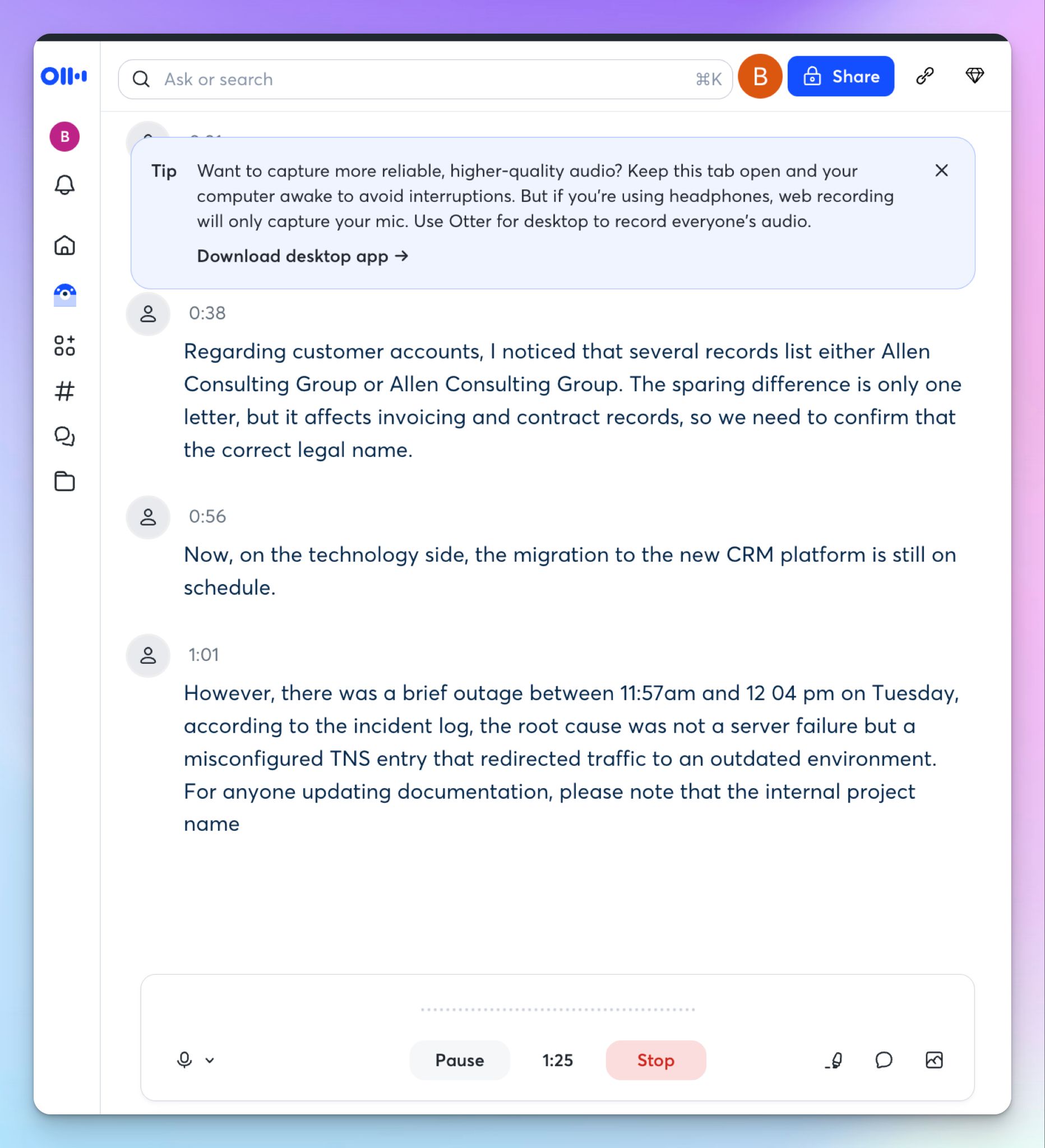
It’s hard to get one better than Otter. The text shows up on screen as people talk, fast enough to follow a busy call without lag, and it keeps pace even when the conversation speeds up.
No formatting, no qualms for pinpoint accuracy, just live texts as you speak.
It wouldn’t help people who get distracted by texts rolling like credits at the end of a movie, but great for users speaking in different accents or when there’s a genuine knowledge gap.
2. The post-meeting summary actually saves you work
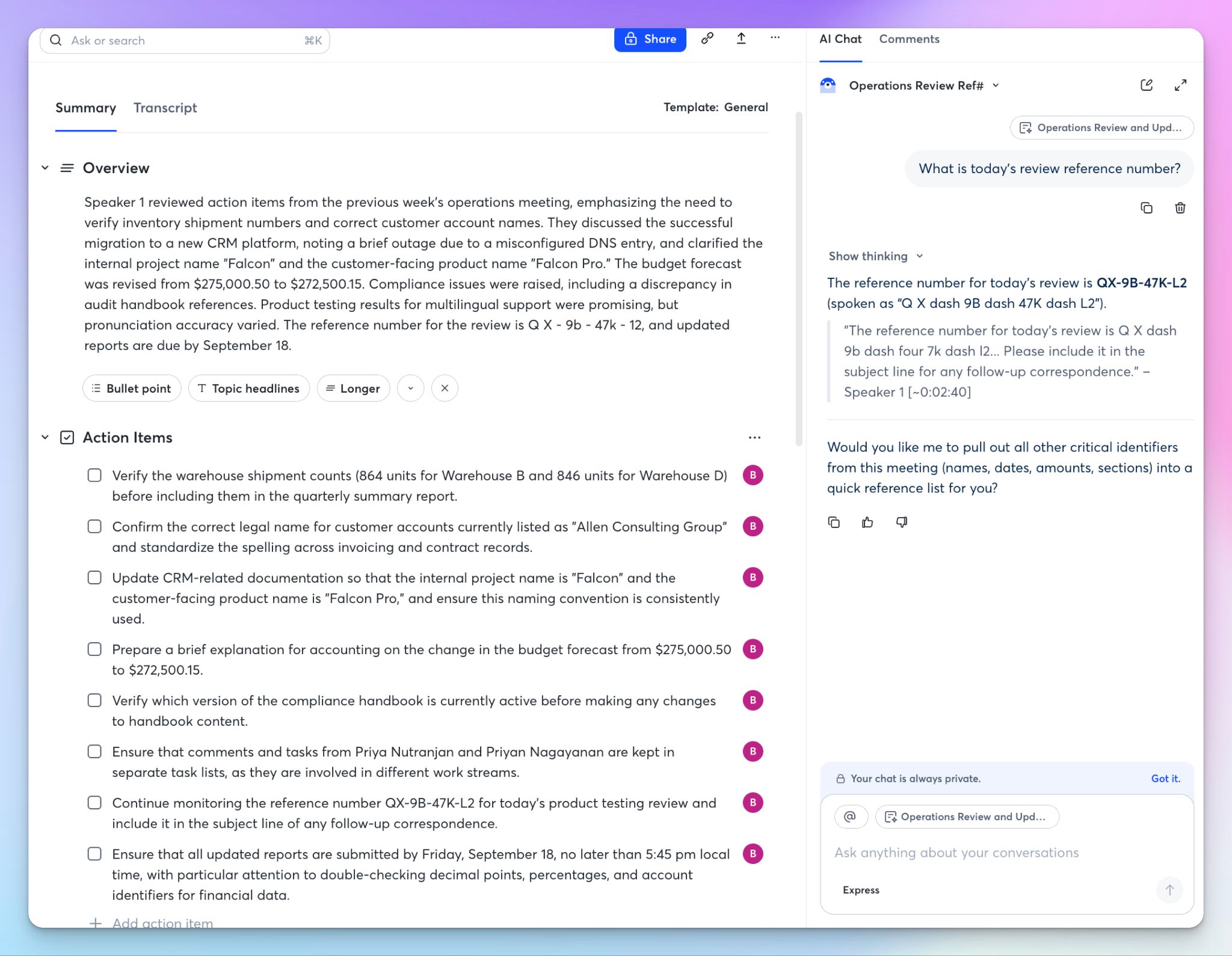
After the call, Otter generates a clean AI summary with an overview, action items, and outlines of key events, structured well enough that you can paste them into an email without much cleanup.
You’ll find the same outline in the chat panel too, so you can scan the shape of long meetings in about 30 seconds. It acts like a searchable archive for transcripts so when you half-remember a decision from three weeks ago, you can pull up the exact moment.
But scanning the raw transcript isn't something Otter wants you to do, so the numerous TL;Drs help.
3. You can mark up a transcript, not just read it
A cool feature for productivity freaks like me. Otter lets you add images straight onto transcript lines, so a screenshot sits right next to the moment it came up.
You can highlight key moments and leave comments as well, which helps teams collaborate on transcripts in shared folders. You can also send a transcript as a link with permission controls attached or export it as text, a PDF, or the audio itself.
For team meetings and reviews, Otter covers most of the bases.
4. The small stuff is done right
A few quality-of-life details have saved me real time. “Rematch speakers” lets you fix a mislabeled speaker once and have it carry across the past and future transcripts. Automatic filler word removal is the other one I'd miss. If you're a journalist pulling quotes out of long interviews, stripping every "um" and "you know" by hand is an afternoon you never get back.
The interface is clean and easy to move around, and the calendar bot turns up when it’s supposed to. None of these make headlines because you only feel them while using, but together, they’re why the daily grind feels light.
Red flags of Otter AI: My honest experience
Every tool looks good in a demo. This is the part of an honest Otter AI review that costs Otter its stars, and none of it came from stress-testing the product.
1. The transcript is a chore to read and a liability to trust
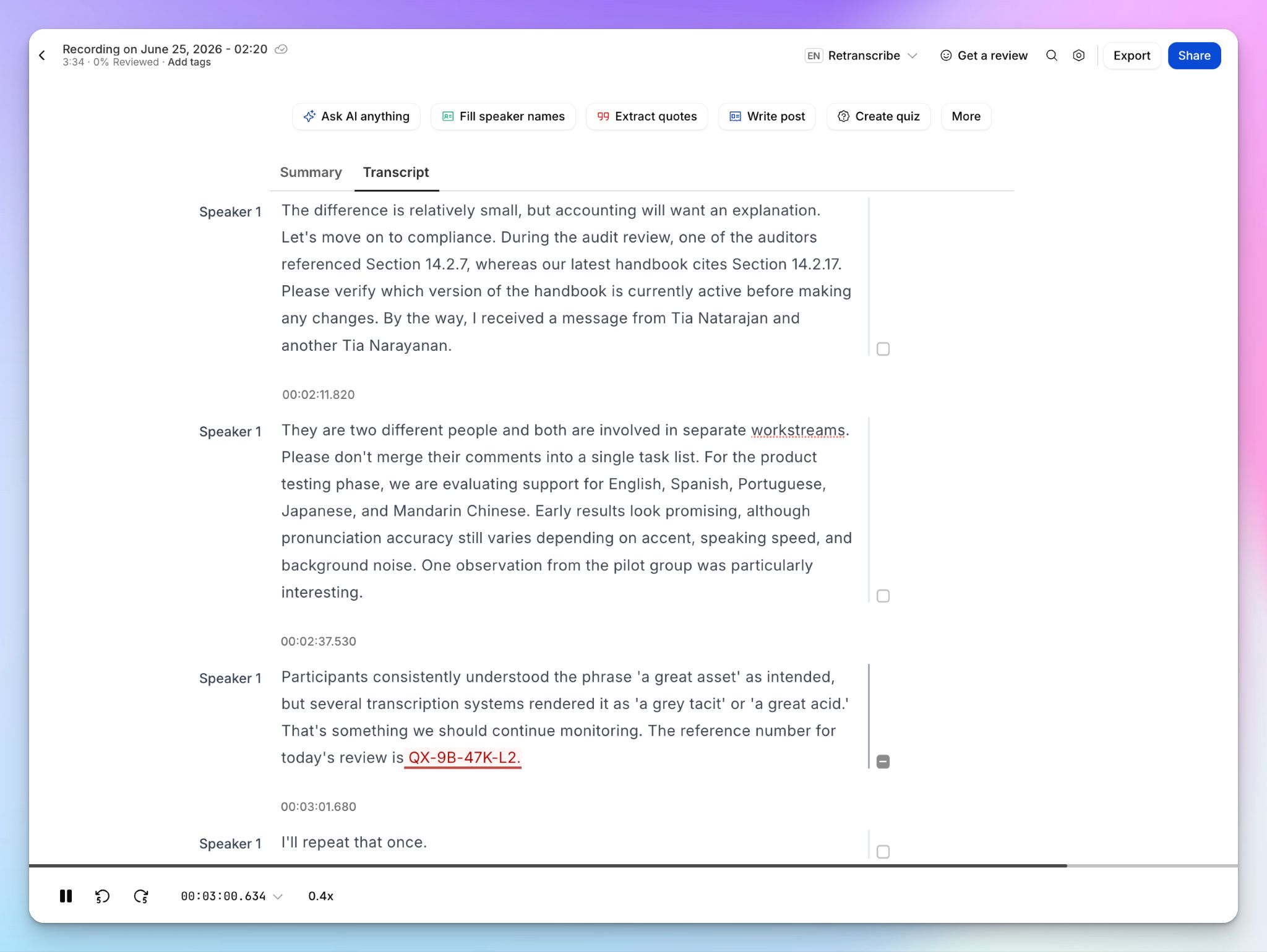
Transcript accuracy is the core of an AI meeting note taker, and it's where Otter let me down most. In a quiet room with one clear speaker, Otter sits at around 85% accuracy and it drops further in group calls with background noise or crosstalk.
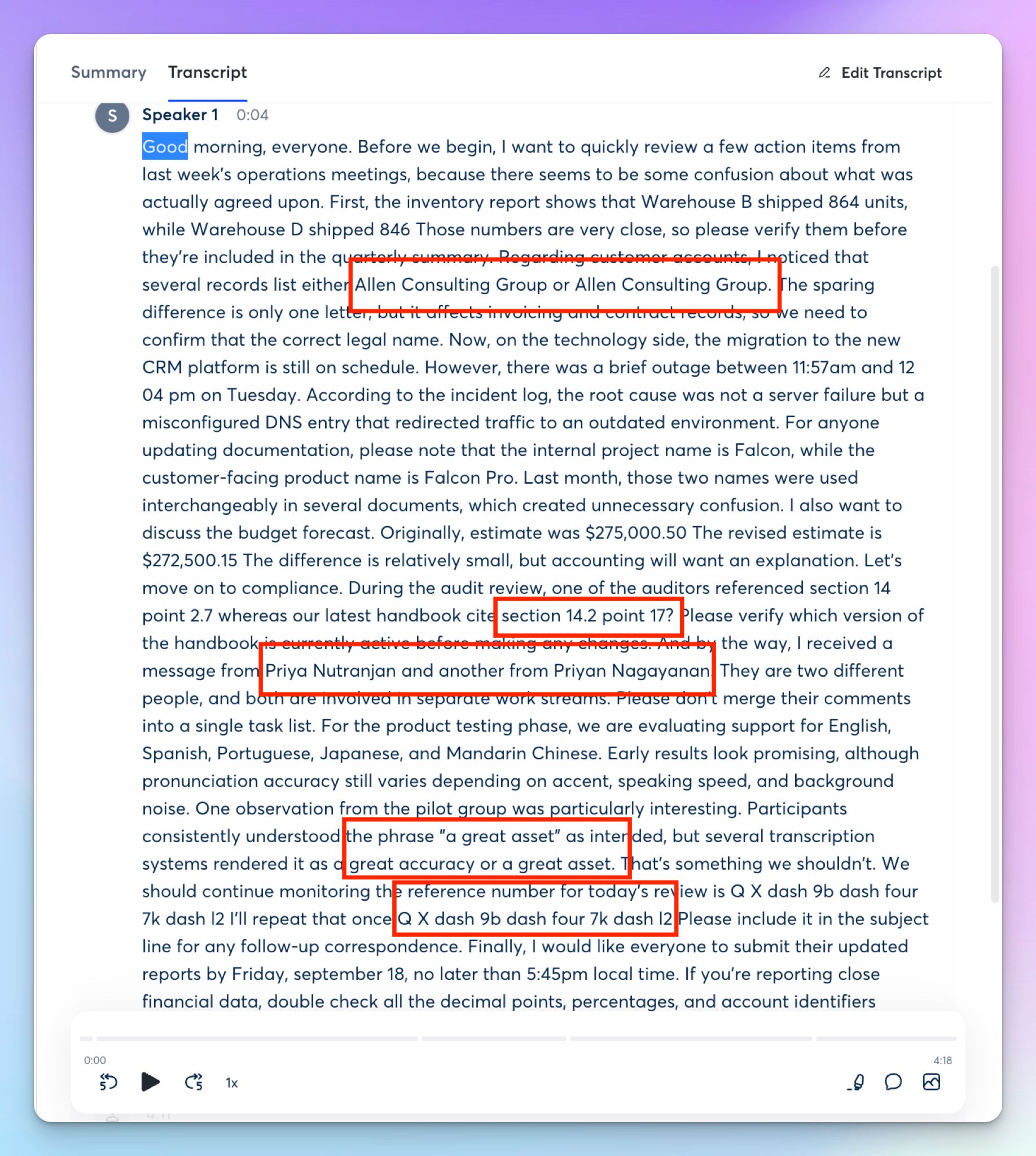
When you start using it, you’ll see two problems stack on top of each other. First, a transcript is a wall of text. Paragraphs? What’s that? Timestamps and formatting? No, thank you.
Then comes the actual words. Feed Otter names, numbers, or multiple speakers, and it trips over them.
The email reference code I mentioned came out as "Q X dash 9b dash four 7k dash l2," spelled out and impossible to paste. Two companies I was flagging as different (the whole point being a small spelling difference) came back as the identical "Allen Consulting Group."
It goes on. The surname I know to be Narayanan became "Nagayanan." It’s not a real name.
And my favorite: a sentence about transcription tools mishearing "a great asset" was itself transcribed as "a great accuracy or a great asset." Otter touts its smart AI agents, but won't flag any of this.
You only catch it by rereading every line, which defeats the point of letting Otter take notes.
2. The good version of your meeting is behind a paywall
Otter doesn’t want you to focus too much on the transcript itself (I wonder why) but rather rely on summaries, outlines, and AI Chat.
These are actually somehow more accurate than the raw texts they’re getting the information from.
I asked Chat to tell me the email reference number I mentioned, and it returned a clean "QX-9B-47K-L2," cited to the speaker and the timestamp.
“Okay, so I will just use the Chat to verify accuracy. What’s the big deal?”
For 10-minute meetings, you’d be fine with the transcript summary, but the AI Chat is severely limited on the free plan. Free users get only 3 queries per chat and a total of 20 per month. To get 50 queries, you have to move to the Pro plan at $17 per month.
So the accurate version of your meeting does exist, but you have to pay to access it. I don’t like note takers withholding a better quality of transcripts simply because you’re not paying them enough. Accuracy is their core service, and there are several other ways to push users to higher tiers.
3. Six languages, and an integration list with terms and conditions
Here's the one that gets me. 10 years in, with millions of users, Otter still transcribes in just six languages. Six.
If you have meetings or upload files in Portuguese, Korean, Italian, Swahili, or Arabic, you’re better off with one of the competitors that support hundreds of languages across the world.
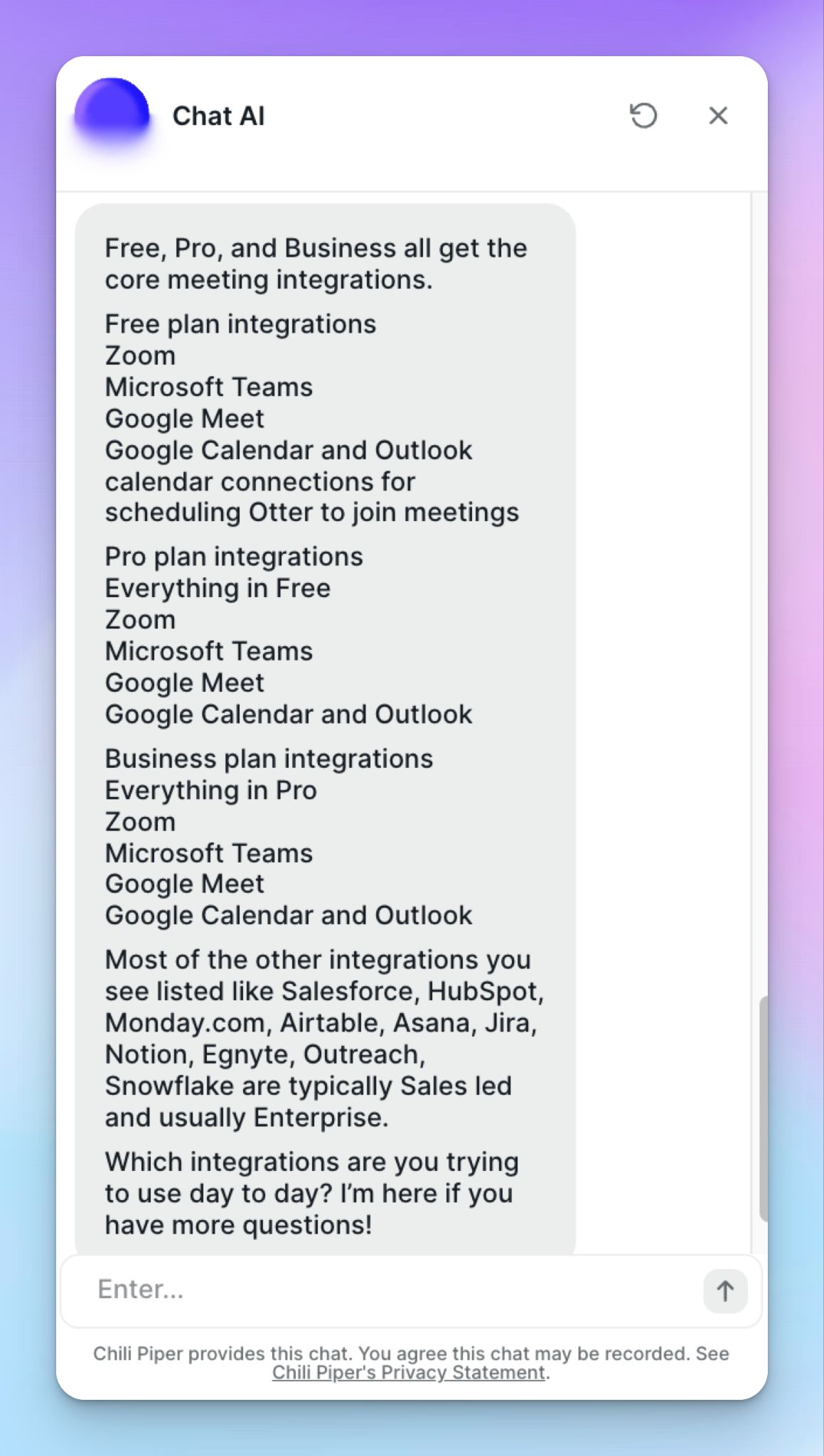
The integration list is the same kind of letdown. Don’t go by the website; Otter's own support bot admits that Free, Pro, and Business all get the same short set: Zoom, Teams, Google Meet, Slack, and the Google and Outlook calendars.
Everything else you see, Airtable, Egnyte, Salesforce, HubSpot, Monday, Asana, Jira, Notion, Snowflake, depends on talks with Otter’s sales team. Wider HubSpot and Salesforce syncs are Enterprise-only, and for some reason, a basic Dropbox integration requires an access request.
4. The lawsuit hanging over everything
And then there's the part Otter would rather you didn't dwell on. In August 2025, a Californian named Justin Brewer sued the company after its bot recorded a sales call he was on, a call he'd joined because another participant was running OtterPilot.
He had no account and no chance to say no. His case became the lead in a consolidated class action, In re Otter.AI Privacy Litigation, in the Northern District of California.
The suits accuse Otter of auto-joining calls, recording non-consenting participants, and training its models on what they said, under the federal wiretap act, California's all-party-consent law, and Illinois biometric law.
Otter denies any interception occurred and leans on terms of service that tell account-holders to get the necessary permissions themselves, and it's fighting to have the case thrown out.
But read that defense again:Consent is your job. In California, Illinois, and the other all-party-consent states, bringing Otter into a call without everyone's clear yes could put you on the hook, not just Otter. That's a strange weight to carry for meeting notes.
Otter pricing in 2026: What do you actually get?
On paper, Otter is priced reasonably, and it’s one of the reasons people still use it. But prepare for a lighter wallet if you want to replay recorded Zoom and Meet videos because that’s only available to Enterprise customers.
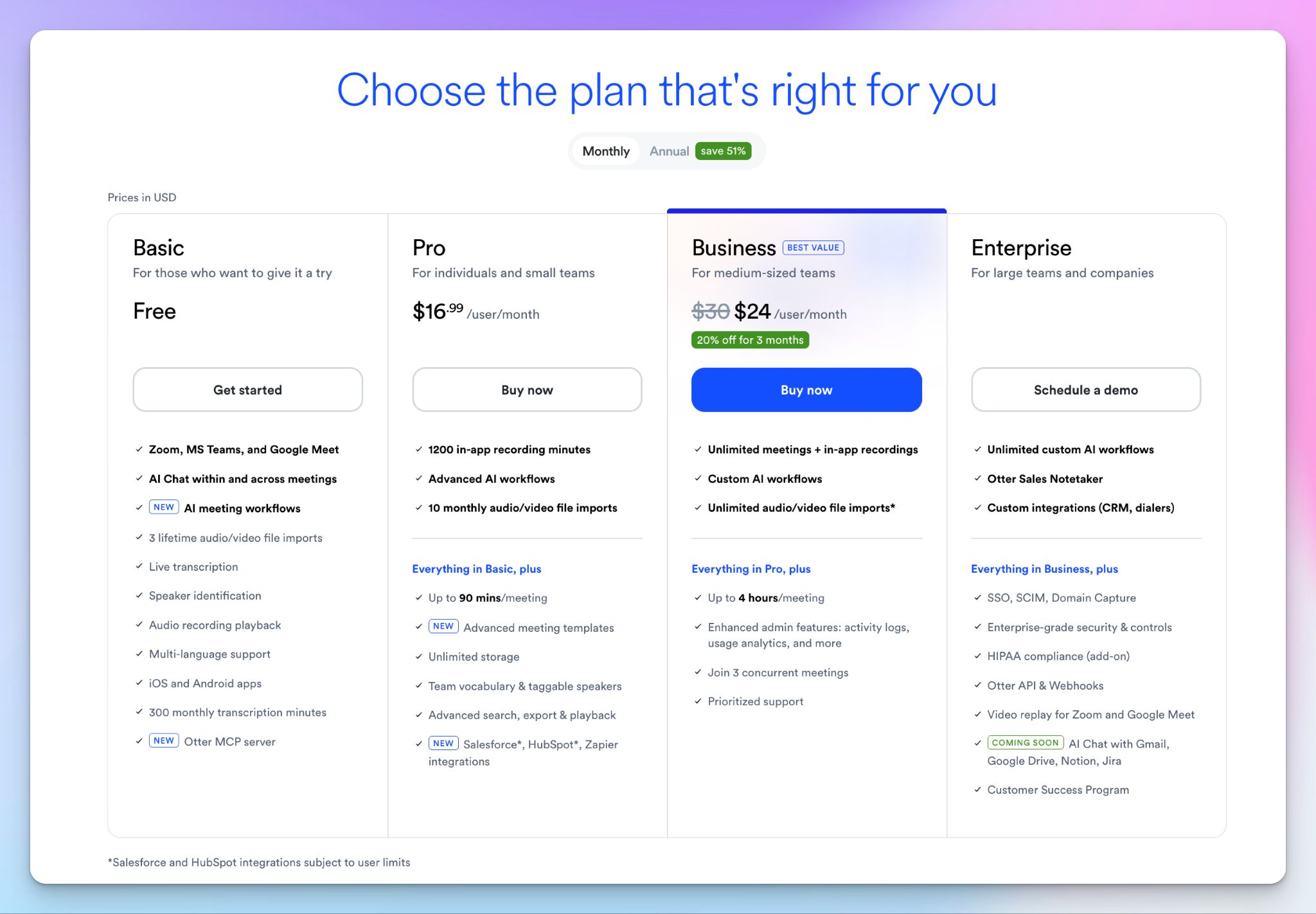
- Basic (free): 300 transcription minutes a month, capped at 30 minutes per meeting, three audio and video file imports total (not monthly, ever), and 20 AI Chat questions
- Pro: $16.99 month to month or $8.33 per month billed annually lifts you to 1,200 minutes, 90 minutes per meeting, 10 imports a month, and 50 chat questions
- Business: $30 monthly or $19.99 per month billed annually with a five-seat minimum. Unlimited meeting transcription and 200 chat questions, though imported files are still capped at 6,000 minutes
- Enterprise: Custom pricing for SSO, the API, deeper Salesforce features, and HIPAA as a paid add-on, and it only counts once you've signed a Business Associate Agreement with Otter
If you have a lot of audio files or pre-recorded meetings, the free plan is basically a demo. Three lifetime imports and a 30-minute ceiling rule out any actual work.
And as I have mentioned earlier in my Otter review, integrations are plan-specific, so pick your plan in line with your workload.
What do real users say about Otter?
Otter’s default behavior, when it works, is great to work with. Users appreciate how little setup it takes, and the praise for real-time accuracy shows up consistently for English, French, and Spanish.
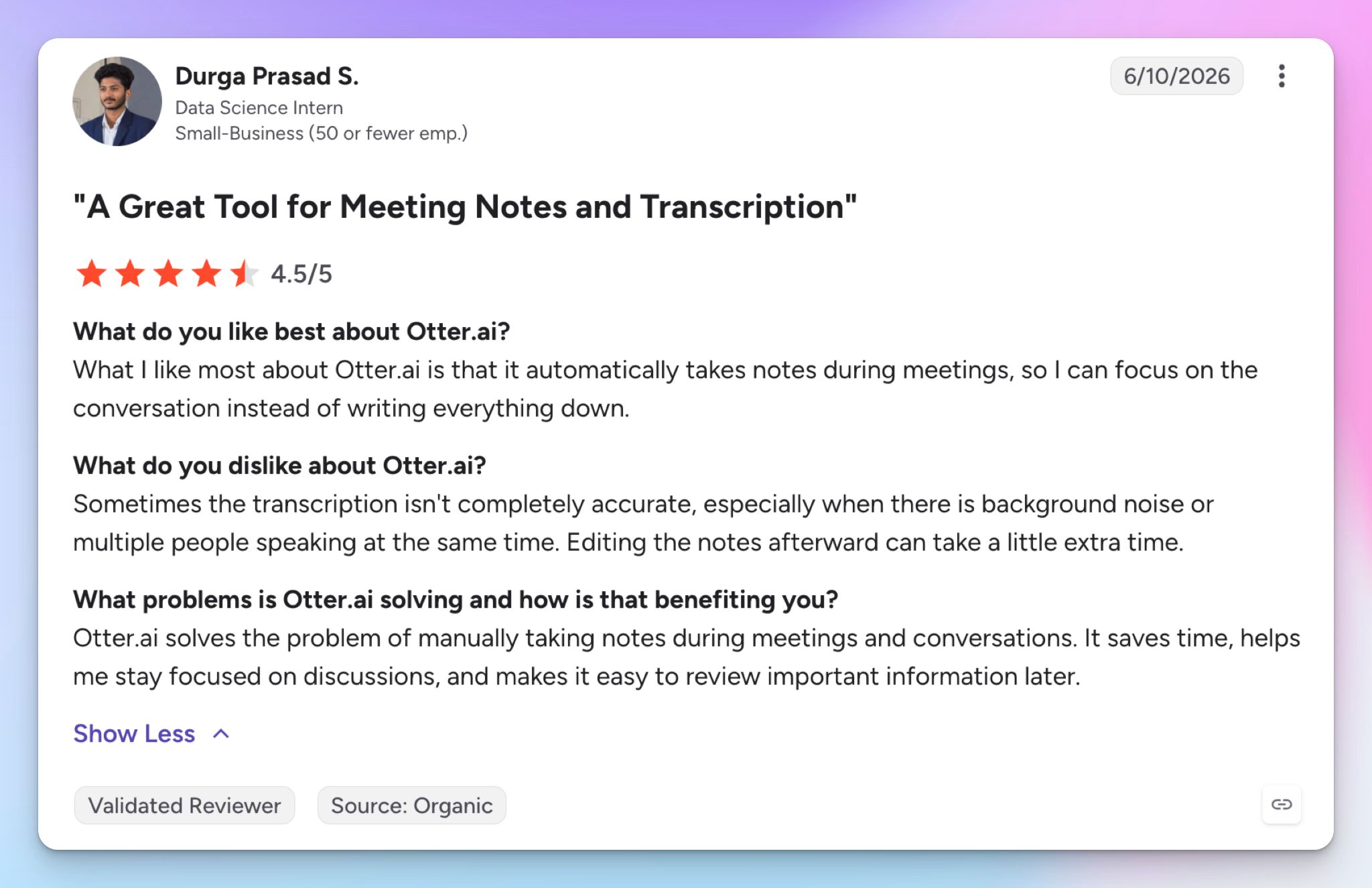
Source: G2
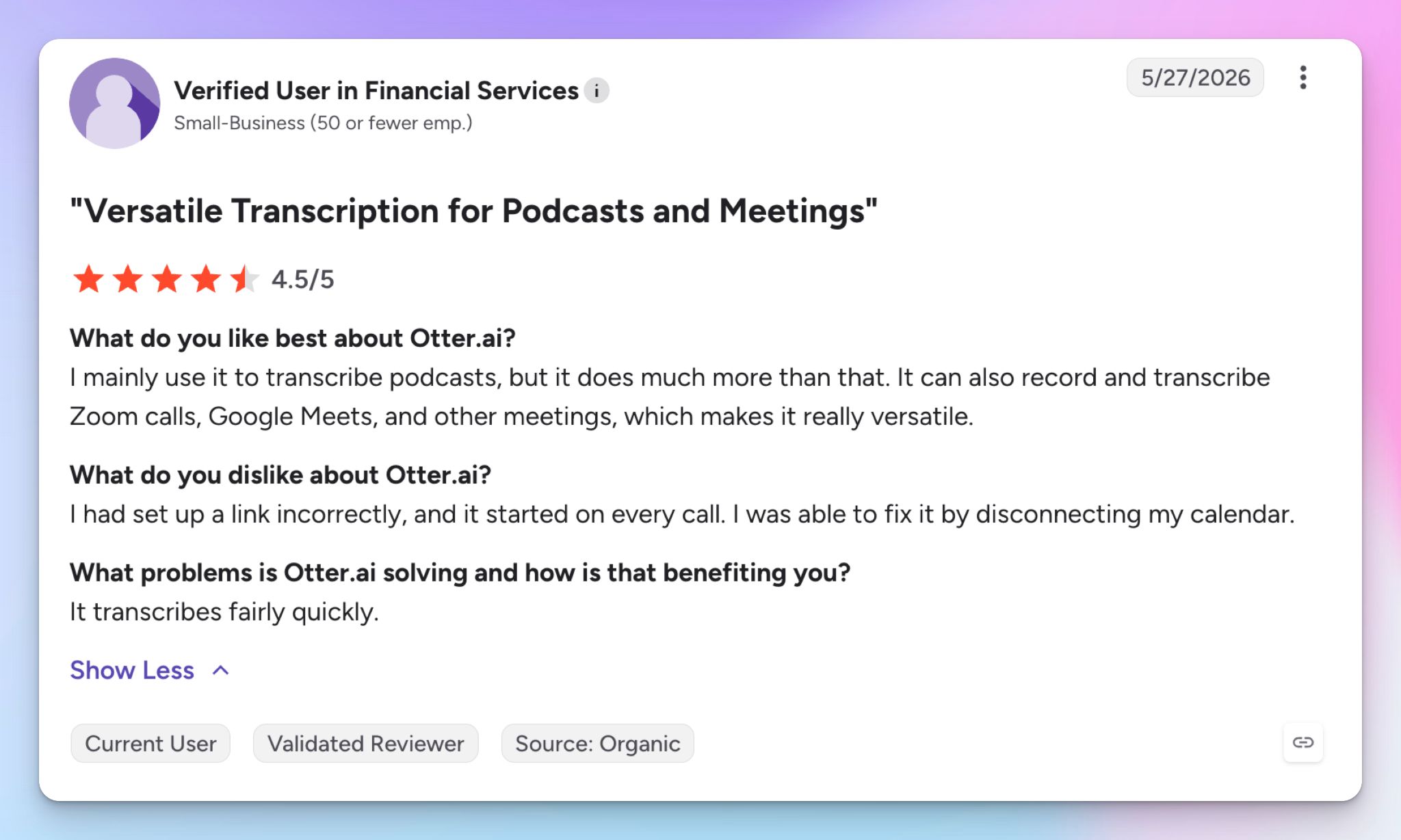
Source: G2
But you can’t shake off the nagging feeling that you get the familiarity at a cost.
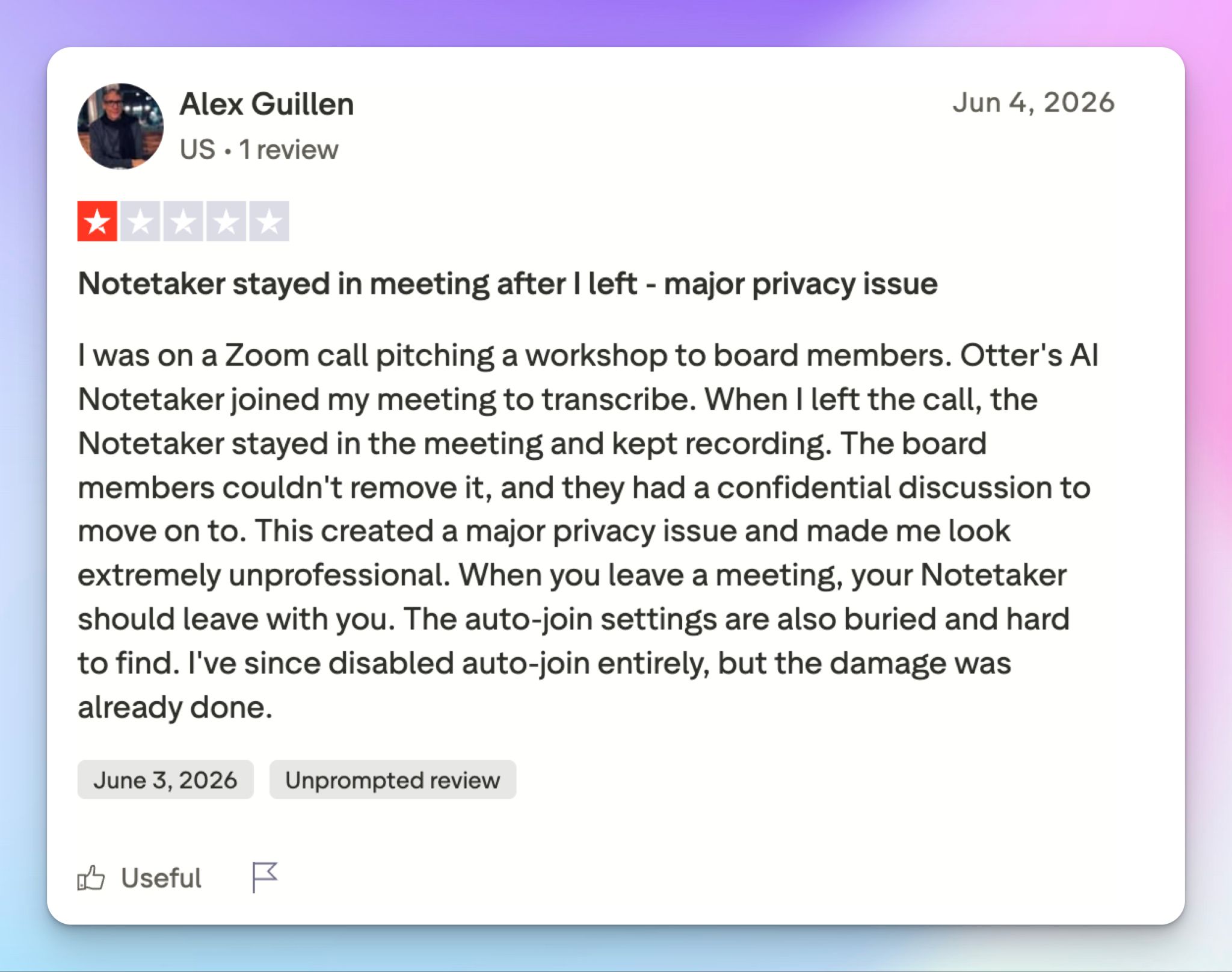
Source: Trustpilot
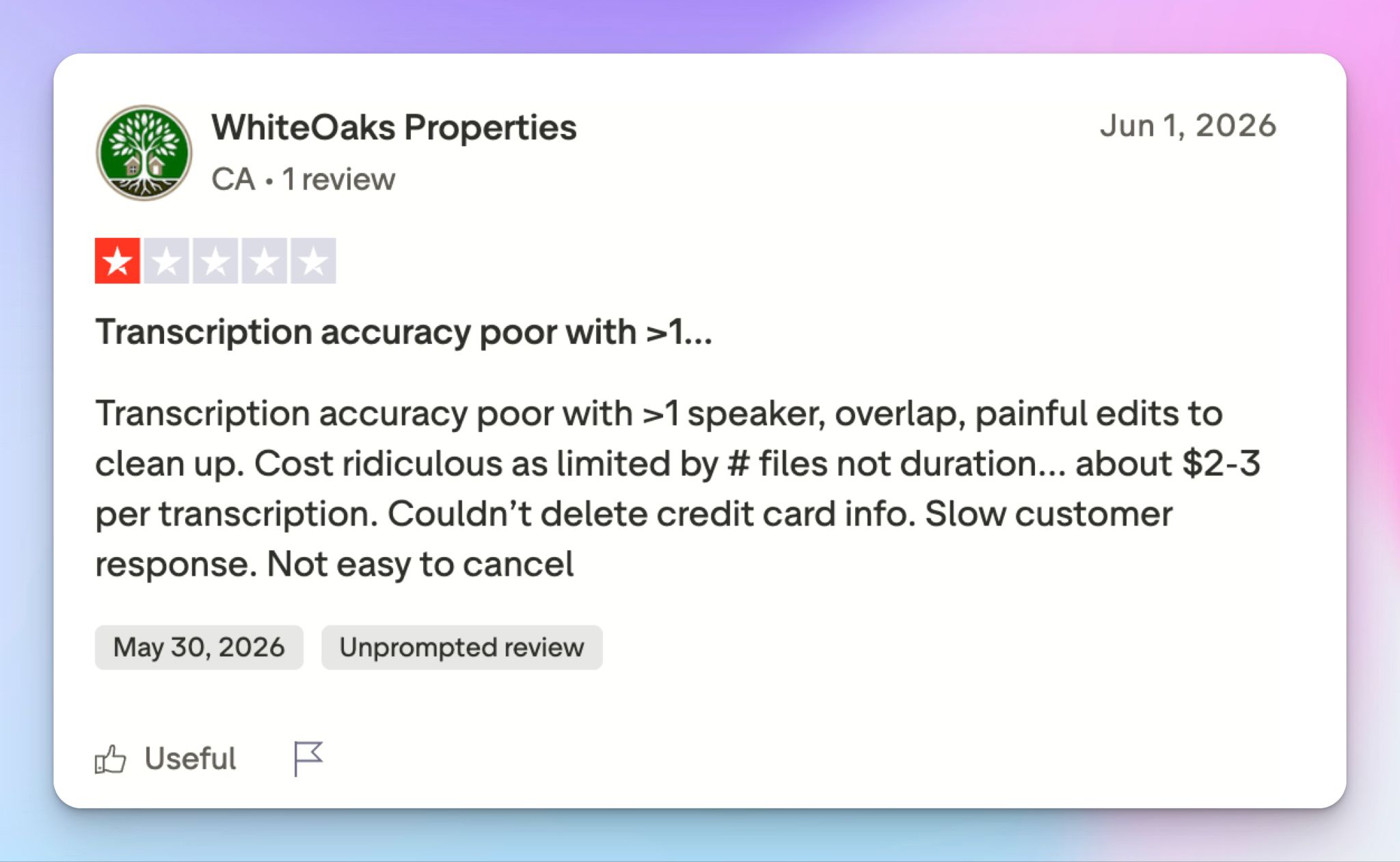
Source: Trustpilot
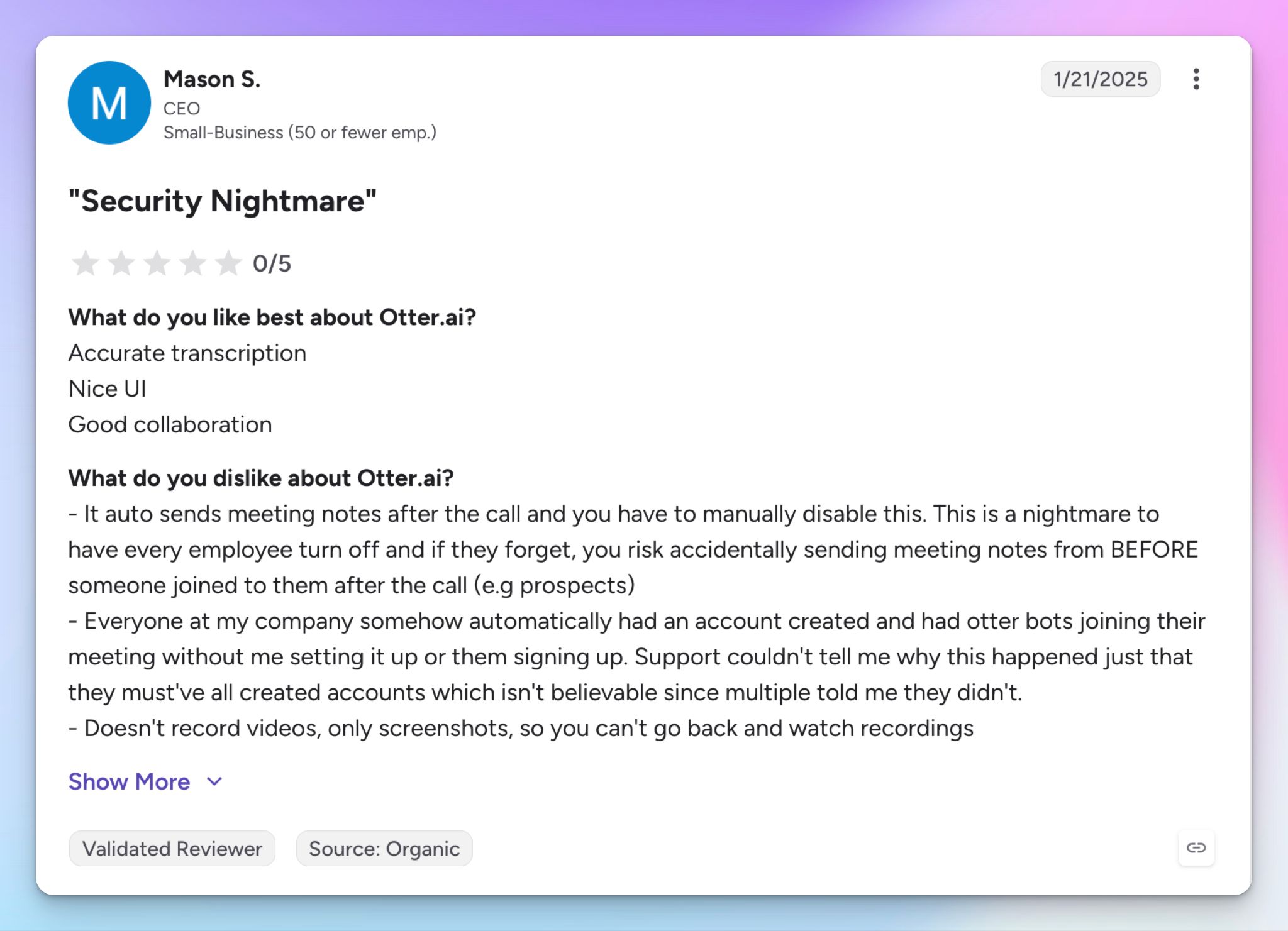
Source: G2
With Otter AI reviews like this, it's not hard to imagine why the tool might be facing lawsuits.
Best Otter alternatives in 2026
Otter isn't your only option, and you don’t have to settle for less just because it’s popular. Here’s how Otter stacks up against direct competitors so you can choose on your own.
| Factors | HappyScribe | Fireflies | Grain | Fathom |
|---|---|---|---|---|
| Best for | All-in-one transcription, subtitles, and meeting notes, with a human-accuracy option | A searchable meeting knowledge base for CRM-heavy sales and ops teams | Sales and customer success teams who want clips and coaching insights | Users on a limited budget looking for a free notetaker |
| Key features | AI plus human transcription, auto-join note taker for Zoom, Meet, and Teams, subtitle editor, AI Chat across meetings and files, 150+ languages | AskFred assistant, conversation intelligence, AI apps, and integrations, 100+ languages | Auto-join bot, video clips and highlights, AI coaching, cross-meeting AI search, 100+ languages | Bot or bot-free capture, instant summaries, Ask Fathom, sales templates |
| Integrations | Zoom, Meet, Teams, Drive, Dropbox, Box, YouTube, Vimeo, Zapier, API, MCP for AI tools | Zoom, Meet, Teams, Salesforce, HubSpot, Slack, Notion, Zapier, API, etc. | Zoom, Meet, Teams, HubSpot, Salesforce, Slack, Zapier, API, MCP, etc. | Zoom, Meet, Teams, Salesforce, HubSpot, Slack, Notion, Zapier, API, etc. |
| Security | SOC 2 Type II, GDPR, ISO 27001-compliant EU data center, you control AI training | SOC 2 Type II, GDPR, HIPAA on Enterprise, no model training | SOC 2, GDPR, no HIPAA | SOC 2 Type II, GDPR, HIPAA, SSO, and SCIM |
| Price | Free tier with unlimited meeting notes, paid from $8.50/month (annual) | Limited free plan. Paid starts from $18/month | Free plan. Paid starts from $19/month | Free plan. Paid starts from about $19/month |
One caveat, if privacy is what's driving you off Otter: Fireflies is fighting its own consent battle, a BIPA class action filed in Illinois a few months ago over alleged voiceprint collection.
What's the best Otter alternative for meeting notes?
HappyScribe is the best option for AI meeting notes. It answers every red flag of Otter’s I just walked you through, without giving up the live meeting capture that made you try Otter in the first place.
- 150+ languages, detected for you: Against Otter's six. Go into a meeting in Swiss-German, Lao, Icelandic, or Swahili with full confidence
- A human expert tier: When AI isn't enough, send the file to a HappyScribe-vetted linguist for research and court-ready documents, something Otter doesn't offer
- A subtitle editor built for compliance and accessibility: SDH captions with speaker IDs and sound cues that meet ADA, FCC, and WCAG standards, edited and approved by your whole team
- EU data residency, training you control: Your files sit in a Tier IV, PCI DSS and ISO 27001-compliant EU data center, and you decide whether AI learns from them
- A free tier you can actually use: HappyScribe gives you unlimited AI meeting notes, not a 300-minute cap every month
You still get the auto-join note taker on Zoom, Meet, and Teams, plus a bot-free recorder for in-person meetings.
HappyScribe vs Otter
Choose Otter if your week is wall-to-wall English-language video calls, and live transcription is very important to you. For broader languages, a human-accuracy option, EU data residency, and a fleshed-out subtitle editor, HappyScribe gives you more and usually for less.
FAQs about Otter AI review
Does Otter.ai actually work?
Otter works for what it's built for. Having tested Otter for years, I can confirm that it works well as an AI note-taking tool that replaces manual note-taking. It joins your Zoom meetings and calls on Google Meet and Microsoft Teams, and Otter captures conversations with automatic real-time transcription and speaker identification. The weak spot is accuracy, since Otter's transcription fumbles terms, numbers, and speakers, so the entire transcript usually needs a check before you can trust it.
How much does Otter.ai cost per month?
Otter has four tiers. The free plan gives you 300 minutes a month, the Pro plan is $8.33 per user a month, billed annually or $16.99 month to month, the Business plan runs $19.99 per user a month annually or $16.99 month to month, and the Enterprise plan is custom-priced. Free users also get only 20 AI chat questions a month, which is the real ceiling, along with the 30-minute cap on meetings.
Is Otter.ai a safe app?
Otter is SOC 2 Type II and GDPR certified and it encrypts your data both in transit and at rest, so your meeting recordings are technically well protected. The concern is that data sits on US servers, Otter trains its models on your conversations by default, and the company is fighting consent lawsuits over recording people in virtual meetings without their agreement. If data residency is a priority, HappyScribe stores files in an ISO 27001-compliant EU data center and lets you decide whether AI learns from your past conversations.
Is Otter.ai actually free?
There's a free plan, but it's closer to a demo. Free users get 300 minutes a month, a 30-minute cap per meeting, and just three lifetime imports for audio files or video files, which rules out any real workload. If you want a truly generous free tier, HappyScribe gives you unlimited AI meeting notes at no cost, whereas Otter pushes you to upgrade to keep your meeting transcripts.
What's the issue with Otter AI?
Three things, mainly. First, Otter transcribes live speech well, but the raw transcript is a messy block with weak accuracy, so reviewing long calls means leaning on the AI summary for your key takeaways. Second, it supports only six languages. Third, and most serious, the auto-join bot has drawn consent lawsuits, with reports of the notetaker staying in a call after the host left. Smaller frustrations add up too: slow Otter support, and video recording is only supported for the Enterprise customers.
What's the best Otter.ai alternative?
HappyScribe, for most people. It matches Otter on the basics that made the tool a game-changer for AI note-taking, then clears the things that wear users down. HappyScribe is an AI meeting assistant that joins your Zoom, Google Meet, and Microsoft Teams calls, records meetings or transcribes uploaded files, and keeps everything as searchable notes you can chat with. You also get a subtitle editor built for team collaboration, support for 150+ languages, a human-accuracy tier, and EU data residency, plus a bot-free recorder for in-person meetings. For sales-heavy teams, Fireflies and Grain are worth a look, and Fathom suits anyone who only needs free notes.

Biplab Mazumder
Biplab is a content marketer and writer who helps high-growth brands scale content visibility across AI search channels. His works have been published in HubSpot, Freshworks, Atlassian, SurferSEO, etc. When he's not planning content strategy, he's testing AI content workflows and use cases.