



TL;DR ⏩
- Claude works best for sales-call analysis when it has access to the full conversation, not just CRM notes.
- Connect HappyScribe to Claude to search transcripts, pull timestamped quotes, review objections, compare calls, and analyze up to 50 transcriptions in one query.
- HappyScribe also has its own AI Chat for quick questions about meetings or folders.
A sales call tells you far more than whether a prospect liked the demo.
Listen closely and you'll hear:
- The problems they care about
- The objections they haven't quite let go of
- How they describe competing solutions
- The questions your rep probably should have asked but didn't
The problem is scale. Reviewing one hour-long recording is manageable. But reviewing 30 discovery calls before your pipeline meeting isn't.
That's where an AI tool like Claude helps. Give it access to accurate sales call transcripts, and you can use it to investigate individual deals, surface recurring objections, find coaching opportunities, or compare conversations without replaying every call yourself.
89% of sellers say AI deepens their understanding of customers, according to Salesforce's 2026 State of Sales report.
Claude becomes much more useful when it works from the conversations themselves. With the HappyScribe Claude integration, you can give Claude access to your transcription library and start analyzing sales calls without repeatedly exporting and pasting transcripts into a chat.
Let me show you how to use that workflow.
What can Claude analyze in a sales call?
Start with the questions you're already asking during a deal review.
What problem is the prospect trying to solve? Which objection is still unresolved? Did they mention another vendor? Who else is involved in the decision? Did your rep miss an opening to dig deeper?
With the transcript as context, Claude can identify:
- Customer pain points and priorities
- Objections and concerns
- Buying signals
- Competitors mentioned during the call
- Decision criteria and stakeholders
- Questions that went unanswered
- Agreed next steps
- Areas worth revisiting on the next call
For sales managers, the same transcript also works as a coaching resource. Instead of replaying the whole call, ask Claude to locate moments where a rep moved on too quickly or failed to follow up on something useful.
Don't treat every interpretation as fact. If you're making a decision based on Claude's analysis, ask for the supporting evidence from the transcript.
How to analyze sales calls with Claude and HappyScribe
You can always upload or paste a sales transcript directly into Claude. For an occasional call, that may be all you need.
The process gets cumbersome when you're managing a team and reviewing calls every week, revisiting older accounts, or comparing conversations across your pipeline.
For a more repeatable workflow, use HappyScribe as an AI meeting note taker for sales teams to capture the conversations and connect the resulting transcript library directly to Claude.
Step 1: Record and transcribe your sales calls
With HappyScribe, you can connect a Google or Outlook calendar and have its AI notetaker join scheduled Zoom, Google Meet, or Microsoft Teams calls. For an impromptu call, paste the meeting link instead.
HappyScribe records the call, identifies speakers, produces a transcript, and sends a structured summary after the meeting. Its sales workflow also supports summaries built around frameworks such as MEDDIC, BANT, or your own discovery framework.
Don't want a bot appearing on a prospect call? HappyScribe also offers a bot-free browser recorder, while its iOS and Android apps let you capture conversations on the go.
Claude then gets a richer source to work from: the conversation itself, rather than the abbreviated notes that eventually make their way into your CRM.
Step 2: Connect HappyScribe to Claude
Once your calls are in HappyScribe, connect your account to Claude.
The integration uses the Model Context Protocol (MCP) to give Claude access to your HappyScribe transcription library. It works on claude.ai and the Claude Desktop app.
From Claude:
- Expand the left sidebar and click Customize > Connectors.
- Search for HappyScribe, then click the + icon or Connect to Claude.
- Sign in to your HappyScribe account and authorize access.
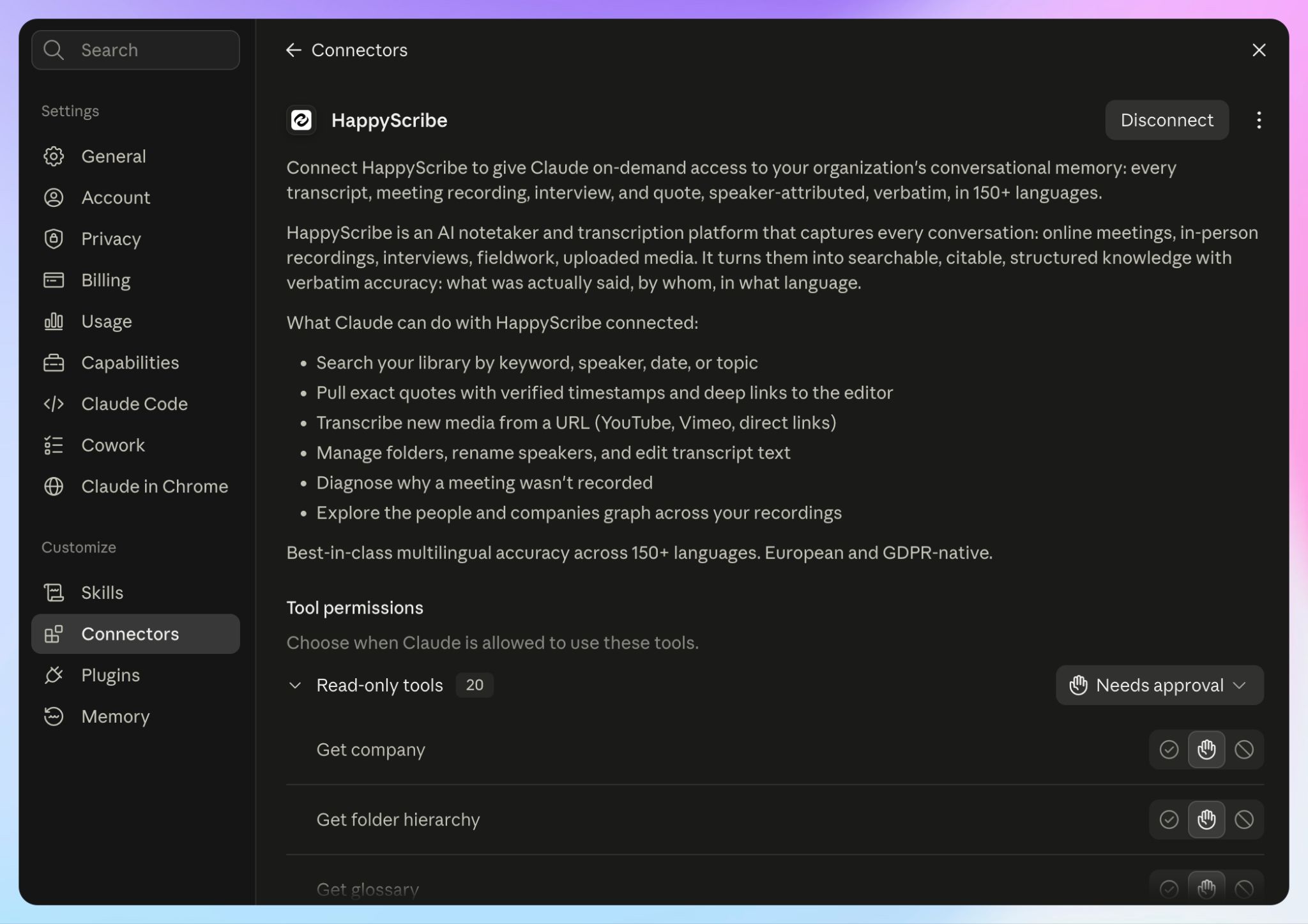
Claude only reaches HappyScribe workspaces and folders your account already has access to. You can also choose which folders to expose and disconnect the integration later.
Once connected, there's no need to find the right transcript, export it, paste it into Claude, and repeat the process whenever you want to investigate another call.
Step 3: Analyze an individual sales call
Avoid starting with:
Analyze this sales call.
You might get something useful, but you're leaving Claude to decide what "useful" means.
Give it a specific job instead:
Review my latest call with Athlead. Based on the call, identify the prospect's main business problem, current solution, requirements, objections, decision criteria, competitors mentioned, unresolved questions, and agreed next steps. Support each finding with a direct quote and timestamp. Separate facts stated by the prospect from your interpretation.
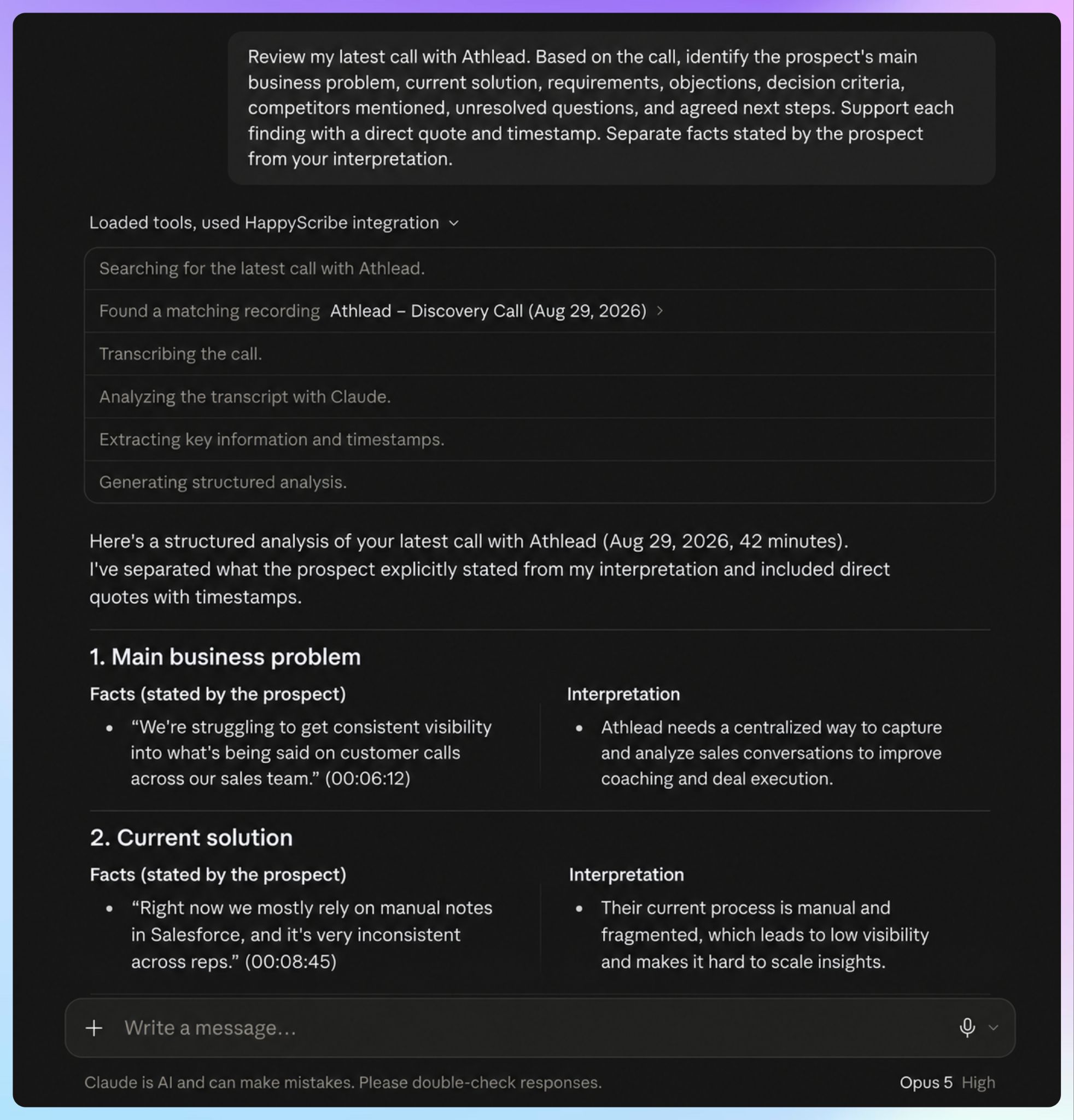
Through the HappyScribe connector, Claude retrieves exact quotes with timestamps. If it tells you implementation appeared to be a major concern, you can return to the exact moment behind the conclusion and check that specific moment.
For a sales manager, that’s way more useful than an unexplained AI-generated deal score.
Users love the HappyScribe + Claude integration. Hear it from one of our users:
HappyScribe offers a comprehensive transcription service that integrates seamlessly with Claude, allowing users to automate follow-up tasks and maintain accurate records of meetings. The platform is designed to respect user privacy and comply with stringent data protection standards, making it a reliable choice for organizations handling sensitive information. With features like unlimited Notetaker recordings and automatic summaries, HappyScribe streamlines the documentation process, saving time and enhancing productivity for teams of all sizes.
Use Claude to unpack objections
Not every objection arrives neatly packaged as, "Your price is too high."
A prospect might repeatedly ask about implementation time. They may mention that finance still needs to approve the purchase. Or they might compare one capability with a competitor several times during the conversation.
Try asking Claude:
Find every objection, concern, or expression of uncertainty in the latest call. Group related concerns together. For each one, tell me whether the rep addressed it fully, partially, or not at all. Include the prospect's exact words and timestamp.
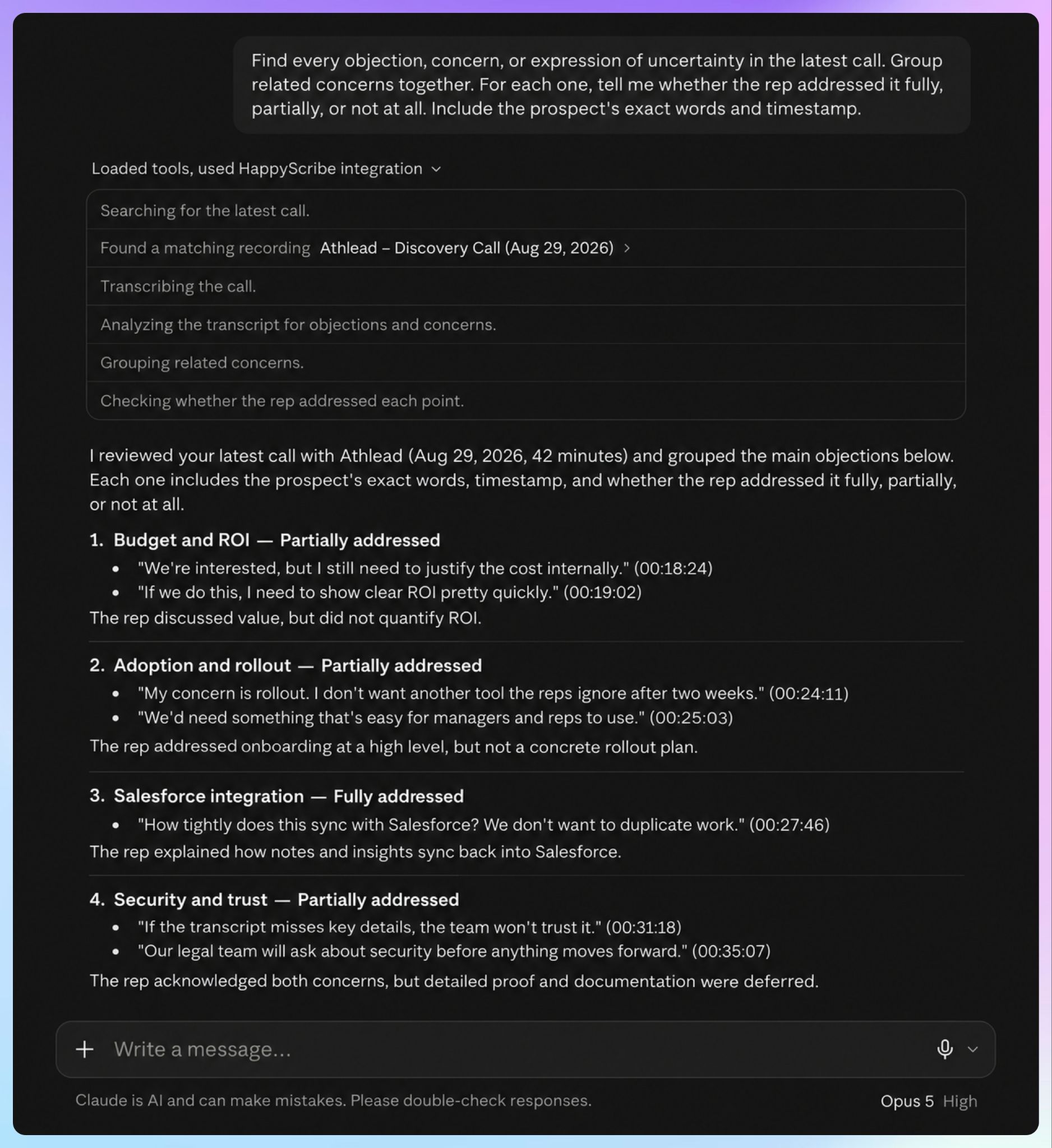
Then drill deeper:
Which unresolved objections are most likely to come up again on the next call? Explain why using only evidence from this conversation.
Claude won't tell you with certainty whether the deal will close. It does, however, make it much faster to get to the relevant parts of the conversation.
Find missed questions and coaching opportunities
Sales coaching comes down to the small moments.
Maybe the buyer mentioned that the team had already tried solving the problem internally, but your rep never asked what happened.
Or a new stakeholder appeared late in the conversation and nobody explored how much influence they had.
Try:
Review our discovery call with JenSki as a sales manager. Find points where the prospect introduced a pain point, concern, requirement, or buying signal that the rep did not explore further. For each one, show the relevant transcript excerpt and suggest one follow-up question the rep could have asked.
You can narrow the analysis around whatever your team is working on, from discovery depth to objection handling or adherence to your sales methodology.
One limitation worth noting:
HappyScribe doesn't provide live AI-generated sales notes or in-call coaching prompts. Its structured summaries arrive after the call, and its sales-coaching workflow is based on reviewing recorded and searchable conversations afterward.
If you need software prompting reps during the conversation itself, you'll need a tool built for live coaching.
Analyze patterns across multiple sales calls
A single transcript helps you inspect one deal. A collection of calls shows what keeps appearing across the pipeline.
HappyScribe's Claude connector supports one question across up to 50 transcriptions at once. You can also find transcripts by keyword, speaker, or date.
For sales leaders, that opens up a different level of analysis.
Find recurring objections
Try:
Review our discovery calls from August. What objections appeared repeatedly? Group similar objections together, show how often each theme appeared, and give me representative quotes with timestamps.
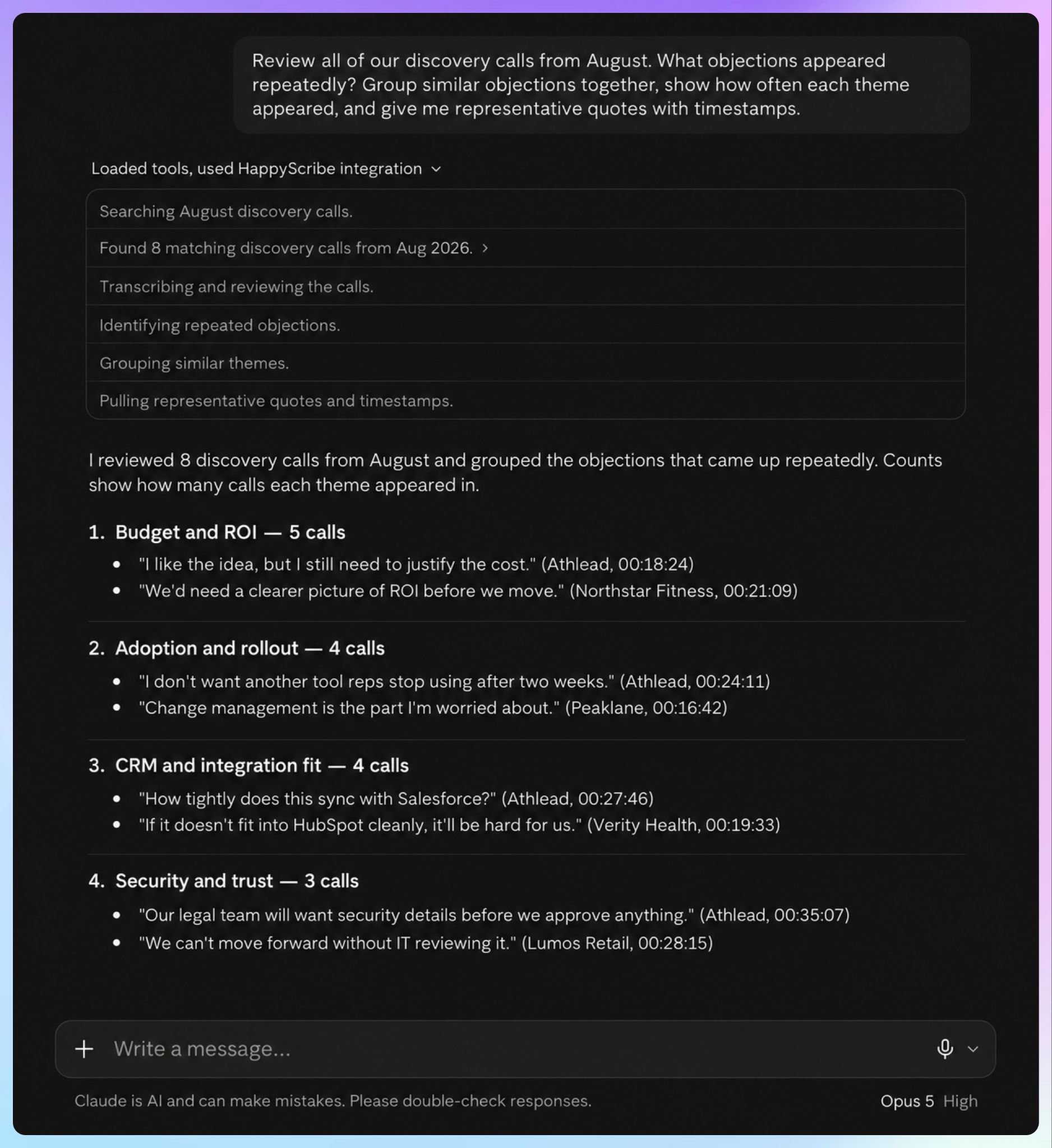
Now you're no longer asking whether one prospect was concerned about onboarding. You're looking at whether the same concern keeps appearing across multiple opportunities.
If it does, you can investigate whether the issue is tied to one rep, your sales messaging, enablement material, or something prospects repeatedly experience during evaluation.
Learn what prospects actually care about
You can also look across calls for the language prospects use before your reps begin positioning the product.
For example:
Across these discovery calls, what problems do prospects mention most frequently before they start discussing our product? Group similar problems together and show how prospects describe them in their own words.
The result is voice-of-customer material grounded in real conversations.
Maybe the terminology your buyers use doesn't match your sales deck. Maybe a supposed top pain point rarely comes up, while another issue appears in call after call.
Patterns like those help sales leaders refine discovery questions and give marketing or product teams a clearer view of what buyers are actually saying.
Track competitor mentions
Instead of searching individual transcripts manually, ask:
Which competitors were mentioned across these calls? For each competitor, explain why prospects brought them up, what they appeared to value, and what concerns they raised. Cite the relevant conversations.
The answer gives you a starting point for understanding how competitors enter deals, based on prospect conversations.
You could also compare competitor mentions by account segment, call type, or stage of the sales cycle.
Compare groups of conversations
You can compare conversations associated with different stages or outcomes.
Perhaps implementation comes up earlier in calls attached to later-stage opportunities. Or prospects who progress tend to involve additional stakeholders sooner.
Treat those findings as patterns to investigate rather than proof of causation.
💡 Did you know?
Recent McKinsey research gives some context for why sales teams are investing in workflows like these. Among growth leaders that had embedded AI directly into core workflows, 59% cited seller efficiency and 53% cited better customer experiences as primary benefits.
Useful Claude prompts for sales call analysis
The best prompt depends on what you're trying to learn from the calls. Be specific about the task and ask Claude to trace its conclusions back to the transcript whenever possible.
For deal reviews
Review my last three calls with [company]. Build a concise deal brief covering the buyer's priorities, unresolved concerns, stakeholders, decision criteria, commitments, and changes between calls. Cite the call and timestamp behind each point.
Based only on this transcript, what information would a sales manager still need before considering this opportunity well qualified? Do not assume information that wasn't discussed.
For rep coaching
List every objection raised in this call. Explain how the rep responded and whether the prospect appeared satisfied with the answer. Show the transcript evidence rather than inferring from tone alone.
Identify five moments worth reviewing with this rep. Prioritize missed follow-up questions, weak objection handling, or moments where the prospect revealed useful information that wasn't explored. Include timestamps.
For cross-call analysis
Across these calls, find every competitor mention. Explain the context in which buyers brought each one up. Include representative quotes.
Across these discovery calls, find recurring phrases prospects use to describe [problem]. Preserve their original wording and link each theme back to the relevant call.
Compare our sales calls from the last two months. Which customer concerns are becoming more common? Show the evidence and distinguish recurring patterns from themes that appeared only once or twice.
HappyScribe AI Chat or Claude: which should you use?
Claude isn't your only option for asking questions about a HappyScribe transcript.
HappyScribe has its own AI Chat, which lets you ask questions about one transcript or an entire folder. It generates summaries, pulls action items, extracts timestamped quotes, and searches across the files you've selected.
Which route should you take? It depends on what you're trying to do next.
Use HappyScribe AI Chat for quick questions about your calls
If you're already inside HappyScribe and want an answer from your meeting history, AI Chat is the shortest route.
A sales manager can ask:
What objections did this prospect raise and how did the rep address them?
Or,
Across all of our discovery calls last month, what objections did the prospects raise? Identify themes and give me top 3 objections that appeared most.
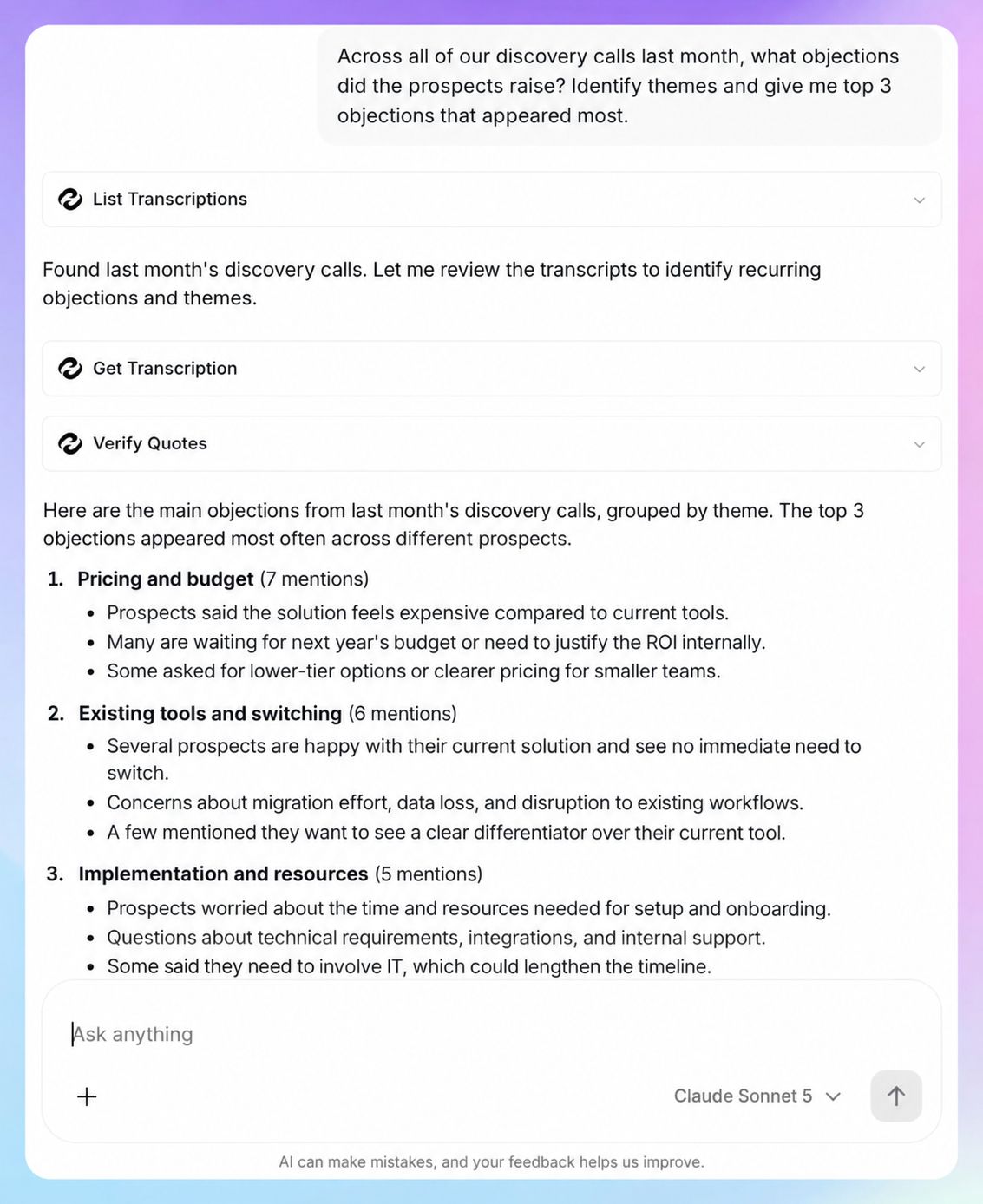
HappyScribe's sales workflow also supports searches across team calls for objections, competitor mentions, and changes such as pricing shifts between a demo and negotiation.
For a quick query about your meeting history, AI Chat is enough.
AI Chat is available on every HappyScribe plan. The current limits are 3 files per month on Free, 10 on Basic, and unlimited AI Chat on Pro and Business.
Use Claude when the transcript is part of a broader workflow
You may already use Claude to prepare deal reviews, apply your own sales framework, develop coaching material, or synthesize customer research.
In those situations, bringing HappyScribe into Claude means the call record becomes part of the work you're already doing there.
The connector searches your HappyScribe library, retrieves timestamped quotes, analyzes up to 50 transcriptions in one query, and surfaces people or companies through HappyScribe's knowledge graph.
So you don't need to choose one system for every question.
For a quick query about a meeting, HappyScribe AI Chat may be enough. When you want to take the conversation into a larger analysis inside Claude, the connector removes the manual transcript handoff.
Why connect HappyScribe instead of copying transcripts?
If you analyze two calls a month, copying a transcript into Claude may be perfectly reasonable.
The connector becomes more useful as your call history grows.
Instead of locating several transcripts and feeding them into Claude one by one, you can ask:
What did Athlead say about implementation across our last four calls?
Claude searches the connected HappyScribe library and returns evidence from the relevant transcripts. Exact quotes may include timestamps, so you can return to the recording and check the original context.
Sales leaders can revisit older accounts or compare conversations across several deals without turning call review into hours of searching and exporting files.
Turn your sales calls into usable sales intelligence
Sales teams already have plenty of customer conversations. The harder part is finding the useful information again after the call ends.
Details get scattered across recordings, CRM notes, rep memory, and transcripts nobody has time to reread.
Claude gives you another way to query that history. HappyScribe provides the underlying call record through recordings, speaker-labeled transcripts, searchable meeting history, AI Chat, and its Claude connector.
You can investigate one objection before a deal review, revisit exactly what a prospect said three calls ago, or compare recurring themes across weeks of conversations.
Keep the tools' roles clear. HappyScribe's workflow is designed for post-call notes and analysis rather than live sales coaching, while Claude's conclusions still need human judgment.
Used together, they help sales teams spend less time hunting through calls and more time closing deals.
FAQs on how to analyze sales calls with Claude
Can Claude analyze multiple sales calls at once?
Yes. When Claude is connected to your HappyScribe transcription library, it can review multiple recent call transcripts together instead of analyzing each sales call recording separately.
You can use the same prompt to compare recent calls by deal stage, surface recurring pain points, identify competitor mentions, or see whether certain objections appear across new deals.
HappyScribe gives Claude the underlying conversation context, including timestamped transcript evidence, so the analysis is based on what prospects actually said rather than only on CRM data or rep notes.
Can Claude help with pre-call research?
Yes. Claude can turn information from previous conversations and other data sources into a useful pre-call brief. Ask it to review recent calls and summarize the economic buyer, unresolved pain points, previous commitments, deal context, and questions to revisit.
You can also add account research, recent company news, hiring signals, job postings, company size, or tech stack information when those sources are available. For a first meeting or first call, external company context becomes especially useful because there may not be any previous transcript history yet.
Can Claude write a follow-up email from a sales call?
Yes. A full call transcript gives Claude the real context behind the conversation, including the buyer’s pain points, questions, objections, commitments, and agreed next steps.
With HappyScribe, the sales call is recorded and transcribed before Claude accesses it through the connector, so you do not have to manually paste the transcript into a new session. You can then ask Claude to create a follow-up email based on what was actually discussed and, if needed, turn the same information into CRM notes. Check important details such as pricing, owners, and close dates against the original transcript before sending or updating CRM data.
How can sales managers use Claude for sales coaching?
Sales managers can use Claude to turn recent calls into a repeatable coaching brief. For example, ask it to identify surface-level questions, missed opportunities to explore pain points, weak objection handling, or moments where a rep failed to clarify the buyer's doubts. Managers can also compare calls across new reps or against the team average to look for patterns in discovery quality or talk-to-listen ratios, provided the necessary data is available.
HappyScribe supports this as a post-call workflow rather than live assistance on live calls, so it is better suited to structured review after the conversation.
Can Claude help standardize a sales process?
Yes. Claude works well for reusable workflows that follow the same structure every time. A sales team could use the same prompt or brief format for deal reviews, CRM cleanup, one-on-one preparation, pipeline reviews, or coaching.
For example, a recurring workflow could ask Claude to extract the deal name, account name, pain points, economic buyer, deal stage, next steps, and close date from recent call transcripts. That makes the sales process more consistent for new reps and reduces repeated re-explaining of what each analysis should include. The output still needs human review, especially when it feeds CRM hygiene, forecasting, or other decisions based on deal data.
Can Claude help me prepare a sales pipeline report?
Yes. Claude can turn your recent call transcripts and CRM data into a more useful pipeline report by summarizing what changed across deals. For example, you could ask it to flag new deals, opportunities that moved backward, changes in deal stage, upcoming close dates, missing economic buyers, or accounts where the latest call revealed new pain points.
If your calls are stored in HappyScribe, Claude can pull the conversation context behind those updates instead of relying only on CRM fields or rep memory. That gives managers more evidence for a Monday pipeline report or one-on-one review and reduces the need to rely on gut feel when assessing deal health.
Is HappyScribe suitable for multilingual or sensitive sales calls?
Yes. HappyScribe supports 150+ languages and dialects, which makes it useful for sales teams working across regions or reviewing calls with multilingual prospects. It can transcribe recorded meetings, keep speaker labels and timestamps, and then make those transcripts available for analysis in Claude through the connector.
For sensitive sales conversations, HappyScribe offers advanced security such as SOC 2 Type II compliance, GDPR support, EU data residency, encryption at rest and in transit, and role-based access controls. That's especially relevant when call transcripts include CRM data, account details, pricing discussions, or other confidential company context.
How accurate should sales call transcripts be for Claude analysis?
The quality of Claude’s analysis depends heavily on the transcript it receives. Automated transcription is useful for processing sales call recordings quickly, while human review is worth considering when accuracy is especially important.
HappyScribe offers both AI transcription (95%+ accuracy) and human-powered transcription (99% accuracy), so teams can choose the appropriate workflow for each recording. The tool supports custom glossaries to ensure it gets your product names, industry terms, and acronyms correct.
It also turns audio and video into transcripts, captions, and translated content, which is useful for multilingual sales teams. Once the transcript is ready, Claude can use it for sales call summaries, follow-up emails, CRM note cleanup, and other post-call workflows.

Rodoshi Das
Rodoshi is the Content Lead at HappyScribe, the privacy-first transcription and AI notetaker platform based in Barcelona. Shaping content strategies and building AI workflows excites her as much as exploring new SaaS tools. She specializes in product-led content that informs rather than sells, grounded in honest product benchmarking and low tolerance for empty marketing speak.