TL;DR ⏩
- Choose a bot-based note taker when you want automatic attendance or a visible recording cue for scheduled online meetings.
- Choose a bot-free note taker when you want a less intrusive meeting experience, need to record in person, or cannot add an external participant.
- HappyScribe supports both workflows, so you do not have to commit to one recording method for every meeting.
- Always disclose the recording and seek consent first. A visible bot supports transparency, but its presence alone does not necessarily establish consent.
I have been in meetings where an AI bot joined before half the attendees did. Its name was visible in the participant list.
I’ve also been in calls where inviting another bot would have felt distracting, especially during an interview or a sensitive one-to-one conversation.
Neither experience is inherently better. A bot-based AI note taker makes recording visible and works well for scheduled online meetings. A bot-free note taker feels more natural and gives you greater control over when and how you record.
What happens before either tool starts listening is more important than how it records. You should tell everyone that you plan to record the conversation and seek their consent, whether a visible bot joins the call or your device captures it in the background.
HappyScribe gives you both options. Its AI meeting assistant can join an online meeting, while its browser and mobile recorder capture conversations without adding another participant. Let’s understand how the approaches differ and when each one makes more sense.
📚 Also read:
What is a bot-based AI note taker?
A bot-based AI note taker joins your virtual meeting as a separate participant. The tool uses the meeting link to enter a meeting and capture the audio available to that participant. It then sends the recording for transcription and turns the transcript into a summary, AI meeting action items, and meeting notes.
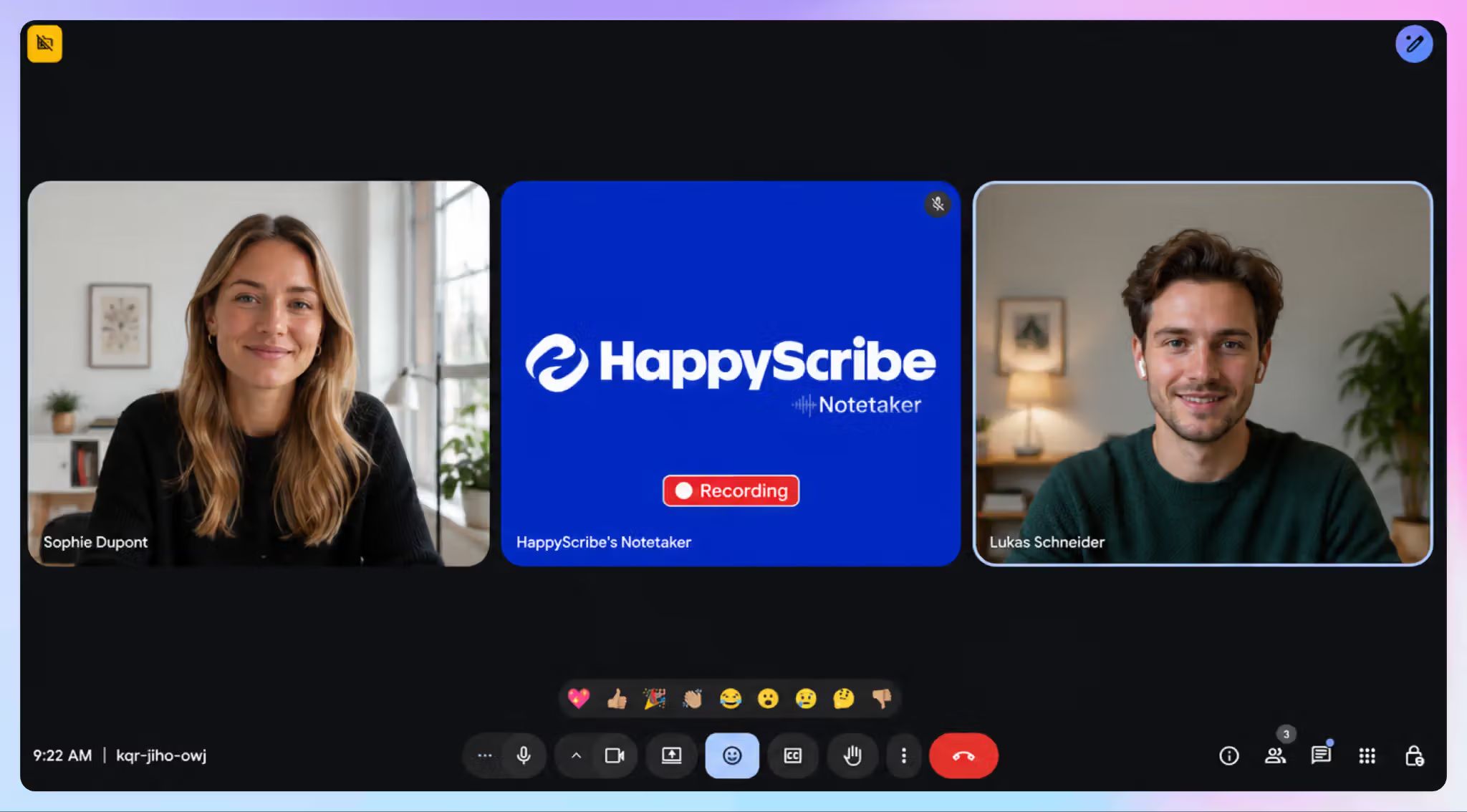
You will normally see the bot’s name and avatar in the participant list, much like another attendee. Many tools connect to your Google or Outlook calendar, identify scheduled calls, and join them automatically.
The setup works well when you want meeting capture to happen with minimal effort. Once you have configured the tool, you do not need to remember to open a recorder at the start of every call.
However, the bot still depends on the meeting platform and host. It can miss part of a call if it remains in the waiting room, joins the wrong calendar event, or gets blocked by an organization’s meeting policy.
The visible bot also signals that an AI tool is present. However, noticing an unfamiliar participant is not the same as giving informed consent, so explain what the bot does and ask for permission before recording.
What is a bot-free AI note taker?
A bot-free AI note taker records a conversation without sending a separate participant into the meeting. Depending on the product, it captures audio through a browser, desktop app, mobile device, microphone, or system audio.
Because capture happens from your device, the tool doesn’t need admission to the call as another attendee.
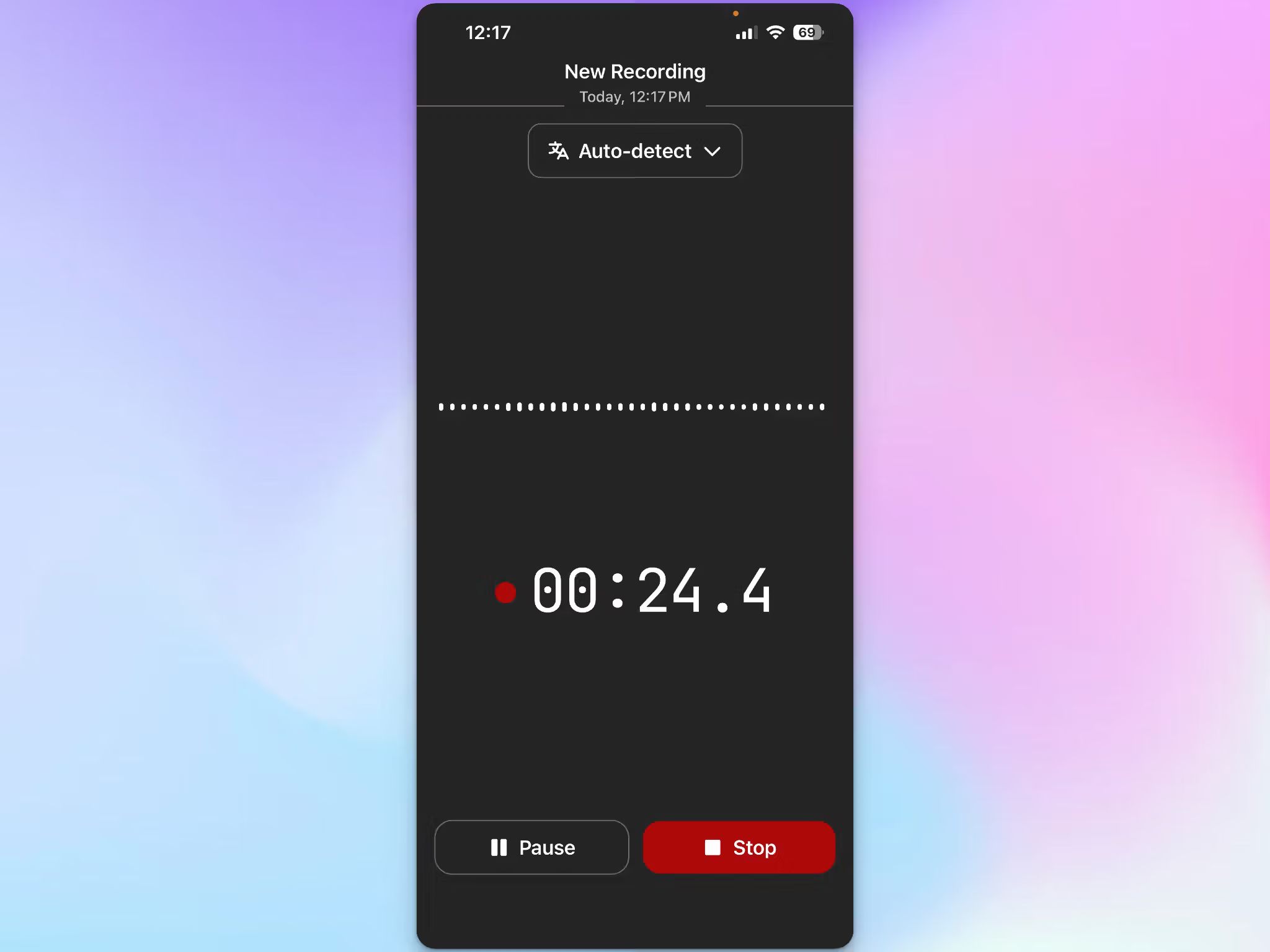
For other attendees, the call looks and feels more like an ordinary conversation. There is no bot occupying a participant tile, or appearing in the meeting roster.
Bot-free recording therefore suits in-person conversations and meetings where external bots are blocked. It can also feel less disruptive during interviews, research sessions, or client calls.
The tradeoff is that capture depends more heavily on your device, permissions, selected audio source, and whether you remember to start recording.
📌 Important:
Bot-free does not mean disclosure-free. Because the recording method is less obvious, ask before you start. Do not assume that accepting a calendar invitation amounts to permission.
Bot-based vs. bot-free AI note takers: At a glance
| Consideration | Bot-based note taker | Bot-free note taker |
|---|---|---|
| How it records | Joins the meeting as a participant | Captures audio through your browser, app, or device |
| Visibility | Appears in the participant list | Does not appear as a separate attendee |
| Best suited to | Scheduled virtual meetings | In-person, spontaneous, or bot-restricted meetings |
| Setup | Often joins through a calendar integration | Usually requires you to start recording |
| Main dependency | Meeting link, platform access, and host admission | Device permissions and the correct audio input |
| Typical failure point | Stuck in the waiting room, removed, or blocked by policy | Recorder not started, wrong microphone selected, or device asleep |
| In-person use | Unsuitable | Well suited to conversations in the room |
| Meeting experience | Adds a visible AI participant | Keeps the participant list and interface uncluttered |
| Consent | Ask participants before recording | Ask participants before recording |
When should you use a bot-based note taker?
For recurring internal meetings
A bot works well for weekly stand-ups, project reviews, and team syncs. These meetings follow a predictable schedule, and participants generally know how the notes will be used.
Calendar-based auto-join also removes a small but common failure point: forgetting to press record. If you move from one meeting to another all day, automatic capture is easier to manage than starting each session manually.
Before enabling auto-join, be clear about which meetings will be recorded, where the notes will live, and who will have access.
When visible recording supports transparency
Some people prefer seeing the note taker in the participant list. The bot provides a persistent visual reminder that the conversation is being captured.
The bot reinforces your disclosure; it does not replace it.
When nobody wants to manage the recorder
A bot-based workflow is helpful when the host already has enough to do. The note taker can join, capture the call, and process it without someone managing a separate recording window.
The hands-off approach is useful for larger meetings, provided the platform allows the bot to join.
When Should You Use a Bot-Free Note Taker?
1. For in-person and spontaneous conversations
A meeting bot cannot join a conversation happening around a table. A bot-free recorder lets you capture workshops, interviews, lectures, and face-to-face discussions from a browser (when your laptop is open) or mobile device.
It also works for unplanned conversations that become important enough to document. Again, get everyone’s agreement before starting.
2. When bots are blocked
Some organizations prevent external bots from joining meetings. A host may also leave an unfamiliar bot in the waiting room or remove it because of an internal security policy.
A bot-free option may fit these environments better, but only if organizational policy permits recording through another method. A technical workaround does not override a company’s rules.
3. When you want a more natural conversation
An extra AI participant can change the tone of an interview, discovery call, or research session. People may become more guarded when a bot occupies a tile beside them.
A bot-free workflow removes that visual interruption. Its benefit is a cleaner interface and a more natural flow, not secrecy.
Does bot-free recording solve the consent problem?
No. The difference between bot-based and bot-free tools is how they capture a meeting, not whether permission is required.
Recording and privacy laws around the world differ widely. And consent laws in the United States vary by state.
The Reporters Committee for Freedom of the Press maintains a state-by-state guide because consent requirements and potential civil or criminal penalties are not uniform. Cross-border and interstate calls make the picture even more complex.
Data protection rules add another layer. Under GDPR, an organization needs a valid lawful basis to process personal data and must be transparent about its purpose. Consent is one possible basis, but it is not the only one. Your company may also impose stricter recording and retention rules.
For day-to-day meetings, the clearest practice is still to disclose the recording and seek everyone’s consent before it begins. That recommendation applies whether or not the recorder appears in the participant list.
What do the AI note taker lawsuits allege?
Recent litigation shows why teams should take consent and privacy seriously.
Otter
Plaintiffs filed four proposed class actions against Otter.ai in August and September 2025, and the court consolidated them as In re Otter.AI Privacy Litigation. They allege that Otter's notetaker recorded participants who never agreed to it and used those conversations to train its speech-recognition models.
On August 13, 2026, the court allowed the core claims to proceed, including federal wiretap, California Invasion of Privacy Act, and Illinois biometric-privacy claims, and dismissed several others. The judge found it plausible that Otter acted as a third-party eavesdropper because it allegedly kept and used recordings for its own purposes.
For a closer look at how the tool performs day to day, read this Otter AI review.
Fireflies
Cruz v. Fireflies.AI Corp. alleged that Fireflies' speaker-recognition feature created voiceprints of participants without the notice and written consent that Illinois's Biometric Information Privacy Act (BIPA) requires. The plaintiff dropped the case in March 2026.
That same month, Fricker v. Fireflies.AI Corp. brought similar claims, and the court has since consolidated it with a related suit.
These cases focus on how Fireflies handles biometric data, which is a separate question from whether recording is lawful.
Our Fireflies AI review walks through the tool's privacy trade-offs in more detail.
Granola
Chamberlain v. Granola, filed on July 30, 2026, alleges that Granola captures meeting audio through the user's device without notifying other participants. It also claims Granola uses transcripts to train its models by default.
For more information on the tool, read our Granola AI review.
No court has found any of these companies liable. Still, each case asks what the vendor does with recordings once the meeting ends, whether that means training AI models or storing voiceprints.
Before you pick a tool, check how secure your AI note taker is, where it stores data, and whether it trains on your conversations.
How to ask for consent before recording meetings (Without making it awkward)
You do not need a long legal speech at the start of every meeting. A clear sentence is often enough for an ordinary business call:
“I’d like to record this conversation so I can create an accurate transcript and meeting notes. Is everyone comfortable with that?”
For a scheduled meeting, mention the recording in the invitation as well. At the beginning of the call, confirm again before activating the note taker. If someone says no, leave the recorder off and take written notes instead.
If someone joins after recording has started, pause to let them know and ask for their consent too. Keeping the disclosure at the beginning of the recording also creates a clear record of what participants agreed to.
For interviews, research, legal discussions, healthcare conversations, or meetings involving confidential information, your organization may need a more formal consent process. Check the applicable law and internal policy rather than relying on a generic script.
It also helps to tell participants why you are recording, where the file will be stored, who can access it, and how long you plan to retain it. Consent is more meaningful when people understand what will happen to their conversation.
How HappyScribe handles both recording styles
You might want bot-based automatic capture for a weekly team call but a quieter experience for a customer interview or an in-person conversation.
HappyScribe supports both bot-based and bot-free capture. Connect your Google or Outlook Calendar and the AI notetaker can automatically join scheduled Zoom, Google Meet, and Microsoft Teams calls.
For impromptu conversations, the browser recorder captures audio without a meeting link or a separate participant.
The HappyScribe mobile app for iOS or Android offers another bot-free route. You can record and take notes during in-person conversations like interviews, lectures, conferences, and field discussions, even when you are offline. Your recordings sync with your HappyScribe account once you reconnect.
Whichever route you use, HappyScribe produces an editable transcript with speaker identification, an AI summary, and action items.
It supports more than 150 languages and delivers over 95% transcription accuracy. You can pause, resume, or remove the notetaker during a call and control who can view each transcript.
On the Pro plan and above, you can customize your AI notetaker with your own branding.
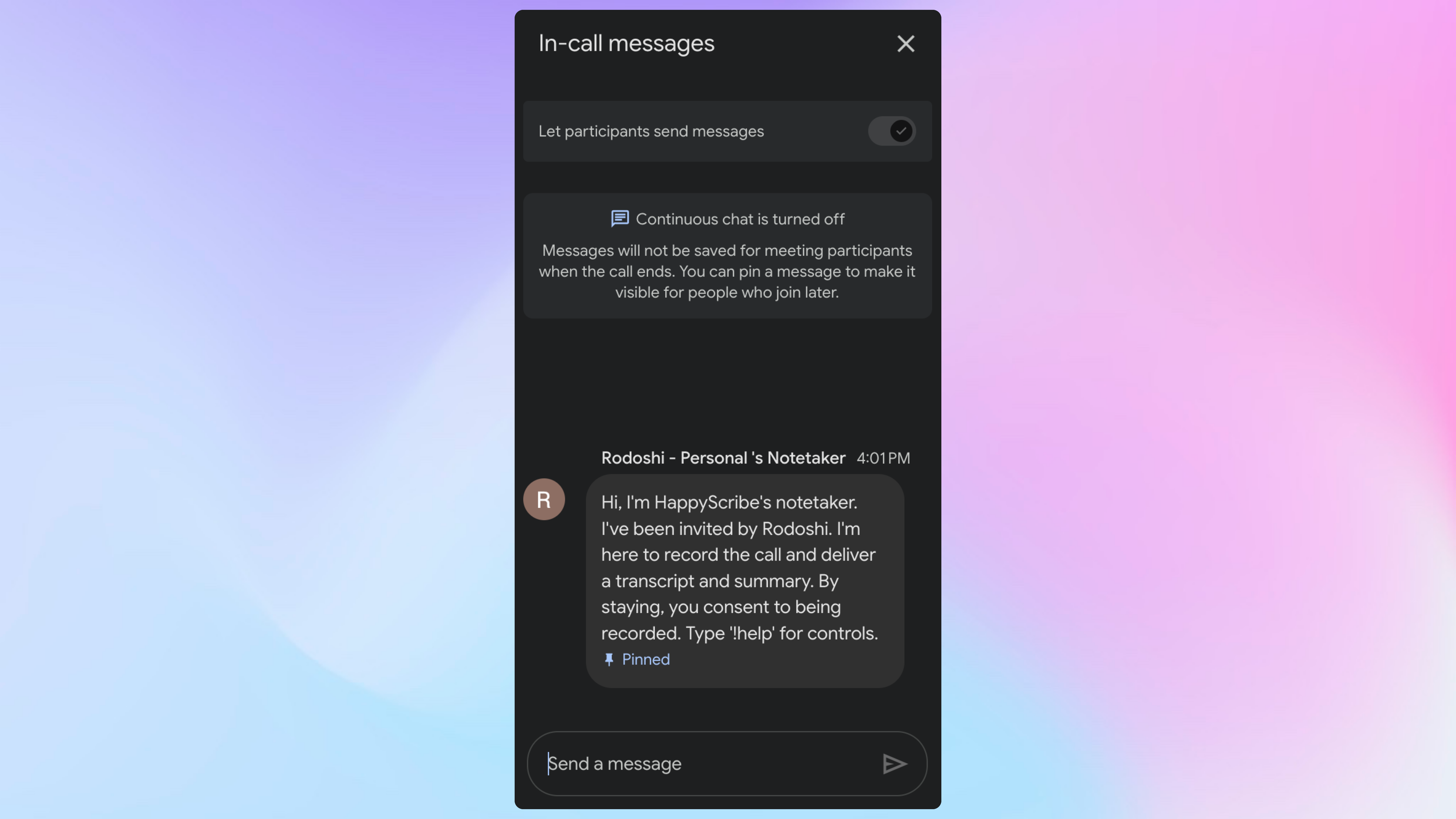
The best part is having both bot and bot-free workflows in one account. You can match the capture method to the conversation and manage your notes in the same place.
Real-life users love how HappyScribe integrates into their existing organizational setup. Hear it from one of our users (via G2):
I like that HappyScribe can be completely personalized, making it feel like our enterprise's own note taker. It's user-friendly and connected with Anthropic, which aligns with our company's needs. The personalizability helps build client trust by overcoming initial hesitations, especially when we promote it as our enterprise's notetaker.
How does HappyScribe protect meeting data?
Because meeting recordings often contain sensitive information, capture is only one part of the decision.
HappyScribe is a SOC 2 Type II-certified and GDPR-compliant AI notetaking tool, with meeting data hosted in an EU-based data center. It encrypts data in transit using TLS and at rest using AES-256 encryption.
HappyScribe does not use your content to train AI models unless you explicitly opt in, and you can use the full service without doing so.
📚 Also read:
How to choose between bot-based and bot-free recording?
Before the meeting, ask yourself:
- Is the conversation online, in person, or hybrid?
- Does the host or organization allow external meeting bots?
- Would a visible bot reassure participants or distract them?
- Do I want automatic capture, or do I need precise control over when recording starts?
- Have I clearly explained the recording and received consent from everyone involved?
If you run scheduled online meetings all day, bot-based capture will often be the easier default. If you conduct interviews, meet people in person, or work with organizations that restrict bots, a bot-free recorder gives you more flexibility.
You do not need to make a permanent choice. The right approach may change from one meeting to the next.
For an important call, spend a minute checking the workflow before people arrive:
- Confirm that the correct meeting is selected and the bot has permission to join
- For bot-free capture, check the microphone or audio source and record a short test
- Disable automatic recording for personal, confidential, or unrelated calendar events
- Decide where the transcript will be stored and who should be able to open it
Where should you start?
The line between bot-based and bot-free tools keeps blurring as more note takers add a second way to capture. Over time, the more useful question will be how easily a tool lets you move between the two.
A simple place to start is your calendar. Look at next week's meetings and see where a bot would help and where it would get in the way. Then set your auto-join rules to match.
FAQs on bot-based vs. bot-free AI note taker
Is a bot-free AI note taker legal?
Bot-free AI note takers are legal tools, but how you use one must comply with applicable recording, privacy, and data-protection laws. Requirements vary by location and context. Disclose the recording and seek every participant’s consent before you start.
Does a meeting bot automatically notify participants?
A bot usually appears in the participant list, which makes its presence visible. That does not guarantee that everyone understands the meeting is being recorded or has agreed to it. Give participants a clear verbal or written notice and ask for consent.
Is bot-free recording more private?
Not necessarily. “Bot-free” describes the capture method, not how a provider stores, processes, or protects your meeting data. Compare security certifications, data-hosting locations, encryption, access controls, retention, and AI-training policies separately.
Can I use a bot-free recorder when meeting bots are prohibited?
Only if the organization’s policy allows another form of recording. Do not treat bot-free capture as a way to bypass security controls or meeting rules. Ask the host or administrator when the policy is unclear.
Can HappyScribe record meetings with and without a bot?
Yes. HappyScribe’s AI notetaker joins scheduled Zoom, Google Meet, and Microsoft Teams calls through a connected Google or Outlook Calendar. Its browser recorder and iOS or Android app provide bot-free options for impromptu and in-person conversations.

Rodoshi Das
Rodoshi is the Content Lead at HappyScribe, the privacy-first transcription and AI notetaker platform based in Barcelona. Shaping content strategies and building AI workflows excites her as much as exploring new SaaS tools. She specializes in product-led content that informs rather than sells, grounded in honest product benchmarking and low tolerance for empty marketing speak.