
Key Takeaways ⏩
- Call feedback gets lost between teams, because every summary comes out in a different shape
- Duplicate HappyScribe’s Customer feedback template and add Objections and Concerns plus Competitive Mentions, so product and sales share one set of sections
- Before your first call, add product and competitor names to the glossary so every theme is counted correctly
- Review the week’s calls by account, not by mentions, with a timestamped quote behind every count
- Claude sends each finding to Linear, Notion, or Slack, and your reps tell customers what the product team decided
Let’s paint a picture:
Maya is an account executive who just finished a discovery call with the finance lead at a logistics firm. Three things stood out: the prospect's controller rebuilds Maya's CSV export in Excel at every month-end, they're evaluating a competitor, and per-seat pricing worries them.
By Friday, the product manager reads “wants better exports” in a Slack recap. But the pricing concern sits in Maya’s CRM notes, and neither team has the customer’s exact words.
Now, you may not be Maya, but you’ve seen this play out all too often.
Recording the call isn't the hard part. Most teams already use one of the AI note takers for product managers or a sales call recorder. The hard part is getting the same details out of every call and into the hands of the team that can act on them.
A Product-Led Alliance survey found that only 34% of product professionals regularly collect customer insights and use them to guide prioritization. Another 18.9% collect insights but struggle to turn them into decisions.
In this guide, you'll set up one template that turns every customer call into the same sections for product and sales. Then you'll run a weekly review that answers the questions asked by sales and product teams.
What does structured feedback from a customer call look like?
Structured feedback is the same set of named sections, filled in after every customer call, with each point tied to a speaker and a timestamp.
A meeting summary tells you what happened on one call. Structured feedback fills the same sections on every call, so you can compare 30 calls side by side.
Here’s what that changes:
- From a summary: “The customer wants better exports.”
- To structured feedback: “Five accounts rebuild the export in Excel at month-end. Here’s each customer’s quote, with a timestamp.”
Each section has a clear owner:
| Sections | Owner | What they use it for |
|---|---|---|
| Pain points, feature requests, and current workarounds | Product team | Prioritizing the roadmap |
| Objections and concerns, competitive mentions | Sales team | Handling objections and sharpening positioning |
| Account and role, notable quotes | Both teams | Counting accounts and proving each point |
Keep both teams in one template. If product managers and sales use different sections, their calls stop lining up, and you can’t count accounts across them.
How to turn customer calls into structured feedback for product and sales teams
Step 1: Build one feedback template both teams share
HappyScribe includes pre-made summary templates for common call types. Open Settings > Summary templates and find Customer feedback. Click Duplicate, and the copy becomes editable, including the Meeting context box that tells the AI what the call is for.
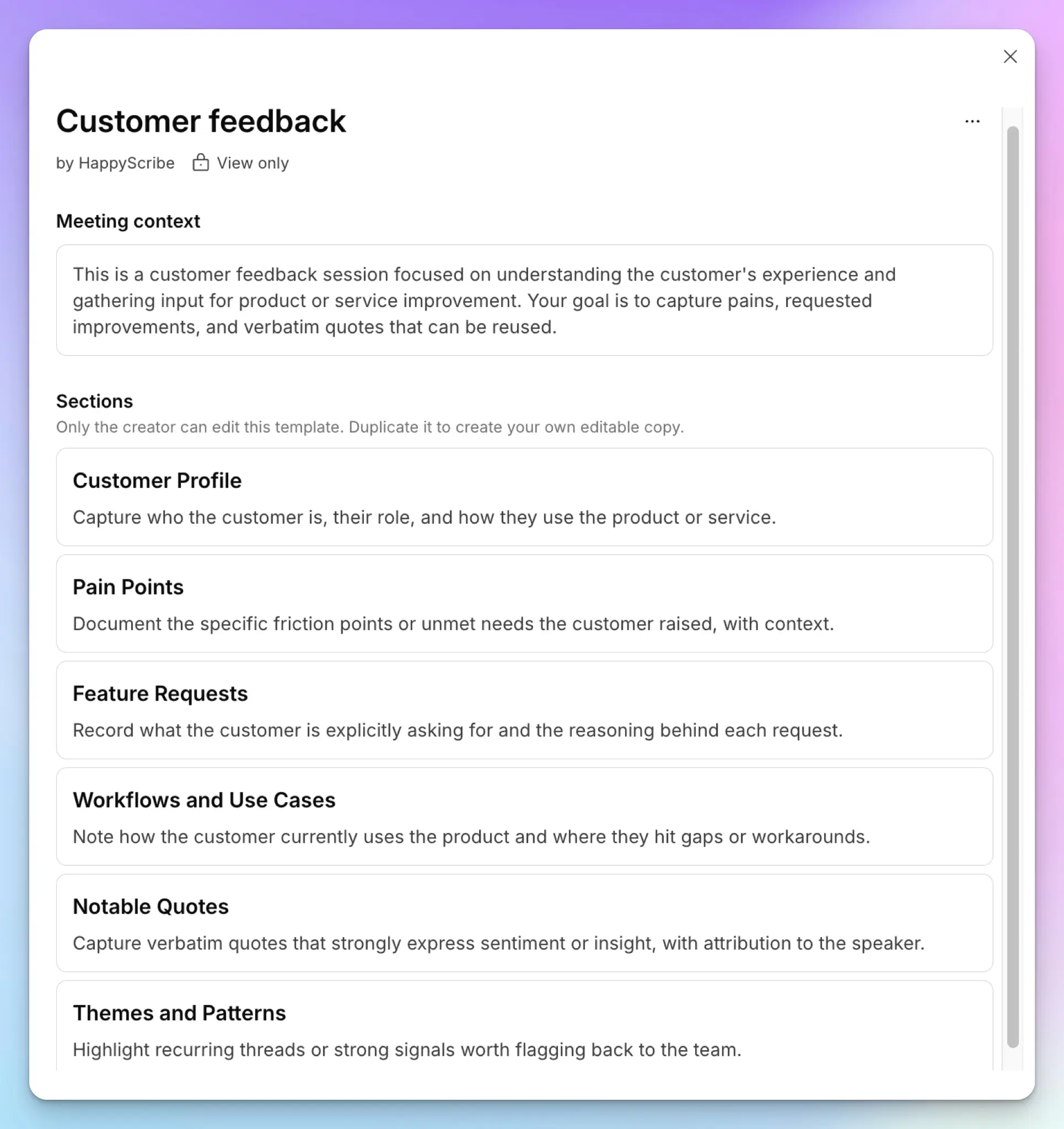
The original template is built for product teams. These changes make it work for sales as well:
- Add Objections and Concerns from the Discovery call template and Competitive Mentions from the Product demo template
- Rename Workflows and Use Cases to Current Workarounds, because a manual workaround is the clearest sign of real pain
- Delete Themes and Patterns, since patterns only show up across many calls
Here's the finished version you can paste in:
Template name: Customer call feedback
Meeting context: This is a call between our team and a prospect or customer. It could be a discovery call, demo, renewal, or check-in. Capture feedback for two teams. The product team needs pains, requests, and workarounds. The sales team needs objections, competitors, and the buyer's own words. Attribute every point to a speaker. Ignore ideas our own team suggested unless the customer agreed with them.
Account and Role: Capture the company name as it appears in our CRM, along with the speaker's name and role. Note whether they're a prospect or an existing customer.
Pain Points: Document each specific friction point or unmet need the customer raised. Note how often it happens and what it costs them, if they said so.
Feature Requests: Record what the customer explicitly asked for and the reason behind each request. Keep requests separate from pain points.
Current Workarounds: Note the tools, spreadsheets, or manual steps the customer uses today to get around the problem.
Objections and Concerns: List anything the customer hesitated about, pushed back on, or flagged as a blocker. Include pricing, security, and implementation concerns.
Competitive Mentions: Note every competitor or current tool the customer named, why they brought it up, and what they compared.
Notable Quotes: Capture verbatim quotes that support the points above, with the speaker's name. Don't paraphrase.
Next Steps: List the agreed actions with owners and dates.
Next, copy the same sections into duplicates of the Discovery call, Product demo, Renewal conversation, and Customer health check templates. Keep the section names identical. Your weekly review depends on every call type filling the same fields.
Then set a default template for each team in your workspace settings. Your sales workspace can default to Discovery call, while customer success defaults to Customer health check. If a call turns out to be something else, you can switch templates from the meeting transcript in one click.
Reps spend only 40% of their week selling, according to Salesforce's 2026 State of Sales. The template does the logging, so your reps don't have to.
The result? Product gets the same fields from every call, and sales gets every objection in the buyer's own words.
Step 2: Capture every customer call with the right names and languages

Connect your Google or Outlook calendar, and the HappyScribe notetaker joins your scheduled Zoom, Google Meet, and Microsoft Teams calls. Sales teams use it to take notes because they can switch between the meeting bot and bot-free recordings and send data to CRM.
For a sensitive prospect call, use the bot-free browser recorder. For on-site visits, record with the mobile app. You can also import older recordings from Google Drive, Dropbox, or Box, so old calls flow into the same review.
Before your first call, open the glossary and add your product names, plan names, and competitor names. A misheard competitor name can mess with the themes and patterns of the weekly count.
If you sell across regions, HappyScribe detects the language on its own across 150+ languages. Be it a discovery call in German or a customer review in Korean, you’re covered either way.
After Maya follows these steps, her calls will be recorded, and the competitor's name will be spelled correctly in every section.
Step 3: Check each entry against the transcript
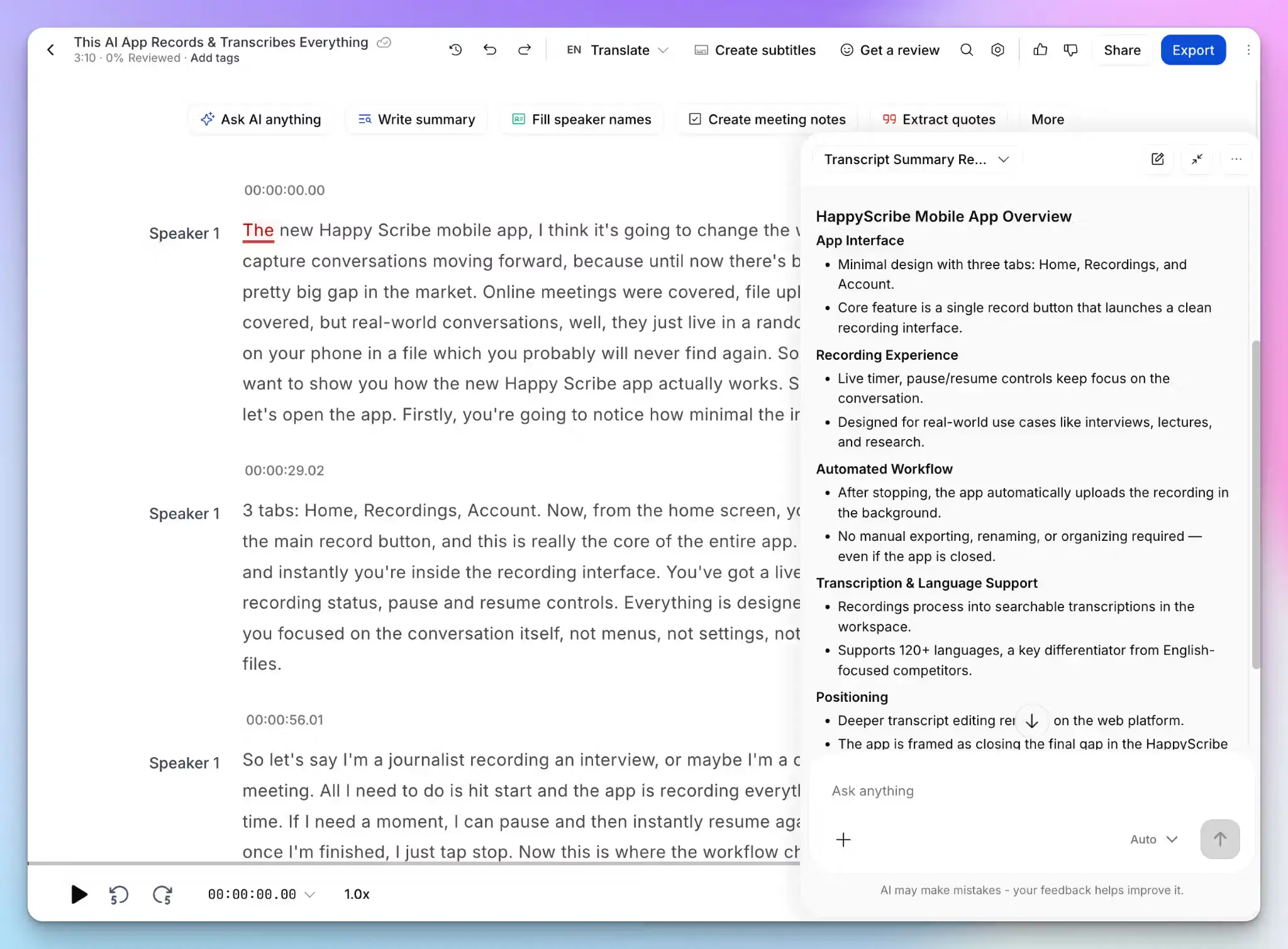
A structured summary only helps if both teams trust it. Before anything leaves HappyScribe, spot-check the entries that will drive a decision.
Open AI Chat in the transcript and ask for the quote behind a line, such as "Show me where the customer described the export problem." The answer comes with a timestamp, so you can jump to that moment in the recording.
Speaker labels help here. A feature your rep pitched isn't a customer request. If the transcript shows the rep suggested it first, delete it from the Feature Requests field.
For quotes headed into a roadmap review or a board deck, order human transcription at 99% accuracy.
Product can now defend each request in planning. Sales can quote buyers word-for-word in a deal review.
Step 4: Run a weekly review by account, not by mentions
Once a week, move the week's customer calls into one folder and open AI Chat in that folder. Run one prompt for each team.
For the product team:
Across these calls, list every pain point and feature request. For each one, count the distinct accounts that raised it and give one timestamped quote per account.
For the sales team:
Across these calls, list every objection and competitor mention. Group them by account and deal stage, and keep the buyer's exact words.
Count accounts, not mentions. A champion who repeats a request on four calls is still one account.
For larger batches, connect HappyScribe to Claude. The connector answers questions across up to 50 transcripts. Add Claude's HubSpot connector, and Claude can weigh each theme by deal stage and revenue. Product teams can use the same setup to build a customer research repository, while sales leaders can go deeper and analyze sales calls with Claude.
Product now knows how many accounts raised each request. Sales knows which objections keep coming up, and in which deals.
Step 5: Send each finding to its owner and close the loop
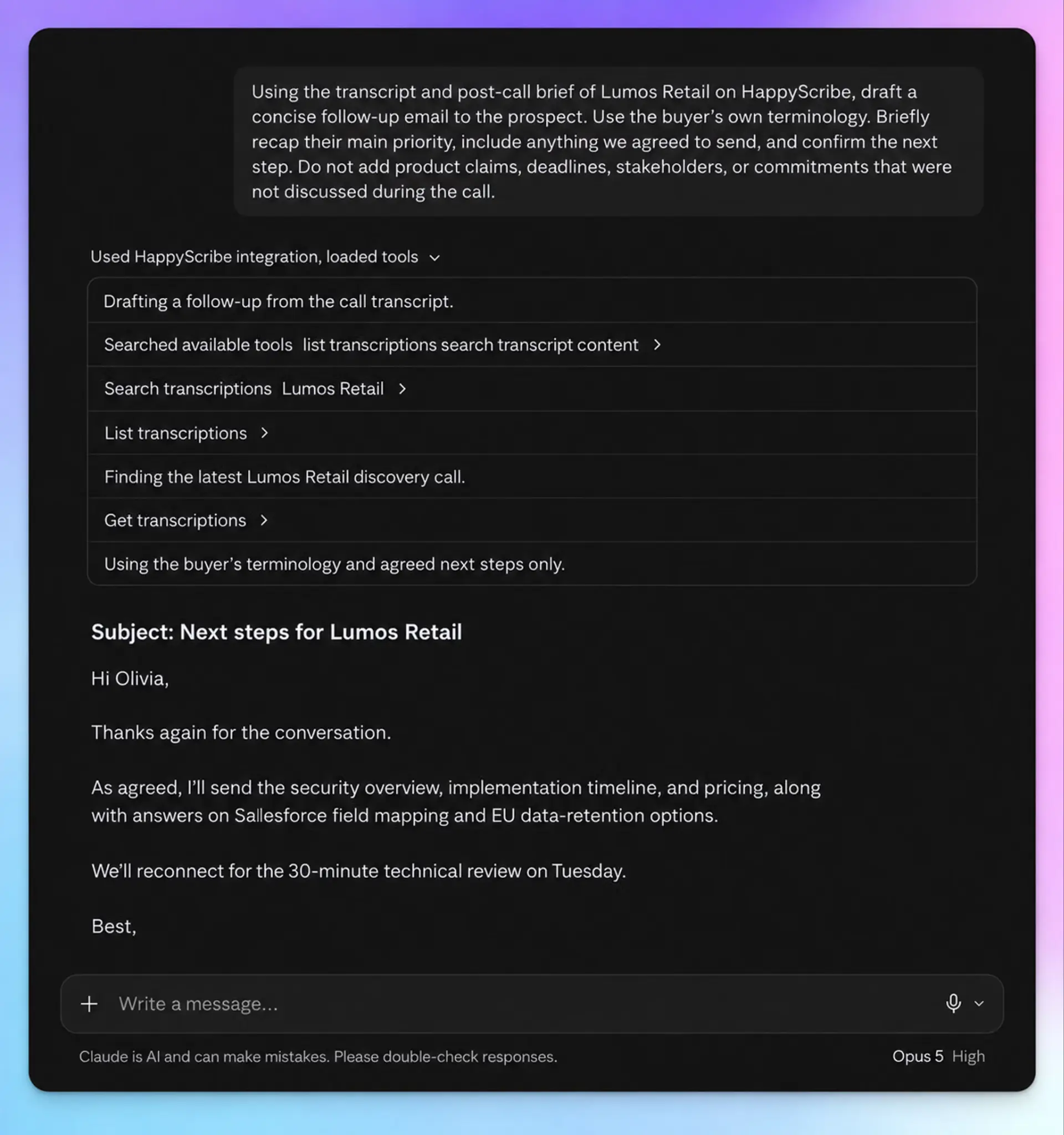
Route the weekly patterns so the signal doesn’t get buried. By using Claude’s HappyScribe and other connectors, you can ask Claude to:
- Create a Linear or Jira issue for each product theme, with the account count and three quotes
- Add a row for each theme to your Notion feedback database
- Post objections and competitor mentions to a #deal-intel Slack channel
Give the sales findings the same care. Gartner found that 67% of B2B buyers prefer a rep-free experience, so each live call carries more weight. An earlier Gartner survey found that 69% of B2B buyers notice inconsistencies between a company's website and what its sellers say. Your objection data shows marketing which messages to fix.
Then close the loop. Product owners record a decision for each theme, and reps pass that decision back to the customers who raised it. If you already turn discovery calls into sales follow-ups with Claude, add the decision to the next follow-up email.
Product now works from evidence. Sales now hears what happened to every request it passed on.
Put the workflow to work on a discovery call
Back to Maya. Her call used the shared template, so the export problem went into Pain Points and Current Workarounds. The pricing concern went into Objections and Concerns.
1. On Friday, the weekly review found four more accounts rebuilding the export by hand. Claude created a Linear issue titled "Month-end export rebuild, 5 accounts," with three timestamped quotes. The product manager scheduled scoping for the next cycle.
2. The same review found the per-seat objection in three deals. Claude posted it to #deal-intel with each buyer's wording. Sales leadership decided to pilot an approver-only seat.
3. Maya then emailed the finance lead. She confirmed the export work was scheduled and offered the approver seat pricing.
Product and sales teams now have answers to their questions. Five accounts raised the export problem, and three deals raised the pricing concern. Every answer comes with the customer's exact words.
Turn your next customer call into feedback for product and sales teams
Maya’s call didn’t need more meetings or extra admin. It simply needed structure. HappyScribe is GDPR-compliant and SOC 2 Type II certified and stores your data in the EU, because your calls carry sensitive details.
Start with your next set of customer calls. Duplicate the Customer feedback template, add the two sales sections, and run your first review. By the end of the month, your product team will have account-level evidence for its roadmap, and your sales team will have objections in the buyer’s own words.
FAQs on turning customer calls into structured feedback
What’s the difference between a call summary and structured feedback?
A call summary describes one conversation in whatever format the AI picks. Structured feedback fills the same named sections on every call, such as pain points, feature requests, and objections. Each point is tied to a speaker and a timestamp. Since the calls follow the same structure, you can compare calls and count how many accounts raised the same issue.
Can product and sales use different templates and still compare calls?
Yes, as long as every template includes the same feedback sections with identical names. Each call type can keep its own extra sections, like Decision Process on discovery calls or Commercial Terms on renewals. In HappyScribe, you can duplicate pre-made templates such as Discovery call and Renewal conversation, then add the shared sections to each one.
How do you keep product and sales teams aligned with structured feedback?
Give both teams one shared set of sections and one weekly review. Product works from pain points and feature requests, while sales works from objections and competitor mentions. Count each issue by distinct account, attach the customer’s exact words, and send every finding to the team that owns it. Then tell reps what the product team decided so they can update customers.
What tools do product and sales teams need to collaborate on customer feedback?
You need a call recorder with templated summaries, an AI assistant that finds patterns, and the trackers your teams already use. HappyScribe records every customer call and fills the same summary template, so product and sales start from identical sections.
Claude then reads those transcripts through the HappyScribe connector and finds patterns across accounts. With Claude’s Linear, Jira, and Slack connectors, it sends product findings to the issue tracker and sales findings to a shared Slack channel.

Biplab Mazumder
Biplab is a content marketer and writer who helps high-growth brands scale content visibility across AI search channels. His works have been published in HubSpot, Freshworks, Atlassian, SurferSEO, etc. When he's not planning content strategy, he's testing AI content workflows and use cases.