TL;DR ⏩
- Your phone recorder is limited. Voice Memos and Notes lock the transcript inside the recording and don't connect to Claude, while HappyScribe keeps your lectures in folders that Claude can read.
- A study guide is not a summary. Ask Claude to rebuild the lecture around concepts instead of the order in which it was delivered.
- Claude works across up to 50 transcripts at once, so you can revise a whole module. Teaching it instead? Build the review sheet from what you actually covered
- Verify before you memorize. Claude gives you the timestamp for any point, so you can check it against the lecture
Research from the University of Cape Town shows that students play back lecture recordings most in the run-up to exams. You know how it goes: too little time and too many classes to cover.
A lecture transcript gets you closer. But when you have a semester's worth of lectures to revise from, even the transcripts don't save you much time. What's changed recently is that you can share your readings with an AI and get back something built for revision instead.
I’ll walk you through a workflow that saves you time during studies without losing all the context. All you need is a good audio recorder, an accurate audio transcript, and Claude.
The same workflow works if you're the one teaching the course.
Why can't your phone's recorder app do this?
Voice Memos and Notes apps will record your lecture on iPhone and transcribe it. Then they stop. You can’t rely on your phone’s default apps because:
- They're built to capture audio, not for advanced tasks. Your transcript stays locked inside the recording, and exporting the text is difficult
- System apps don't connect to Claude, so you're pasting transcripts every single time. Imagine doing that for an entire semester
- On Android, what you get depends on who made your phone, so the recording and transcription features vary across devices
A dedicated lecture recorder app keeps your lectures and notes organized, and that brings us to the steps that turn recorded lectures into study guides with Claude.
Step 1: Turn your lecture recording into a transcript
HappyScribe is a Barcelona-based transcription platform that’s been documenting speech for a decade. It helps students and researchers turn recordings into something useful.
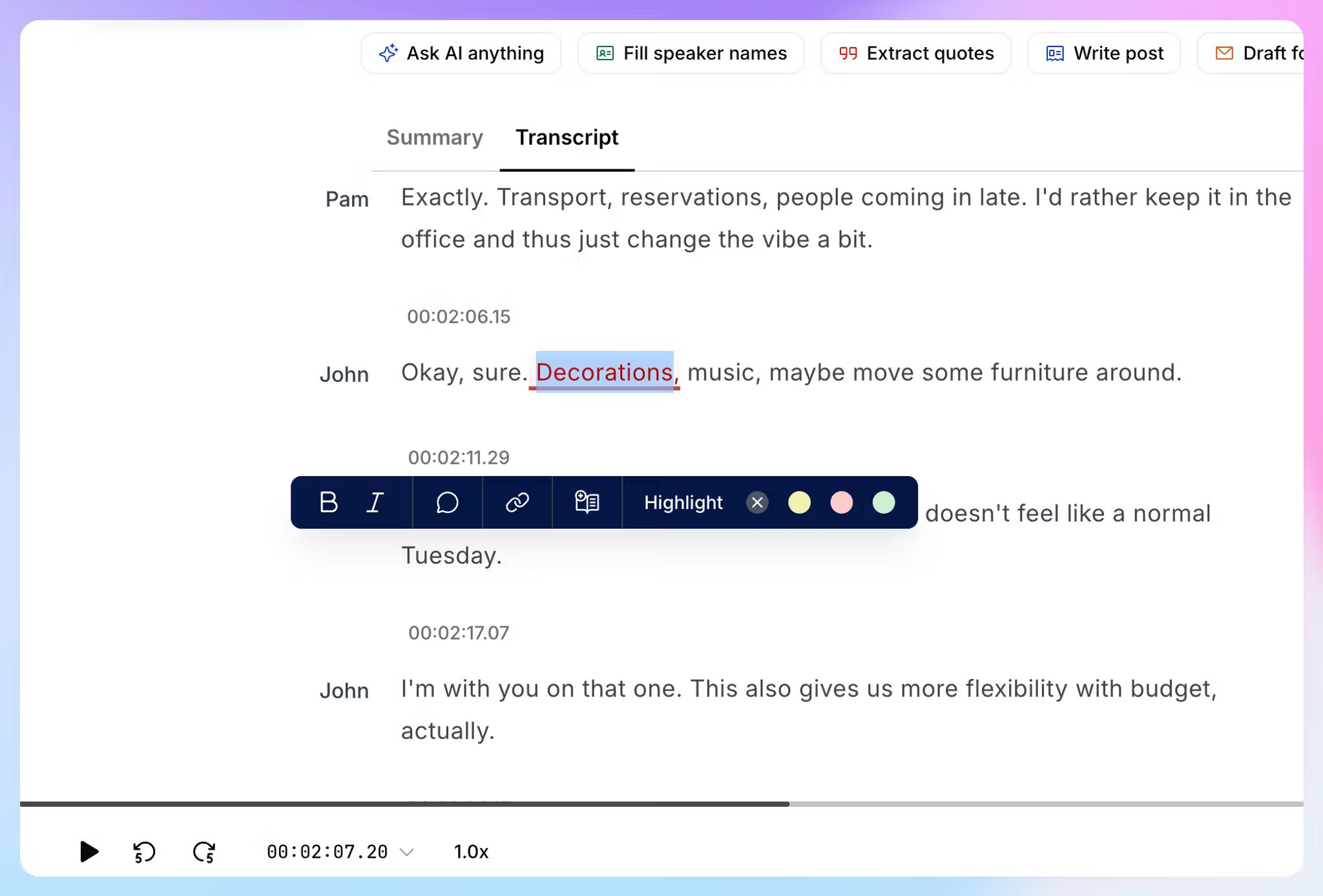
Here’s how to get a lecture into HappyScribe:
- Record it live in the iOS or Android mobile app
- If it’s a scheduled online class in Zoom, Meet, or Teams, send the AI meeting note taker to join and record for you
- Open the website and upload an audio or video file you already have
- Import your recordings from Google Drive, Box, or Dropbox, or paste the lecture links from YouTube or Vimeo
Recording in the app is free with no limit on how many lectures you capture, though each recording stops at 45 minutes.
📚 Also read:
Three things to set up before your first lecture:
- For live recordings, transcription accuracy depends on what the mic picks up. Set your phone at the front edge of your desk with nothing covering it. Build course-specific custom glossaries for niche words and phrases.
- In HappyScribe, create separate folders by course and semester names so you can organize your classes and let Claude access only the ones you want. Step 5 depends on this.
- Most colleges allow recording for personal study but not for sharing, so check the policy before your first class.
Step 2: Connect HappyScribe to Claude
Connecting the two takes a minute, and you only do it once.
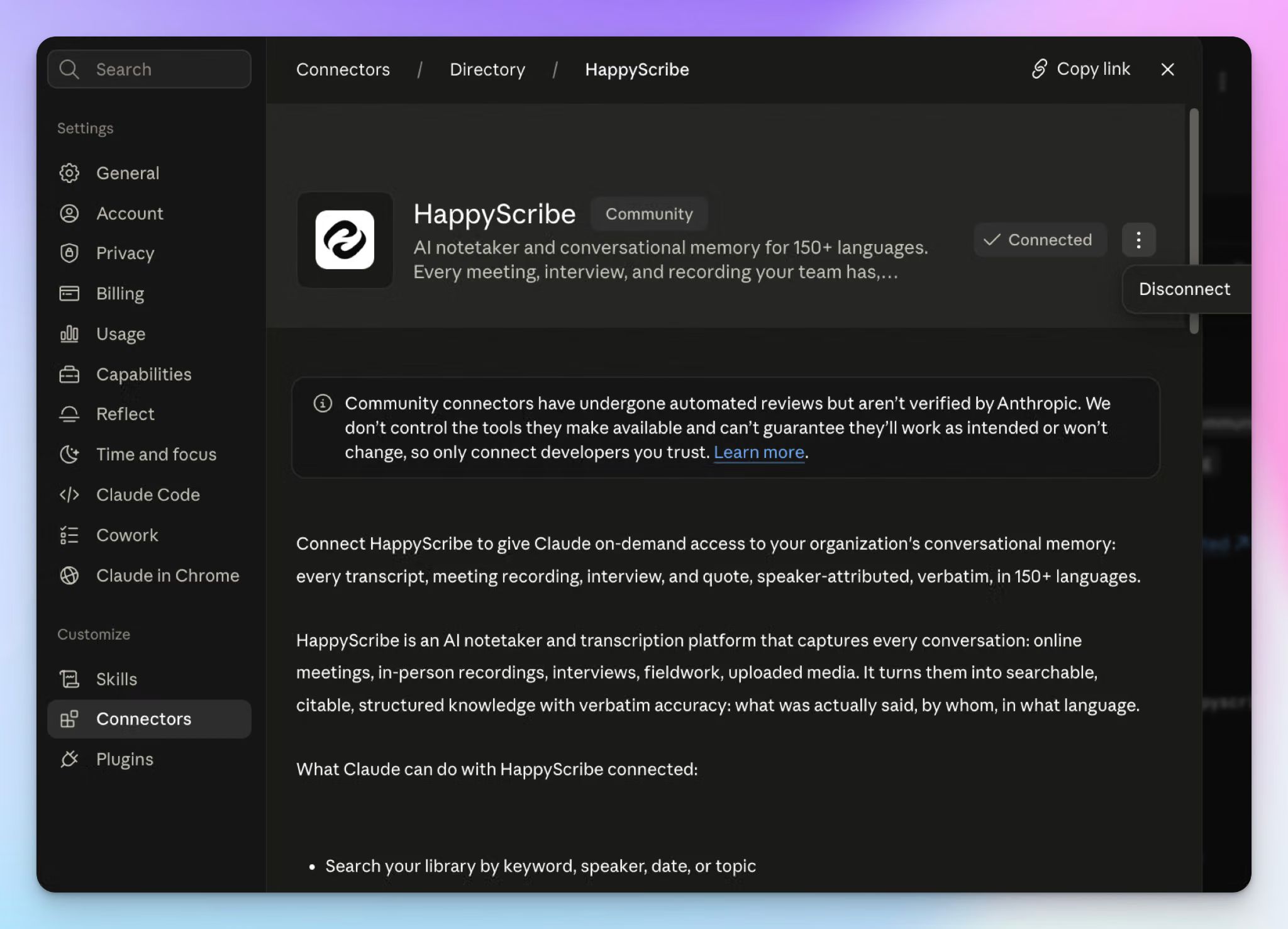
From Claude's side:
- Expand the left sidebar and click on Customize > Connectors
- Search for HappyScribe and click the + icon or Connect to Claude button
- Sign in to your HappyScribe account and authorize access
You can also start from HappyScribe. Click Integrations in the left sidebar, find the Claude card, and click Connect.
You sign in through OAuth rather than handing over a password, and Claude reaches only the folders your account can already see. You can disconnect from the same screen whenever you want.
HappyScribe has its own AI Chat if you'd rather not set anything up, and it works across all your files. The connector is for when you want Claude to help with coursework and tasks outside of recordings.
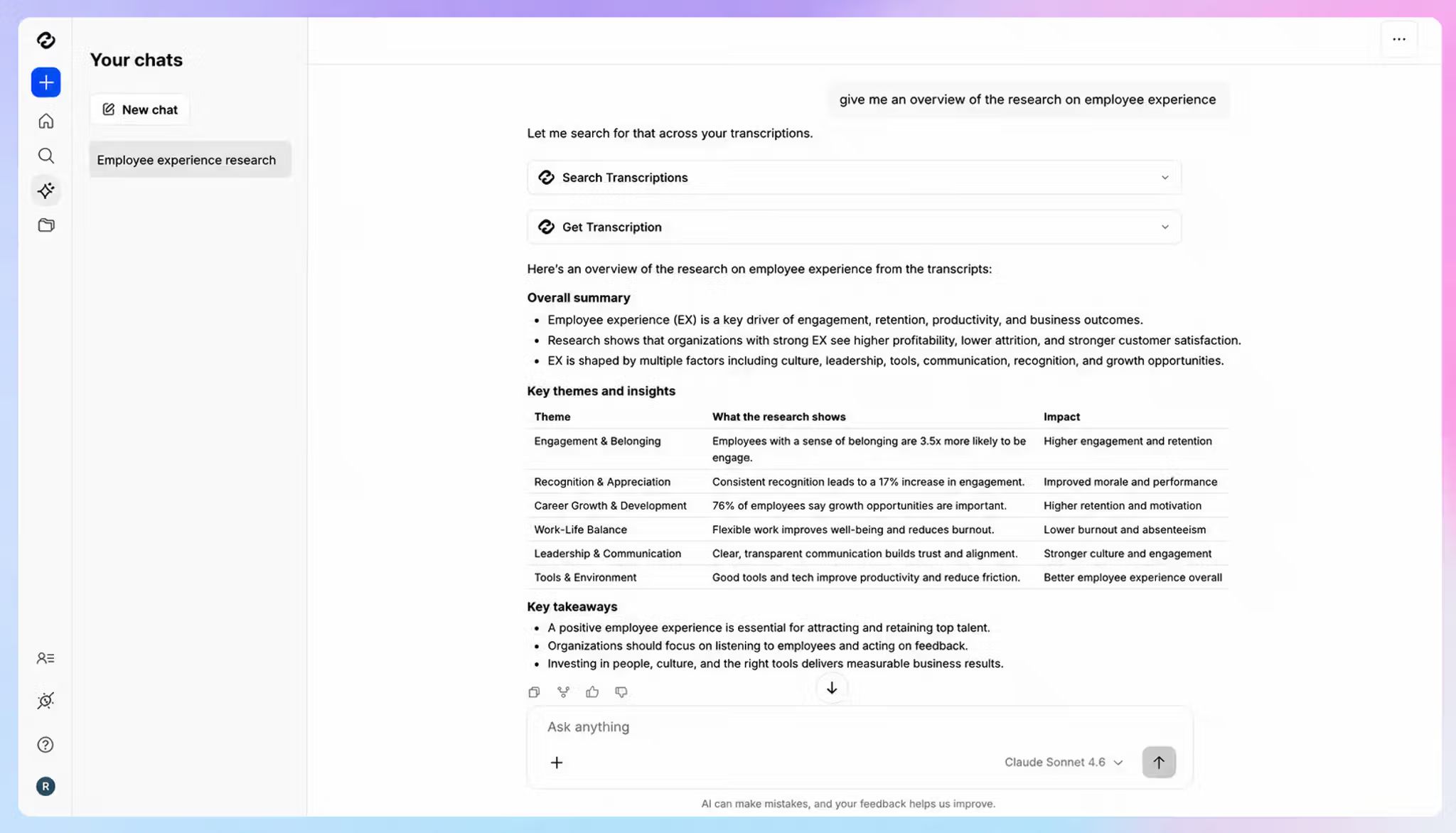
Step 3: Ask Claude to build the study guide
A 45-minute lecture comes back as roughly 4,000 to 7,000 words of raw transcript. Claude reads all of it at once, so you can start with a single instruction:
Using my PSYC 210 transcript from HappyScribe, create a study guide based only on the material covered. Organize it by topic and include key concepts, definitions, important distinctions, and examples the lecturer used.
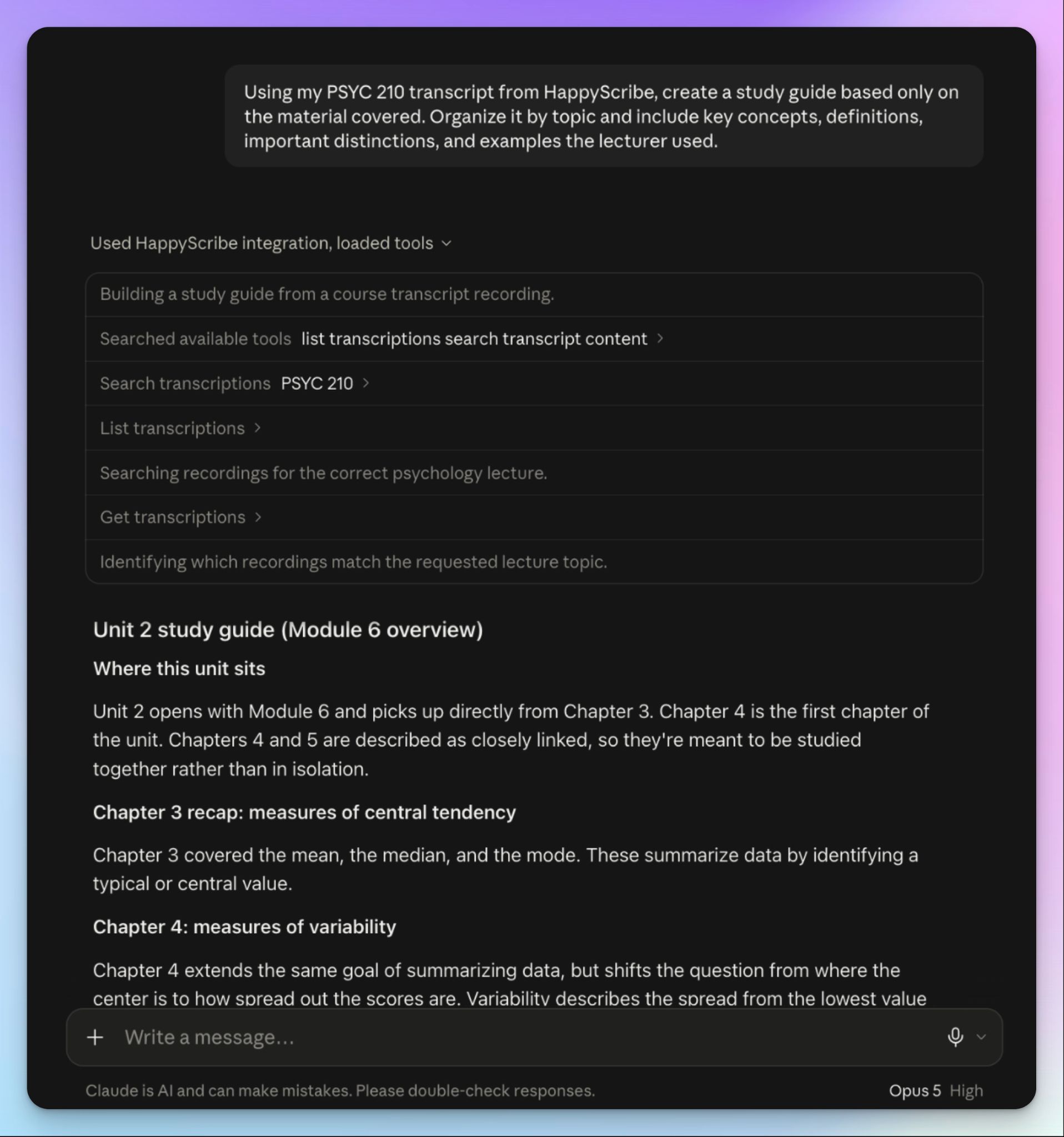
The phrase "based only on the material covered" is doing real work there. With it, you ground Claude to the source and avoid hallucinations and general knowledge filling in the thin bits.
Now notice what the prompt doesn't ask for. A summary compresses the lecture and keeps it in the order it was delivered, which might not help your revision. A study guide breaks that order and rebuilds the material around concepts to help you absorb and retain information.
Here’s how a student is using HappyScribe:
It saves me time when reviewing lectures and makes my studying feel more organized. It also helps me create more accessible notes and quickly search through long recordings when I need to find a specific part. On top of that, it simplifies creating subtitles for coursework presentations, which makes the whole process easier.
Step 4: Refine the first draft
The first study guide is rarely the one you revise from. Ask for changes in the same conversation, since Claude still has the transcript.
Simplify difficult concepts
Some explanations only make sense in the room. When a section comes back dense, send it back:
Explain [concept] in simpler language using the lecturer's explanation as your source.
By anchoring it to the lecture, you make sure the simpler version doesn’t miss the nuances.
Compare similar ideas
Lecturers often introduce concepts in pairs and expect you to tell them apart under exam pressure.
Create a comparison table for the concepts the lecturer contrasted.
A table also makes the distinctions easier to test yourself on later.
Find the examples
Examples are what you remember in the exam hall when the definition deserts you.
Pull out the examples used to explain [topic] and explain what each one demonstrates.
Create practice material
Reading a study guide feels productive without proving much. Retrieval practice is what moves the material into long-term memory.
Turn the key concepts from this lecture into practice questions with answers.
Ask for flashcard pairs instead if you want something to drill, or for a concept map when you want to see how the ideas connect.
Step 5: Build one study guide from a whole module
One lecture at a time is fine for weekly reviews. But it's not enough before an exam, because you’ll be asked about themes and structures that were developed over the months in class.
This is where the folders from Step 1 pay off. Point Claude at the course instead of individual lectures:
Using all lectures in my PSYC 210 folder, create one study guide organized by theme. Combine repeated concepts and highlight ideas that came up across multiple classes.
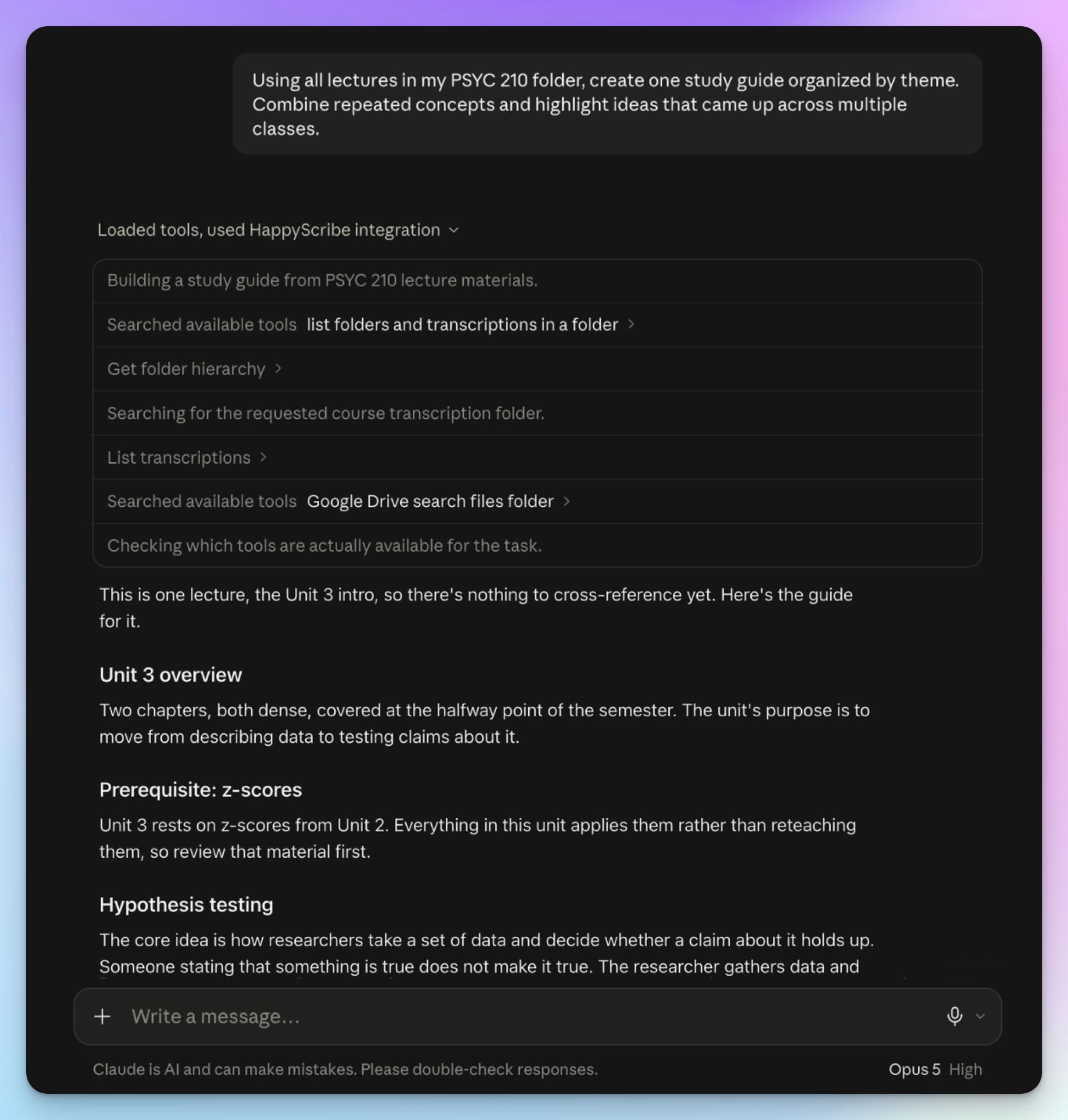
What comes back tends to surprise people. A concept your lecturer mentioned once in week two and circled back again in week nine is almost certainly on the exam, and you'd rarely spot that emphasis reading week by week.
Claude can work across up to 50 HappyScribe transcripts at once, which covers a full semester for most courses. For anything larger, split the request by half-term, since Claude loses depth when you go over its context window.
The same approach turns months of scattered notes into one connected picture of the subject. And that’s how you ace the exams.
Step 6: Check the guide against what was actually said
AI-generated study guides sound confident, whether or not they're right. That can cost you in an exam, so verify anything you plan to memorize.
The connector makes this quick because Claude can go back to the source instead of relying on what it produced earlier:
Find the part of the lecture that supports this point and give me the timestamp.
Timestamps speed up the verification step. Click through, and you're at that specific moment in the transcript.
Two more worth having:
What exactly did the lecturer say about [topic]?
Did the lecturer mention that this would be on the exam?
The second one catches what lecturers say offhand, and students forget. Those "you'll want to know this" asides are in the recording even when they didn't make it into your notes.
Use the guide to study for exam prep. Your transcripts are your lecturer's words, and your assignments still have to be yours. Check your institution's rules on AI as well, since they differ by department and change often.
If you're teaching the course, not taking it
Faculty tend to have the opposite problem with lecture notes: hours of your own recorded teaching, and no time to turn any of it into something students can use.
Teachers can also use HappyScribe's Claude connector to ease their work. Since it’s your lecture, recording it usually doesn’t raise the issues a student might face. For security, HappyScribe is GDPR and SOC 2 Type 2 certified and stores all data in an ISO 27001-compliant EU data center.
Build the review sheet from what you said
Study guides are usually written from the syllabus, which describes the course you planned rather than the one you delivered. But a few weeks later, you might not reliably remember which examples you used or which tangent ate away minutes.
You can use a prompt like this:
Using my BIOL 240 lectures from weeks 1 to 6, draft a review sheet for the midterm covering only what I actually taught. Flag anything on the syllabus I didn't get to.
The transcript also catches every "this will be on the exam" you said out loud, which is the promise students hold you to.
Check next year's course against last year's recordings
Same folder, different job. Ask what you compressed, skipped, or repeated across the term, and you get a picture of the delivered course before you rebuild it.
Researchers can run the identical workflow on seminar series, conference sessions, or recorded interviews.
Here’s what another user has to say about HappyScribe:
Happy Scribe saves me hours of manual transcription when analyzing student-teacher interactions and qualitative interviews for my Master's thesis. Instead of spending an entire evening typing out dialogue from a 60-minute recorded PE class, Happy Scribe gives me a usable draft in just a few minutes.
HappyScribe also helps researchers transcribe qualitative research interviews and run preliminary thematic analysis.
A prompt bank for studying lecture transcripts
Keep these for the week before an exam:
Build a glossary of the key terms from this lecture with the lecturer's own definitions Find the themes that came up in more than one class this term Extract every formula and step-by-step process, and note where each one is used Which concepts did the lecturer spend the most time on, or return to more than once? Write exam questions in the format my lecturer uses, and mark the ones I'd struggle with Which parts of this lecture are thin enough that I should listen back to the audio?
If you're teaching the course:
Compare what I covered this term against my learning outcomes, and show me which outcomes got the least class time Pull the questions students asked across these lectures and group them by topic Find the concepts I explained differently in two classes, so I can settle on one version
Turn your lecture library into a study system
The value here isn't a one-off study guide.
With HappyScribe’s accurate transcripts as a foundation, Claude can build helpful guides for students and teachers. You set it up once, and the work compounds across the term instead of restarting with every class. The recordings on your phone can't do that.
FAQs about turning recorded lectures into study guides with Claude
Can Claude analyze audio recordings?
No. Claude works with text, images, and PDFs, so it can't process lecture audio or pull anything from a recording on its own. You need a transcript first. Once HappyScribe turns the recording into text, Claude reads the whole thing and produces structured summaries, review questions, or study notes from that source material. Transcription accuracy sets the ceiling, because errors in the transcript carry straight into your study materials.
Can Claude transcribe a meeting recording?
No. Claude can't transcribe audio or join a call, so capture has to happen elsewhere. HappyScribe's AI notetaker joins Zoom, Google Meet, and Microsoft Teams, records the session, and returns a transcript with speaker labels and timestamps. Connect HappyScribe to Claude, and it reads that transcript directly, which removes the manual effort of exporting and pasting. HappyScribe also offers human proofreading when AI accuracy alone isn't enough.
Can I upload recordings to Claude?
You can upload documents, not audio. Claude accepts PDFs, Word files, and plain text, so the usual route is exporting your transcript and uploading it. That works for one lecture and gets tedious across multiple files, and it adds editing time every session. With the HappyScribe connector on, Claude reaches your library directly, so a quick review before class costs you nothing.
How can I convert lecture recordings into notes?
Record the lecture, transcribe it, then turn the raw notes into something organized. HappyScribe handles the first two steps from your phone, browser, or an existing file. For the third, ask Claude for notes built around concepts rather than concise summaries, since consistent formatting across study materials makes each new set faster to work through. Manual transcription takes hours, and messy notes are hard to revise from. You can also ask for flashcards, mind maps, or review questions, all of which support active recall better than rereading.
How do I record a lecture clearly enough to transcribe?
Mic placement does most of the work. Put your phone on the desk in front of you with nothing covering it, and use a directional mic in large halls where background noise is the problem. Record continuously from the start rather than stopping and starting, because gaps are where new concepts go missing. Recording also improves the accuracy of your own notes, since you're no longer relying on what you managed to write down while listening to lecture audio.
Is it cheating to use AI tools for study guides?
Using AI for revision is active learning when you're testing yourself against material your lecturer actually delivered. Academic integrity becomes a question when AI does the writing you're being assessed on. Study guides, flashcards, and supplementary materials are fine at most institutions, while generated essays are not, so check your department's rules. Transcripts also support diverse learners by giving students who process text better than speech a version they can work through at their own pace.

Biplab Mazumder
Biplab is a content marketer and writer who helps high-growth brands scale content visibility across AI search channels. His works have been published in HubSpot, Freshworks, Atlassian, SurferSEO, etc. When he's not planning content strategy, he's testing AI content workflows and use cases.