My Notes is Zoom’s way of saving meeting notes for you, so that you hate Zoom meetings a little less. It started as Zoom AI Companion, but the current iteration is easier to use and works cross-platform.
I’ve used Zoom My Notes for months, and I can see why users might stick with Zoom’s default note taker. I can also see why plenty of them look for something better for meetings.
If you're on the fence about My Notes, my experience might help you make that call.
Here’s everything you get (and don’t) with Zoom My Notes:
📌 In a nutshell: Is Zoom My Notes worth using in 2026?
Short version: Zoom has got many things right with My Notes, but how much of it you control depends on who pays for your account. No bot joins your call, it works on Teams, Google Meet, and across a table, and your typed notes enrich the summary.
The trouble is what comes back. Transcripts read closer to a rough draft than a finished one, speaker separation slips even in one-on-ones, and hosts can switch the whole feature off even for your personal account.
👍 My Notes is best for: Solo Zoom Workplace users on unlocked accounts who take their own notes
👎 My Notes is not a great fit for: Multilingual work, anyone who needs reliable notes to share or make decisions on, or teams whose admin has locked it down
Which Zoom AI product is this, actually?
Over the last few years, Zoom has shipped multiple products for meeting transcripts. I spent days in the Zoom Community forum trying to figure out the tools, so here’s a simple version of Zoom’s transcription tools:
| What it's called | What it actually is |
|---|---|
| Zoom AI | The umbrella term for Zoom’s AI capabilities and products, not something you buy |
| Zoom AI Companion | Retired as a brand in June 2026. The features survived and now go by what they do, like meeting summary |
| Live Transcript | Real-time captions and transcripts, built into meetings for years |
| My Notes | The personal note taker. Works on Zoom, Teams, Google Meet, and in person |
| ZoomMate | An AI agent add-on at $20/month, launched June 2026 |
Two of these will transcribe your Zoom meetings without My Notes ever being switched on. Meeting transcript gives you a recap (with host’s permission), and live transcript gives you captions.
This review covers My Notes only.
What Zoom My Notes gets right
My Notes feels the most polished take on AI note taker by Zoom so far. If it doesn’t get rebranded or deprecated, it might even be around long enough to build a habit on.
Over the weeks of using it, here are the three things that stood out for me:
1. A bot-free note taker without annoying AI participant
My Notes doesn’t have a bot. Nothing joins my calls, and nothing appears in the participant list as “Biplab’s AI note taker”.
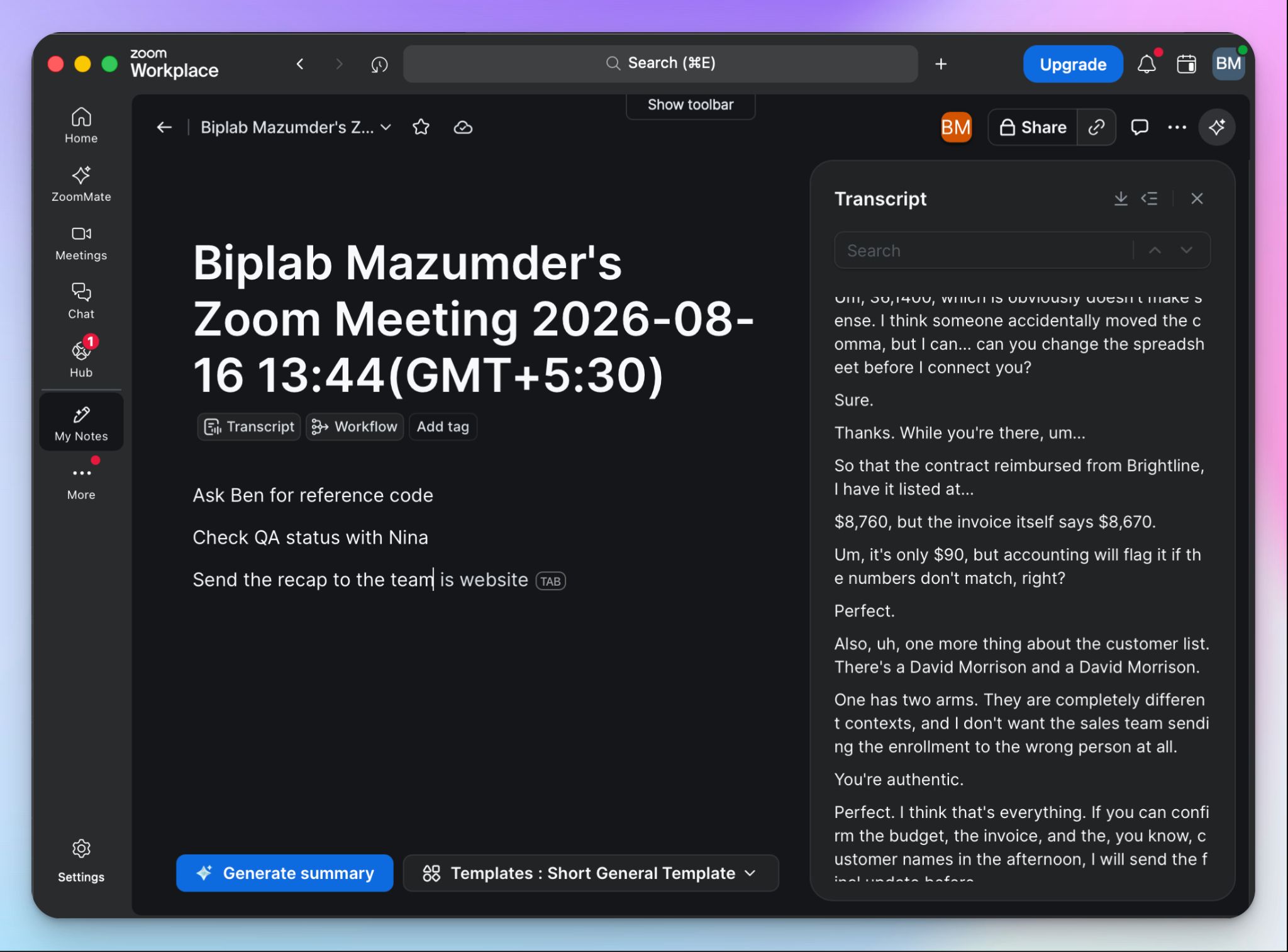
My Notes captures through my own device instead, using my microphone and system audio, and only after I grant those permissions. That's why it works outside Zoom. I ran it in Teams calls, in Google Meet, and across a table in a coffee shop, and it behaved the same way in all three.
Microsoft users go hunting for Copilot alternatives for meeting notes for exactly this reason, since Copilot is locked into the Office ecosystem.
For a first-party Zoom feature to work across platforms is a strange and welcome thing. But the bot-free setup cuts both ways, and I'll get to that.
2. Your Zoom notes are more than just automated notes
The good thing about My Notes is that you can actually take part in and improve the notes. You can add manual notes as your meeting goes on, and My Notes combines AI and human inputs to create richer, more personalized meeting notes. So if you’re using Granola for its notepad, you can consider My Notes as a Granola alternative.
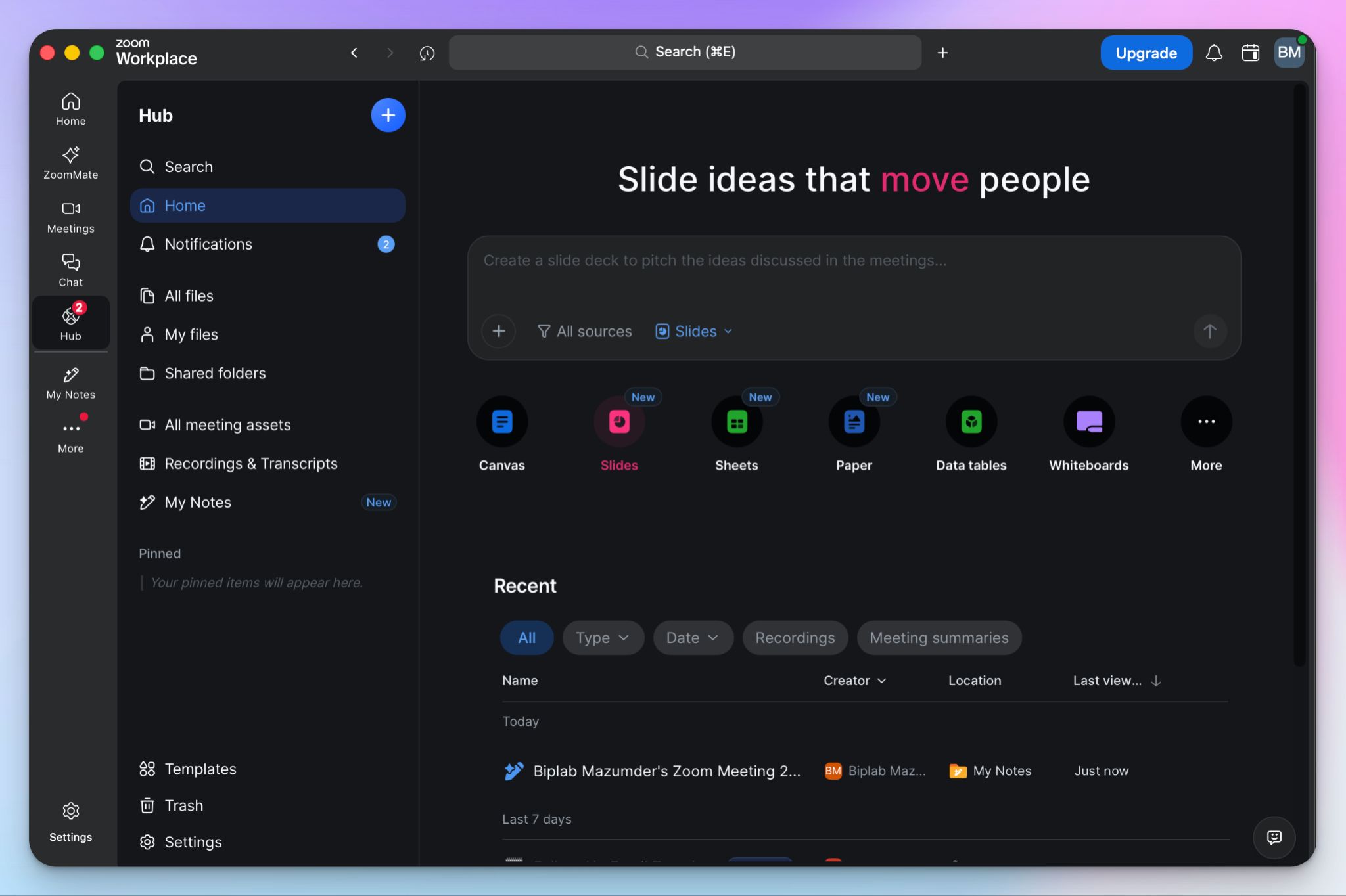
It’s also a part of the Zoom Hub, so everything else in the stack can reach your notes. I pushed a set of client notes into a Canvas and had a project outline in a few minutes.
I also handed a week of notes to ZoomMate and asked what I'd promised people, which it answered better than I would have. Notes go into Docs, into Team Chat, into workflows that fire without being asked.
The catch, and it's a real one, is that the best of this sits behind ZoomMate at around $20 per user per month.
3. Templates shape your output, and the UI stays out of your way
I loved using My Notes’ summary templates. You can turn your notes into the shape you want, whether that's decisions and owners or a straight recap. It works best when you’re working with multiple teams, and they need documentation formatted in line with their tasks.
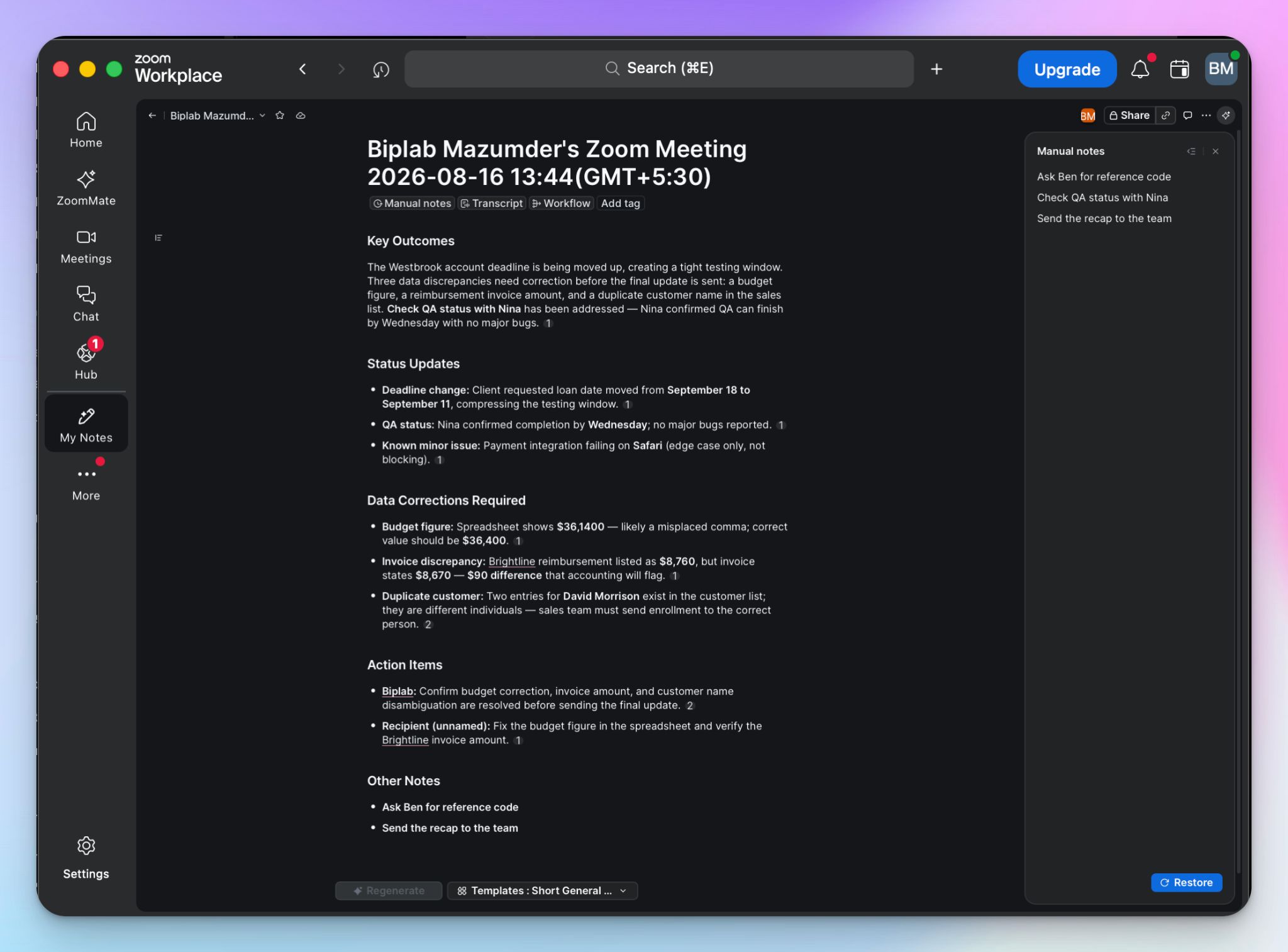
The interface deserves credit too. Despite the corporate outlook, Zoom’s My Notes sit where you'd look for them, and the free-text field is right there during the call. The Canvas basically mimics Notion, so if you’re familiar with other office tools, you’ll like the notes.
📚 Fun read:
Given how much of this review is about configuration, it's worth saying plainly: the part you touch every day is well built. What templates can't do is improve the transcripts they're built on.
My Notes at a glance
| Factors | What I found | Rating |
|---|---|---|
| Ease of use | Clean interface and templates that structure the output well, but getting it working means a chain of toggles across the web portal and desktop client | 🟢🟢🟢🔴🔴 |
| Security | Enterprise-grade Zoom infrastructure with admin controls and per-app permissions, though bot-free capture keeps it discreet off Zoom | 🟢🟢🟢🟢🔴 |
| Integrations | The deepest in the category if you live in Zoom, with Canvas, Docs, Team Chat, and ZoomMate reachable from your notes, though little outside it | 🟢🟢🟢🟢🟢 |
| Customer support | Help center and ticketing. Forum threads on bugs and troubleshooting for weeks with no staff reply | 🟢🟢🔴🔴🔴 |
Drawbacks of My Notes: My honest experience
My Notes has a lot going for it, but Zoom hasn’t quite nailed the quality. If you rely on meeting notes for split-second decisions, My Notes will test you.
Here are some major flaws that stopped me from making My Notes my daily driver:
1. The transcript isn’t super accurate, and neither are the notes
I ran a call full of product names and technical details through My Notes. The summary looked fine, but once I started reading it, I realized I'd be making wrong decisions based on this.
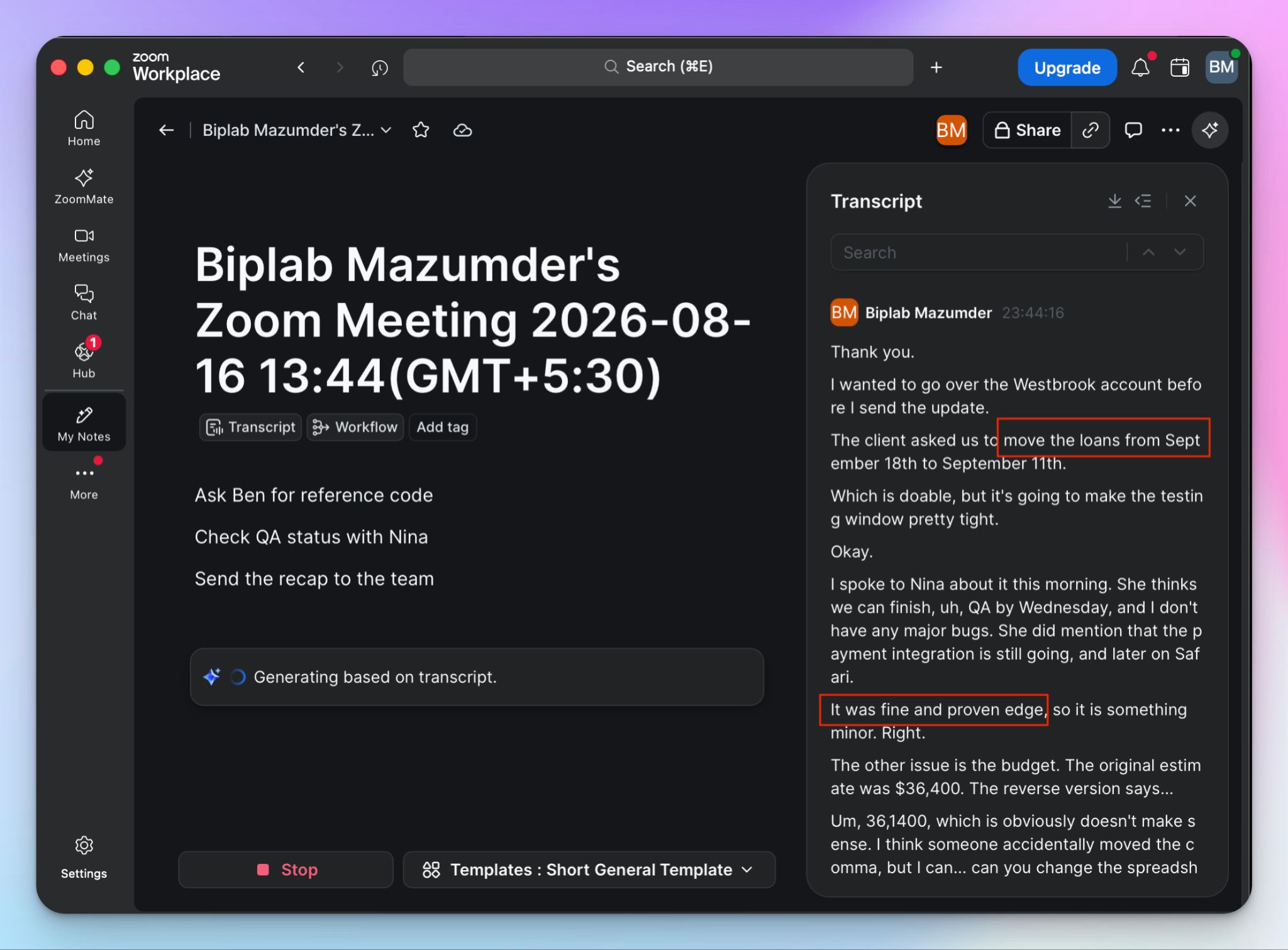
"Launch" came back as "loan," "Throwing an error" became "going and later." The word "assuming" vanished, and so did "Chrome," which is not a difficult word.
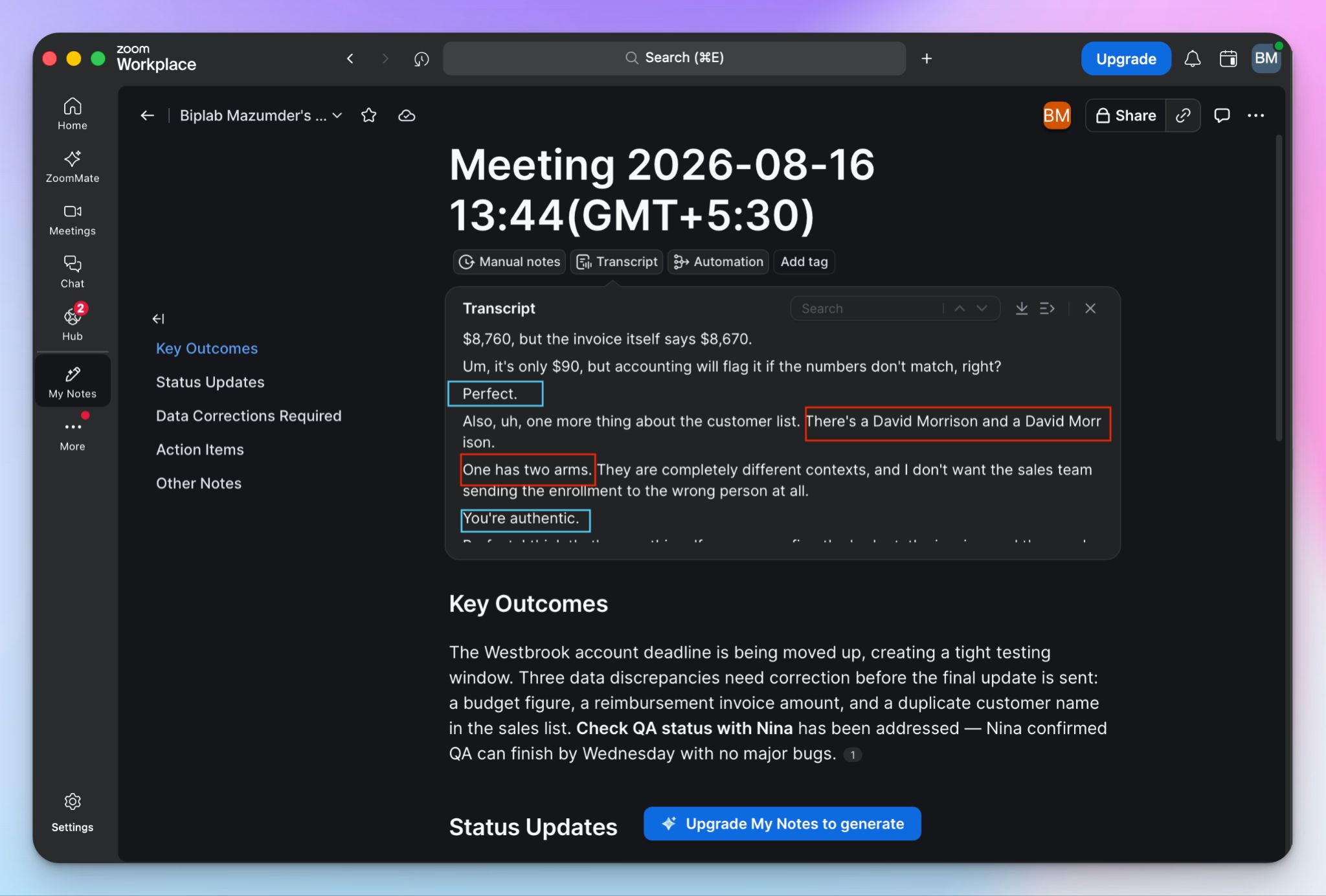
My favorite was My Notes missing the entire point of two clients sharing the same name. I specifically mentioned how to pick out the two, and it missed that completely.
Then there's the style. My Notes transcribes closer to verbatim than a clean read, so every um, uh, and false start gets into the final text. Punctuation is scattered, sentences run together, and the result is something you have to fix before you can use it anywhere.
This also ties into a major failure: My Notes often fails to identify separate speakers (even in one-on-one meetings), which is annoying.
That's the problem with summary and notes built on top. When the transcript underneath is wrong, you're making decisions on wrong information, and you won't know which parts. This was the same problem when I reviewed Fireflies AI, and it’s the same for My Notes.
2. You only get full control if nobody else is paying
On a personal account, My Notes is yours. On a corporate one, it's your admin's.
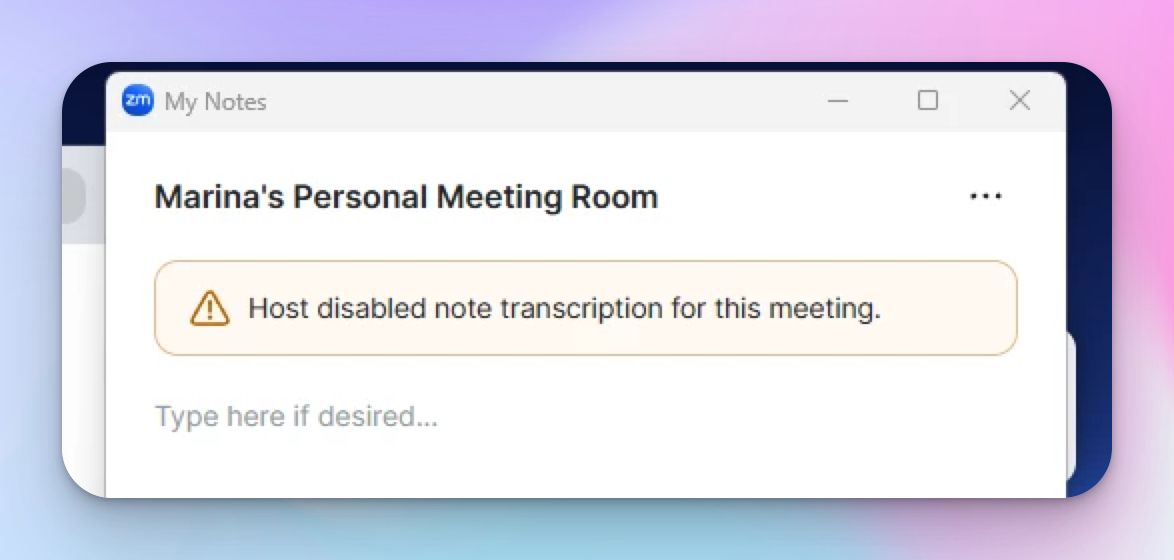
Admins can switch the feature off across the whole organization. Some already have, and users on those accounts have their Notes tab leading nowhere. Despite the nice UI, you can’t avoid complex corporate policies that burden all Zoom products.
Even when everything works, the control runs one way. A Zoom host can open the participant list and see the notes icon beside your name, and they can stop your transcription from there.
You have as much control over your note taker as the host allows.
3. The product keeps changing, and your meetings suffer
Zoom Notes became My Notes. AI Companion was retired. ZoomMate arrived as a separate paid agentic layer. You now have four Workplace plans and two AI tiers to reason about before you know what you're entitled to.
If My Notes isn’t set up for you by your company, you’ll struggle for a hot minute as a solo user.
But that’s not where it ends. With so many changes, Zoom users struggle with lost notes and buried settings.
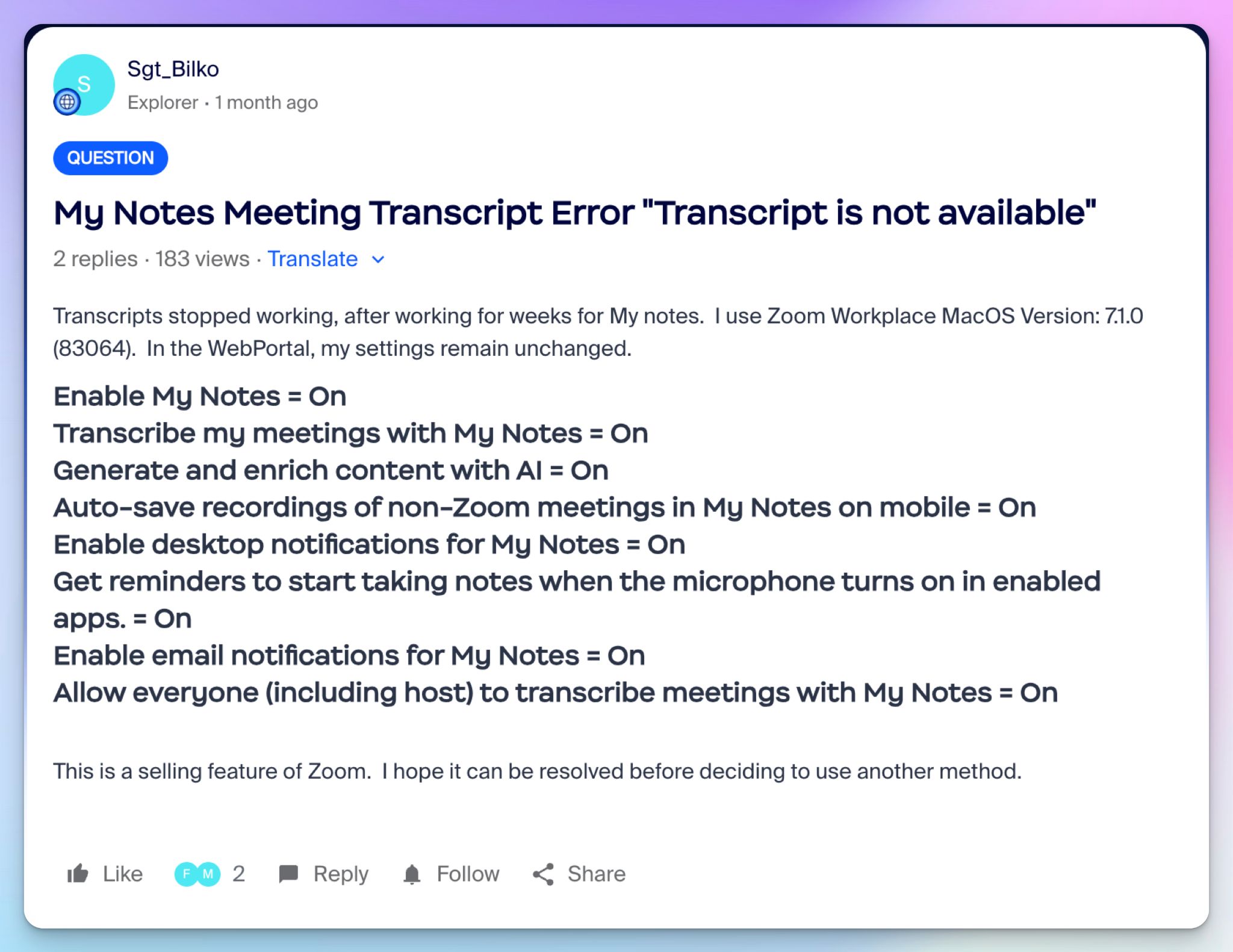
Check the above image for example. The user had all these enabled and still couldn’t find the transcripts. It turns out they didn’t have the newly introduced “Meeting Transcript” setting enabled on the web. The solution came three weeks later.
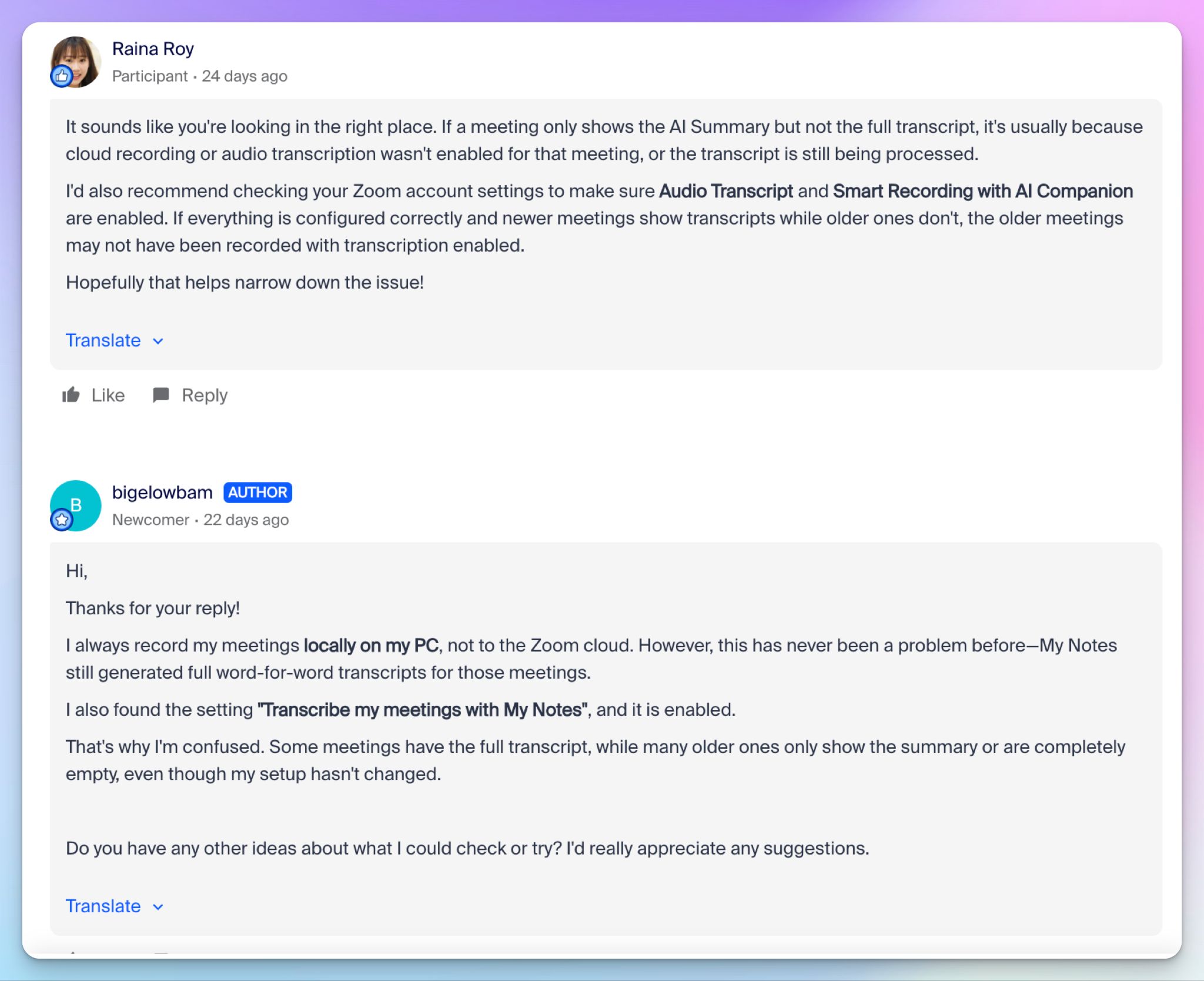
In July, a user posted in Zoom's own community forum asking where their transcripts had gone. Recent meetings were fine. Everything before May was empty. They recorded locally, which had always worked.
The only person who answered was another user, who told them to check a setting under AI Companion, a product Zoom retired in June. That's the whole problem in one reply. Nobody can help you troubleshoot a tool whose UI changed twice while you were using it.
The line that stayed with me was the poster's own: they had never downloaded any notes, because they trusted Zoom.
I said earlier that My Notes can become a tool you can build your meeting habits around, but it needs to survive long enough for that. Export your transcripts. Do it on a schedule.
4. Bot-free cuts both ways
My Notes works outside of Zoom because it’s bot-free, and the custom notepad makes it similar to Granola. That design similarity is now a risk.
In July 2026, Granola was sued in California federal court over exactly this design. Chamberlain v. Granola alleges that silent, device-level capture records people who were never told and never agreed to, under federal and California wiretap law. These are allegations, and Granola hasn't answered on the merits.
It isn't alone. Otter and Fireflies are both defending class actions built on the same consent violation theory, which I got into when I reviewed them.
Zoom isn't a party to any of this. But the theory targets the architecture, not the logo. Whatever tool you use, tell people you're recording because acquiring consent is on you, not the software.
What does My Notes cost you?
Nothing, and also $20 per user per month, depending on how far you take it.
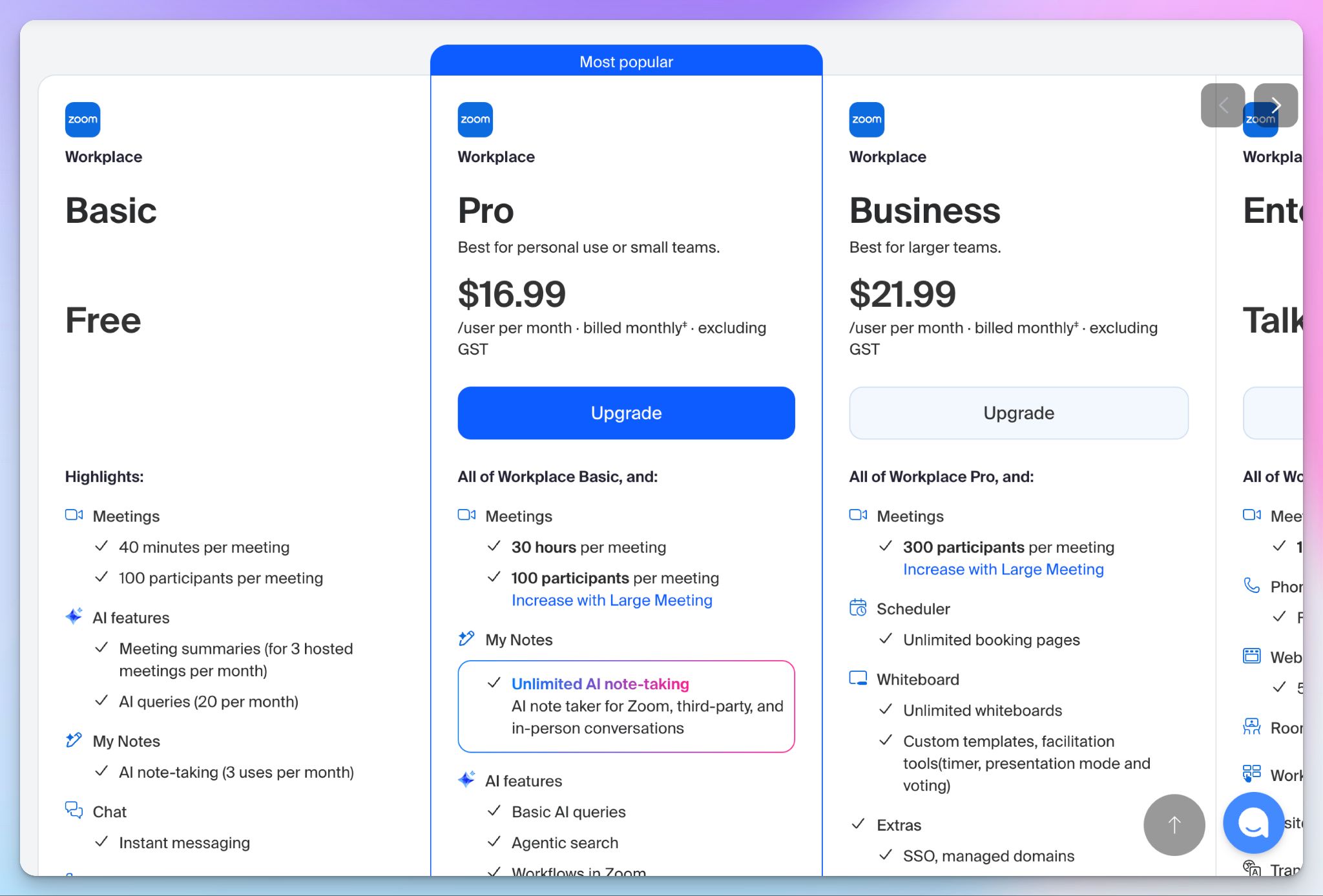
My Notes comes with Zoom Workplace, so if you're already paying for a Pro plan or above, you have it. That's the honest answer, and it's one of the pros of My Notes.
The catch sits a layer above. Everything I liked about it, pushing notes into Canvas, asking what I'd committed to across a week of meetings, is part of ZoomMate, and it’s a separate add-on starting around $20/month.
But if you don’t want to use ZoomMate and only need the notes, My Notes also has a $10/month plan.
Best Zoom My Notes alternatives in 2026
If the rough transcripts or the admin switch are what's pushing you to look elsewhere, these three each solve a different part of the problem.
| Factors | HappyScribe | Fellow | Jamie |
|---|---|---|---|
| Best for | All-in-one meeting notes, transcription, and subtitles, with a human-accuracy option | Enterprise teams that want structured meetings, not just recordings | Solo users who want bot-free capture with EU hosting |
| Key features | Auto-join note taker for Zoom, Meet, and Teams, bot-free mobile and desktop apps, subtitle editor, AI Chat, 150+ languages | Shared agendas, pre-meeting briefs, action item tracking, AskFellow, bot, and bot-free capture | Bot-free capture on desktop and mobile, audio deleted after transcription |
| Security | SOC 2 Type II, GDPR, PCI DSS, ISO 27001-compliant EU data center | SOC 2 Type II, HIPAA, GDPR, no model training | ISO 27001, GDPR, EU hosting on every plan, including free, no SOC 2 Type 2 |
| Price | Free tier with unlimited meeting notes, paid from $8.50/month (annual) | Free plan capped at 5 AI notes per user, paid from $19/month (annual) | Free plan capped at 10 meetings a month, paid from €25/month |
Otter, Fireflies, and Granola are all missing here on purpose. Each is defending a privacy lawsuit built on the same theory I covered above, so none of them fixes the My Notes problem.
I'd also skip tl;dv for now. It's a common recommendation in this category, but a researcher found a flaw that exposed 181,874 meeting records across more than 35,000 domains, and the loophole sat unanswered for months.
What's the best My Notes alternative for meetings?
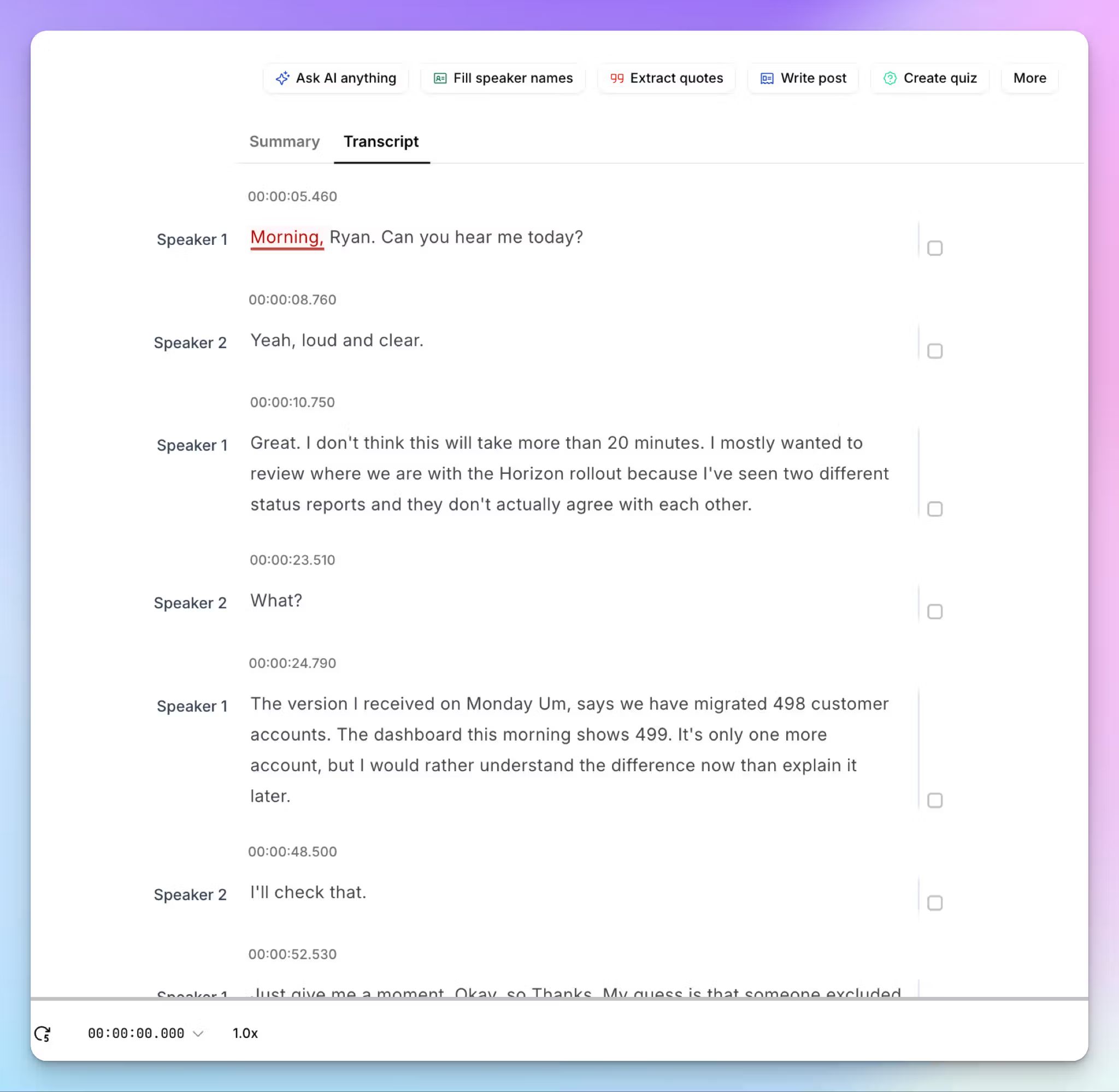
HappyScribe is my pick, and for credible reasons. It clears the five things that stopped me from making My Notes my daily driver, without giving up the bot-free capture that made you try it in the first place.
I ran the same call through both, and you can see the difference below.
- Transcripts you can trust: Unlike My Notes, HappyScribe produces accurate texts, with proper punctuation, paragraph breaks, and speaker labels that hold up across environments. You get a clean read rather than every “um” and false start
- Simple to configure, easier to start: Sign up to HappyScribe and record. You’re not stuck with complex admin policies or hundreds of toggles buried in settings. Use HappyScribe on the web for bot transparency, on the go with mobile app recorder, or bot-free with the desktop app
- 150+ languages, plus human accuracy when it counts: HappyScribe covers 150+ languages and dialects across the world, which is well over Zoom’s 46 language support. You can also send any file to a HappyScribe-vetted linguist for 99% accuracy on legal or research work, and build subtitles from the same transcript
- Unlimited meeting notes in free tier: Zoom My Notes offers only 3 uses for free, whereas HappyScribe’s free tier covers unlimited meetings (up to 45 minutes each) before you pay for anything. The paid plans start cheaper and offer you more value for money
- EU data residency: HappyScribe stores your files in a Tier IV, PCI DSS and ISO 27001-compliant EU data center, and you can toggle off AI training from day one
With HappyScribe, you still get bot-free capture on Zoom, Teams, Meet, and in person, plus an auto-join note taker for transparency and compliance.
HappyScribe vs Zoom My Notes
Choose My Notes if all your meetings live inside Zoom, your admin has it switched on, and you only read your notes inside the Zoom interface. It's already paid for, and the capture works.
For accurate transcripts you can use straight away, wider language support, and notes you control, HappyScribe covers more ground in one place.
FAQs on Zoom My Notes
Is My Notes on Zoom free?
The free tier of My Notes offers only 3 uses per month. The notes feature is bundled into paid Zoom Workplace plans, so if you already pay for Zoom, you have it at no extra cost. The deeper AI features that make My Notes worth using, like pushing notes into Canvas or asking ZoomMate about past meetings, sit behind a separate add-on. There's also nothing to install, since it lives in the Zoom desktop app you already use. Your admin can switch the whole thing off, so check your account before planning around it. If you want unlimited AI meeting notes on a genuinely free plan, HappyScribe doesn't meter them.
How much does Zoom Notes cost?
Zoom My Notes alone costs you $10 per month. My Notes comes with paid Zoom Workplace plans, which run from around $17 per user per month. The cost appears one layer up. ZoomMate, the agentic add-on that turns your notes into follow-ups and drafts, starts at $20 per user per month and runs on AI credits that don't roll over. So the note-taking is free, and the automation around it is not.
How does Zoom My Notes work?
My Notes captures audio through your device rather than sending a bot into the call, so meeting participants see no extra attendees. You type notes during the meeting in a free-text field, and later Zoom combines what you wrote with the transcript to produce AI-generated notes that lead with your key points instead of summarizing the entire meeting flatly.
Because capture happens at the device level, it works for non-Zoom meetings on Microsoft Teams and Google Meet, and for in-person meetings. Notes land in Zoom Hub, where you can search them, apply summary templates, or hand them to other AI tools in the stack. Meeting hosts can see a pencil icon beside your name and stop your transcription.
What is the best free AI note taker for Zoom?
HappyScribe is the best free AI note taker for Zoom. Its plan covers unlimited AI meeting notes with no minute cap, works across Microsoft Teams and Google Meet, and offers both an auto-join Zoom AI notetaker and a bot-free recorder for in-person meetings. Zoom's own notes feature is a reasonable answer if you already pay for Workplace, since you get Zoom AI summaries without a third-party app. Fathom and Fellow both have real free tiers too, though Fellow caps AI notes per user rather than per month.
What are the best Zoom My Notes alternatives?
HappyScribe, Fellow, and Jamie cover most needs. HappyScribe is the broadest, adding 150+ languages, human-verified accuracy, and EU data residency to standard note-taking. Fellow structures the meeting itself with agendas and action items rather than only recording it. Jamie is bot-free and EU-hosted, which suits solo users who want privacy over depth. Skip Otter, Fireflies, and Granola if consent is your concern, since all three are defending class action lawsuits.

Biplab Mazumder
Biplab is a content marketer and writer who helps high-growth brands scale content visibility across AI search channels. His works have been published in HubSpot, Freshworks, Atlassian, SurferSEO, etc. When he's not planning content strategy, he's testing AI content workflows and use cases.